Safe defense industry automation starts with a narrow workflow, approved data, and a clear human decision point. It doesn’t start with a broad instruction such as “automate operations across the enterprise.”
Twin.so can help teams connect workflows across business applications and websites. That capability also creates security, compliance, and operational risks when the agent receives broad access or writes unverified data into a trusted system.
The practical approach is to treat Twin.so as a controlled execution layer. Define the boundary, restrict permissions, test failure behavior, and set measurable go/no-go criteria before production access.
Start with the security boundary
Twin.so’s public materials describe a cloud-hosted AI agent platform that works across apps and the web. The public Twin platform page also points to workflow automation, integrations, and browser-based tasks.
That does not make Twin.so a defense compliance package. Your organization still owns the system authorization, data classification, access decisions, records management, and operational risk.
Treat Twin.so as an execution service
Define what Twin.so can do before you connect an account.
A useful boundary includes:
- The approved sources the workflow can access.
- The fields it can read.
- The systems it can update.
- The actions that require approval.
- The records it must produce after each run.
- The conditions that stop the workflow.
Avoid describing the platform as an autonomous replacement for an authorized operator. Use it for bounded work such as collecting approved records, checking required fields, preparing a report, or routing an exception.
Classify data before connection
Create a data inventory for every planned workflow. Record the source owner, data category, permitted fields, authentication method, destination, retention period, and deletion process.
Public Twin materials describe isolated execution environments and security controls. They don’t publicly confirm every deployment option needed for defense workloads. No public material reviewed here confirms FedRAMP authorization, a DoD Impact Level approval, CMMC status, SOC 2 or ISO 27001 certification, or specific handling terms for CUI and export-controlled data.
Do not connect sensitive data until Twin.so and your security and compliance teams validate those points in writing.
Choose tasks that fail safely
The first workflow should reduce repetitive work without making an irreversible decision. This gives the team a useful pilot while keeping the failure cost contained.
Start with low-impact workflows
Good first candidates include approved reporting, document classification, record reconciliation, exception routing, and status preparation.
For example, an agent can collect approved supplier records, compare them with a known schema, flag missing values, and place the result in a review queue. A person can then approve the final update.
Avoid starting with workflows that:
- Change access rights.
- Approve a safety release.
- Close a compliance finding.
- Modify a system of record without review.
- Control physical equipment.
- Make decisions about weapon systems or military operations.
This guide focuses on safe enterprise automation. It doesn’t replace engineering controls, safety procedures, export-control requirements, or mission authorization.
Separate collection from decision-making
Collection and publication should use different workflow stages.
The collection step can retrieve records. The validation step can check completeness, duplicates, field formats, and source timestamps. The publishing step should update a destination only after the validation result passes.
A failed collection must create an exception. It must not replace the last accepted dataset with an empty file or partial result.
A workflow that cannot show which source produced a value should not write that value into a system of record.
defense industry automation needs a control plane
Zero-trust architecture gives you the right starting point. NIST SP 800-207 describes access decisions based on identity, policy, context, and least privilege instead of location on a trusted network. Use NIST SP 800-207 as a design reference, not as proof that a vendor meets your requirements.
The CISA Zero Trust Maturity Model adds a practical structure for identity, devices, networks, applications, workloads, and data.
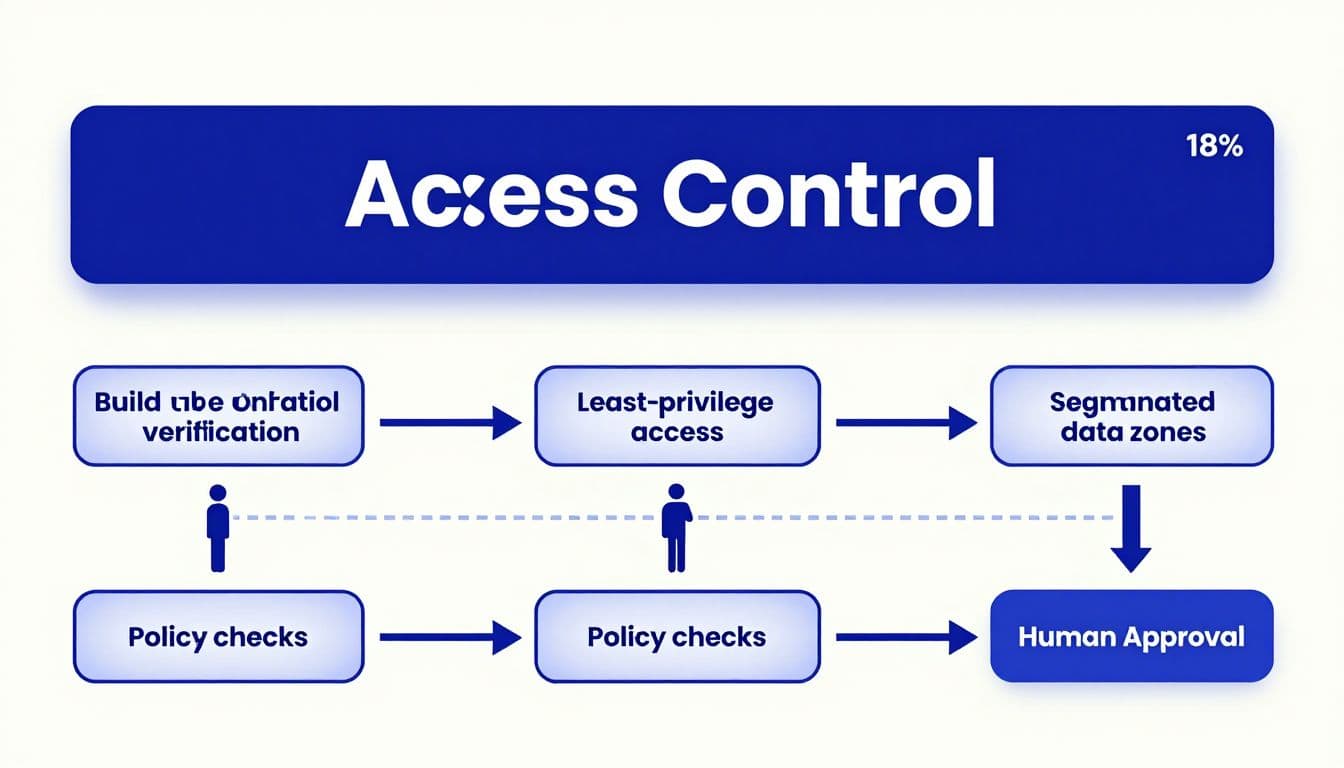
Use identity-based access
Create a dedicated identity for each workflow. Don’t attach a broad administrator account to an agent because it is convenient.
Set access by task:
- A reporting workflow gets read access to approved sources.
- A reconciliation workflow gets read access plus a narrow review destination.
- A write-enabled workflow gets permission for one defined operation.
- A high-impact action requires an approval identity and a separate authorization path.
Use short-lived tokens where the connected system supports them. Record who approved the connection, when it expires, and which scopes it includes.
Review access after every workflow change. Remove unused credentials immediately. Test that a disabled account cannot start a new run or reuse an existing session.
Separate read, propose, and write actions
A safe architecture treats these as different permissions.
Reading a source is one action. Proposing a change is another. Writing the change is a third. Keep them separate in the workflow and in the connected systems.
Don’t allow an agent to read a record and update that same record without a validation step. Don’t allow a draft result to become an approved result because a downstream API accepted the request.
A policy layer should check the user, workload, data type, requested action, and destination before execution. A denied request should be logged with the reason.
Design data sovereignty before connecting systems
Data sovereignty is an architecture decision. It is not a setting you confirm after the workflow is live.
Twin’s privacy policy states that the service uses TLS 1.2 or higher in transit, AES-256 encryption at rest, isolated secrets management, personnel MFA, least-privilege access, access reviews, security monitoring, and alerting. These are useful controls, but they don’t answer every question for a regulated deployment.
Map every data movement
Draw the complete path for each workflow.
Include source systems, Twin.so execution, connected APIs, browser sessions, generated output, screenshots, logs, queues, databases, and notification channels. Mark where each data type is stored and for how long.
Ask Twin.so to confirm:
- The cloud regions used for customer content and logs.
- The locations of subprocessors and model providers.
- Whether customer data is used for model training.
- The retention period for content, screenshots, credentials, and execution artifacts.
- The process for deletion and legal holds.
- Available tenant isolation and private deployment options.
- Incident notification and evidence-sharing procedures.
Public sources don’t confirm all of these details. Treat each unanswered item as a deployment blocker for sensitive data.
Protect credentials and evidence
Store credentials in the approved secrets system. Don’t place passwords, API keys, or session tokens inside prompts, spreadsheets, tickets, or output files.
Limit screenshots and browser artifacts. A screenshot can contain more information than the field the workflow was supposed to collect. Mask sensitive values where possible and restrict access to run evidence.
Data rights also matter. Permission to view a portal doesn’t automatically grant permission to scrape, store, train on, or redistribute its content. Review source terms, contracts, licenses, and export restrictions before moving records into another system.
Use APIs first and browser automation second
A stable API is easier to authenticate, test, monitor, and repeat than a browser session. It also creates clearer request logs and usually reduces workflow cost.
Prefer approved interfaces
Use an API or approved connector when it provides the required fields and access controls. Reserve browser automation for portals that lack a suitable interface.
Twin’s public materials describe connections across business applications and websites, including workflows that read records, update statuses, and synchronize information across services. Confirm the exact connector behavior, permissions, rate limits, and error responses for your workspace before approval.
Define the output schema before building the agent. Include required fields, data types, accepted status values, date rules, currency rules, and source timestamps.
Keep raw values beside normalized values. If a source returns an estimated amount or an unclear status, preserve that condition instead of silently converting it into a normal record.
Bound browser actions
Browser workflows can fail when a login expires, a page changes, a download moves, or pagination behaves differently. A completed run can also miss records without producing an obvious error.
Use bounded retries with backoff for temporary failures. Stop after a defined retry count. Save progress by page, record ID, cursor, or file name when the source supports it.
Test each rerun against a known sample. Track missing records, duplicates, changed labels, unexpected row counts, and source coverage.
Twin.so uses credits, and browser actions can consume more than simple API calls. Planning examples place simple automations around 15 to 30 credits, a 100-item scrape around 20 to 70 credits, and a browser session with about 20 steps around 100 to 200 credits. Treat those figures as planning ranges. Benchmark your own workflow before forecasting monthly use.
Test in a twin before production
Do not assume the name Twin.so means the product provides a physics simulation, a certified digital twin, or a production-equivalent test environment.
Public materials reviewed here don’t confirm a formal sandbox, versioned simulation, or automatic rollback feature. Ask Twin.so to document those capabilities. If the platform doesn’t provide them, build a separate test workspace with synthetic data, mock endpoints, and disabled write actions.
Create a known test set
Build a golden dataset before the first pilot run. It should include normal records and known problem cases.
Test missing fields, duplicate records, stale timestamps, changed labels, renamed sources, invalid identifiers, empty pages, partial downloads, and conflicting values. Include records that should pass and records that must be rejected.
Compare the workflow output with the expected result at field level. Don’t approve a workflow because the final row count looks reasonable.
Test idempotency as well. Run the same input twice. The second run should not create duplicate records, duplicate notifications, or a second status change.
Test failure behavior
Force the source to time out. Remove a required field. Revoke a credential. Return an unexpected page structure. Disconnect the destination API.
The expected result should be a controlled stop, a useful error record, and an alert to an assigned owner. The workflow should not guess, skip silently, or publish partial data.
Test source recovery too. A temporary outage may justify a limited retry. A changed page structure should create an exception for review rather than trigger repeated browser actions.
Put human approval at high-impact gates
Human-in-the-loop control is not a button added at the end. It is a permission boundary in the workflow design.
Public Twin materials describe automation runs, connected applications, and execution artifacts. They don’t publicly confirm a general approval-gate feature for every workflow. Validate whether the exact approval behavior you need is available in your plan and workspace.
Define approval conditions
Create action classes before implementation.
Read-only collection may run automatically after access checks. A proposed database update may require one reviewer. A change affecting safety, compliance, access, or regulated records may require two people or an existing authorization process.
The approval screen should show the source record, proposed change, reason, timestamp, workflow version, identity that requested the action, and any validation warnings.
Never make approval depend on a vague instruction such as “review if needed.” Write the conditions into policy.
Make fail-safe behavior explicit
When the reviewer is unavailable, the workflow should wait or stop. It should not approve by timeout.
When data is incomplete, return an exception. When sources disagree, preserve both values and route the conflict to the owner. When an authorization token expires, stop the write action and request reauthentication.
A failed approval must not trigger a second path that performs the same action without review. Test this condition during pilot acceptance.
Plan rollback before the first write
Rollback is different from retry. A retry repeats an operation. A rollback returns the system to a known accepted state.
Protect the last accepted state
Before enabling writes, define the recovery point. Store the prior value, record identifier, workflow version, approval record, and change timestamp.
Use dry runs before live writes. Where the destination supports it, use transactions, version numbers, conditional updates, or reversible status changes.
Avoid destructive operations in the first release. Don’t delete records, overwrite raw evidence, or replace a complete dataset with an unverified result.
A rollback plan should answer four questions:
- Who can stop the workflow?
- Which changes can be reversed?
- How fast can the last accepted state be restored?
- What evidence proves the restoration worked?
Add circuit breakers
Set limits on records, actions, retries, and execution time. Stop the run when it exceeds those limits.
Add alerts for unusual volume, repeated authentication failures, unexpected destinations, permission changes, and changes in source structure. A workflow that suddenly processes ten times its normal volume should wait for review.
Keep a manual runbook. It should include credential revocation, workflow disablement, destination freeze, evidence preservation, notification steps, and recovery testing.
Monitor quality, cost, and compliance
Continuous monitoring must cover the workflow and its environment. A green run status doesn’t prove that the output is accurate or authorized.
Capture complete audit events
Record the workflow version, initiating identity, approval identity, source, destination, tool call, action, input reference, output reference, timestamp, error, retry, and final disposition.
Twin’s public materials mention execution logs and automation artifacts. Confirm the exact log schema, retention period, export method, immutability controls, and SIEM integration before relying on those records for an audit.
Your security team should be able to answer:
- Which identity accessed the source?
- Which records were read?
- Which fields changed?
- Who approved the change?
- Which version ran?
- What happened when a control failed?
Measure accepted results
Track business and security outcomes, not browser clicks.
Useful measures include field-level accuracy, missing-field rate, duplicate rate, source coverage, failed-run rate, exception volume, review minutes, time to resolve exceptions, unauthorized action count, and cost per accepted record.
Use a conservative ROI calculation:
Monthly benefit = eligible records x minutes removed x loaded hourly rate / 60
Subtract Twin.so credits, connected-system costs, monitoring time, human review, correction work, and incident handling. A workflow that produces bad records may increase total cost even when it completes every run.
Set measurable go-no-go gates
Use written acceptance criteria before the pilot begins. The exact thresholds depend on data sensitivity and action impact, but the criteria must be measurable.
| Control area | Example go condition | No-go condition |
|---|---|---|
| Data access | Every source, field, destination, and owner is documented | Any unapproved source or unclear data path |
| Permissions | Least-privilege scopes are tested and reviewed | Administrator access is required without justification |
| Required fields | 100% accuracy on fields used for production writes | Any missing or incorrectly mapped required field |
| Duplicate handling | Repeated runs create zero duplicate writes | A rerun creates duplicate records or notifications |
| Human review | All defined high-impact actions stop for approval | A timeout or error can bypass approval |
| Audit trail | Every action has identity, time, source, version, and result | Logs cannot be exported or tied to a specific action |
| Recovery | The last accepted state is restored in a test | No tested rollback or manual recovery procedure |
| Data sovereignty | Hosting, retention, subprocessors, and deletion terms are confirmed | Sensitive data location or retention is unknown |
| Cost | Cost per accepted record fits the approved budget | Usage rises without an alert or spending limit |
Run a narrow pilot
Start with one reporting source, one destination, and a small approved batch. Keep a person in the review loop for every result.
Compare the automated output with a manually verified sample. Record corrections, false positives, missed records, credits consumed, and review time.
Use the evidence to adjust the workflow. Don’t expand because the first run completed without an error.
Expand under change control
Add sources one at a time. Revalidate after a portal redesign, connector update, permission change, schema change, or new model behavior.
Keep development, test, and production workspaces separate where the available controls support that design. Require security and compliance approval before moving a workflow into a new data category.
If your team needs help mapping permissions, exception paths, approval points, and recovery procedures, Book A Call before committing to a wider rollout.
Conclusion: make automation accountable
Twin.so can support controlled enterprise workflows when the task is narrow, the data is approved, and the resulting action is easy to inspect. It should not receive broad authority simply because it can operate across applications and websites.
Use least privilege, zero-trust access, human approval, bounded retries, complete audit records, and tested rollback procedures. Validate Twin.so’s hosting, retention, certifications, deployment options, and approval capabilities with the vendor and your internal security team.
The safest path for defense industry automation is measurable and staged. Start with a low-impact workflow, prove the controls, and expand only when every production write has a known identity, approved purpose, and recoverable result.