Automate Crop Planning Models With Twin.so
Crop planning models often fail for a practical reason. The data sits in different systems, and nobody owns the full workflow. Field records live in a farm management platform, water data sits in a spreadsheet, labor availability changes in...
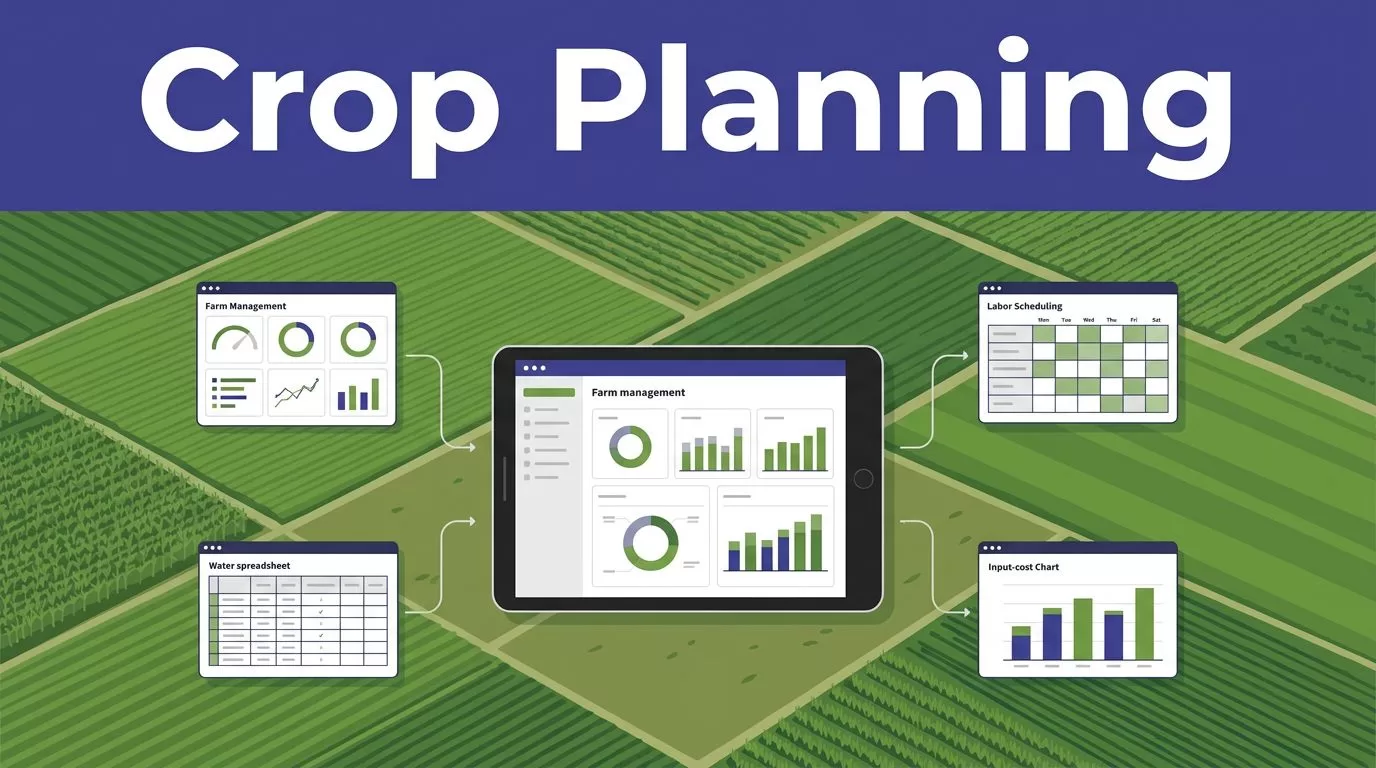
Crop planning models often fail for a practical reason. The data sits in different systems, and nobody owns the full workflow. Field records live in a farm management platform, water data sits in a spreadsheet, labor availability changes in a schedule, and input costs move every week.
Twin.so can coordinate these repeatable steps. It can read connected systems, follow workflow instructions, update approved records, and route exceptions. It isn’t a built-in agronomy optimizer, so the reliable approach is to use Twin as the workflow layer around your crop planning models.
The process starts with a clean data structure, clear constraints, and human review. Build the model first, then automate the work around it.
Know What Twin.so Should Handle
Twin describes its product as an autonomous AI agent platform that works across apps and websites. Its agent workflow learning materials cover browser automation, tools, conditions, and multi-step workflows.
That makes Twin useful for collecting planning inputs, checking records, launching calculations, preparing scenarios, and notifying reviewers. It doesn’t prove that Twin can calculate agronomic recommendations without an external model or solver.
Use Twin as the workflow layer
A practical architecture has four parts:
- A source of truth stores field, crop, water, cost, labor, and yield data.
- A deterministic model or approved spreadsheet calculates feasible plans.
- Twin collects inputs, starts the process, checks the result, and routes exceptions.
- A farm manager or agronomist approves the proposed plan.
If the planning problem requires exact optimization, use a solver, script, or controlled spreadsheet for the calculation. Twin can pass structured inputs into that system and retrieve the result. Don’t ask an AI agent to invent a mathematically valid allocation from unstructured instructions.
Keep agronomic decisions controlled
Twin’s public materials don’t show agriculture-specific features such as soil-zone modeling, crop rotation libraries, irrigation forecasting, or yield prediction. Treat those capabilities as unconfirmed.
Your agronomist should define the rules. The workflow should apply them consistently and stop when required data is missing. A model that produces a complete-looking plan with an unknown water allocation is worse than a workflow that returns an exception.
Build the Data Model Before the Agent
Automation can’t fix inconsistent field records. Start with the data structure that every plan must use.

Use field-level records
Each field should have a stable ID that remains the same across seasons. Store the field area, soil zone, prior crops, irrigation source, planting restrictions, and current availability.
A useful planning record includes:
| Data group | Example fields |
|---|---|
| Field identity | Field ID, farm, area, soil zone |
| Rotation history | Prior crop, harvest date, disease or residue notes |
| Timing | Earliest date, latest date, harvest deadline |
| Water | Allocation, source, expected availability, application limit |
| Resources | Labor hours, equipment capacity, available planting days |
| Economics | Seed, fertilizer, chemical, labor, irrigation, machinery costs |
| Output assumptions | Expected yield, price, quality grade, confidence level |
Normalize units before the model runs. Store area in one agreed unit. Store water in one agreed unit. Use consistent crop names, date formats, currency, and cost periods.
Water deserves its own validation process. USDA data shows the scale of irrigation use across U.S. farms, but national statistics don’t replace farm-level allocations. Use local meter readings, delivery schedules, permits, and irrigation plans for operational decisions. The USDA irrigation and water use data can provide useful context, not a field-specific answer.
Separate facts from assumptions
Store raw values and model assumptions in separate fields. A recorded planting date is a fact. An expected yield is an estimate. A projected crop price is a planning input with a timestamp.
Add these controls:
- Record the source and last-updated time for every important input.
- Mark missing data as missing instead of filling it with a guessed value.
- Keep the previous approved plan unchanged.
- Store the proposed plan and reviewer decision separately.
- Record the model version used for each result.
This structure gives reviewers enough evidence to challenge a recommendation. It also makes reruns comparable when weather, costs, or water availability changes.
Define Constraints and Planning Objectives
Crop planning models need rules that distinguish impossible plans from merely unattractive plans.
A hard constraint might prevent planting a crop outside its approved window. Another might limit total irrigated acreage to the available water allocation. Labor capacity, equipment availability, harvest deadlines, and rotation requirements can also block a plan.
A soft constraint affects ranking rather than feasibility. It might favor a lower-cost crop, reduce concentration in one market, or prefer fields with better historical yield performance.
Write rules in operational language
Avoid broad instructions such as “create the best crop plan.” They leave too many decisions open.
Use instructions such as:
- Assign one approved crop to each available field.
- Do not allocate more irrigated acreage than the confirmed water total.
- Exclude crops when the planting window has closed.
- Apply the minimum rotation break defined by the agronomist.
- Keep total planting labor within available hours for each week.
- Include seed, fertilizer, chemical, labor, irrigation, and machinery costs.
- Return expected yield, total cost, expected revenue, and margin for each field.
- Flag any input that is missing, stale, or outside its approved range.
The last rule matters. An agent should return “water allocation unavailable” rather than silently continue.
Choose an objective that matches the farm
Profit is only one possible objective. A plan may need to protect water, meet a contract, spread labor demand, reduce disease risk, or maintain a target crop mix.
Define the priority order before deployment. For example:
- Meet legal, contractual, and agronomic restrictions.
- Stay within water, labor, equipment, and acreage limits.
- Protect required planting and harvest dates.
- Rank feasible plans by expected margin or another approved measure.
This order prevents a high-margin option from winning when it violates a rotation rule or exceeds water capacity.
Build the Twin.so Workflow
Twin’s integrations page says the platform can read, write, and automate connected apps. It currently advertises a large integration catalog, but availability can depend on your account, vendor permissions, and the specific workflow.
Start with a narrow process. A weekly planning refresh is easier to test than a system that changes crop assignments whenever a spreadsheet cell changes.
Give the agent a complete instruction
Your plain-English workflow should define the trigger, sources, checks, actions, and output destination.
A practical instruction could say:
Every Monday at 6:00 AM, collect approved field records, rotation history, water allocations, labor capacity, current input costs, and yield assumptions. Reject records with missing field IDs or stale water data. Send valid inputs to the approved planning model. Save the proposed field allocation with the model version and run ID. Do not update the production plan. Route exceptions and low-confidence results to the farm manager.
This format gives Twin a bounded task. It also keeps the final operational decision outside the agent.
Add state checks and safe retries
Don’t treat a visible browser page as proof that a record was saved. Check for the changed status, returned record ID, completed calculation, or updated timestamp.
Use a unique run ID for each planning cycle. Store it with every proposed allocation. If a workflow fails, resume from the last confirmed step instead of restarting every action.
Bound retries. A repeated write can create duplicate plans or overwrite an approved record. Never allow an automatic retry to publish a crop allocation, purchase input, or change a production schedule without an idempotency rule and a review gate.
Validate Scenarios Before Rollout
A plan can pass a technical check and still fail agronomic review. Validate the output against known seasons, current field conditions, and the assumptions used by the farm team.
Test with historical seasons
Run the workflow against prior seasons with known field assignments and outcomes. Compare the proposed planting windows, crop rotations, water use, expected yield, and cost totals with the approved records.
The goal isn’t to force the model to reproduce every past decision. Conditions change. The test should reveal whether the workflow reads the right records, applies constraints, preserves units, and produces outputs that a reviewer can interpret.
Test difficult cases deliberately:
- A field has no recent rotation history.
- Two sources report different water allocations.
- A planting window is nearly closed.
- Labor capacity falls during peak planting.
- Fertilizer costs change after the source data was loaded.
- A field appears twice under different names.
- The planning model returns no feasible solution.
Run scenario comparisons
Ask the model to produce controlled variations, not unlimited suggestions. Useful scenarios include a reduced-water plan, a delayed-planting plan, a labor-constrained plan, and a higher-input-cost plan.
Each scenario should show the changed assumption and the effect on acreage, expected yield, cost, revenue, water use, and labor demand. A reviewer should not need to compare two unexplained spreadsheets manually.
A scenario is useful only when the changed input is visible. Never present two different plans without showing which assumption caused the difference.
Keep the output in report-only mode first. The farm team should approve the proposed allocation before it reaches the production planning system.
Measure Quality, Cost, and Exceptions
Track accepted plans, not agent actions. A workflow can complete every browser step and still omit fields, duplicate records, or use stale inputs.
Measure:
- Field-level validation pass rate
- Missing and stale input rate
- Duplicate field or crop assignments
- Constraint violations
- Percentage of plans accepted without correction
- Human review minutes per run
- Failed runs and retry counts
- Exception volume and resolution time
- Credit cost per accepted plan
- Difference between expected and realized yield after the season
Twin uses credits, and planning examples place simple automations around 15 to 30 credits. A browser session with about 20 steps may use roughly 100 to 200 credits. These are planning ranges, not fixed prices. Check current limits and account pricing before forecasting production usage.
Calculate the full operating cost. Include Twin usage, connected-system costs, monitoring time, agronomist review, and corrections. A workflow that saves 30 minutes but creates two hours of cleanup is not reducing cost.
Roll Out in Controlled Stages
Use a staged deployment:
- Run one farm, crop group, or planning cycle.
- Produce proposals without changing production records.
- Compare results with manual plans and review every exception.
- Allow approved writes only after quality targets are met.
- Expand one source, farm, or crop group at a time.
Keep the original inputs, model version, proposed result, reviewer decision, and final published plan. This creates an audit trail when someone asks why a field received a particular crop.
If the workflow spans several systems or needs clear approval and exception paths, Book A Call to map permissions, data ownership, and rollout controls before expanding it.
Conclusion
Twin.so can reduce the manual work around crop planning models when the workflow has structured inputs, approved constraints, and a clear review path. Use it to collect data, coordinate connected tools, launch calculations, check results, and route exceptions.
Keep agronomic logic in a controlled model or approved rule set. Validate field allocation, rotation, planting windows, water, labor, costs, and expected yield before publishing a plan. Start with report-only runs and scale only when the accepted output is accurate, traceable, and cheaper to maintain than the manual process.
