How I Use Baremetrics Cancellation Insights to Cut Churn
A churn chart shows a leak. Baremetrics Cancellation Insights shows where the pipe cracked. The add-on collects a reason from each cancelling customer and ties the reason to the revenue lost. This guide explains how the tool collects reason...

A churn chart shows a leak. Baremetrics Cancellation Insights shows where the pipe cracked. The add-on collects a reason from each cancelling customer and ties the reason to the revenue lost.
This guide explains how the tool collects reasons, what the official pages say about price and setup, how to read the reports, and how to turn the data into a weekly churn routine. Product details come from Baremetrics pages. Confirm current terms on the Cancellation Insights feature page and the Baremetrics pricing page.
What Baremetrics Cancellation Insights does
The feature page describes Cancellation Insights as a churn-prevention add-on for subscription businesses. The tool reaches a customer at the moment of cancellation, collects a reason, and can offer a retention discount or send follow-up emails.
Two collection channels exist. An in-app widget appears before the customer cancels. An email goes to customers after they cancel. Teams can use either channel or both.
| Channel | When the customer sees it | Setup effort | Main benefit |
|---|---|---|---|
| In-app widget | Before the cancellation completes | Embed code in the app | Catches the raw reason and can present a retention offer |
| Email survey | One hour after cancellation, per the Baremetrics setup guide | Low | Reaches customers calmer and often yields fuller comments |
Baremetrics advises using both channels for the best coverage. The email arrives after cancellation, so the email cannot prevent a cancellation. The widget can.

Price and requirements
The feature page states Cancellation Insights costs $129 per month as an add-on to a core Baremetrics subscription. The page also states the fee stays flat regardless of the number of insights collected. The Baremetrics pricing page lists the same $129 monthly add-on price. The pricing page shows two sets of base plan prices, so confirm current plan prices before budgeting.
Requirements are modest. A Baremetrics account tracking subscription data is needed. The in-app widget requires pasting embed code into the product, so some code-editing experience helps. Retention offers tie to Stripe coupons and require the latest Baremetrics Stripe app, according to the feature page. The page does not state which other billing platforms support retention offers. Check with Baremetrics if the billing platform is not Stripe.
How to set up Cancellation Insights
The Baremetrics setup guide for Cancellation Insights lays out four steps.
- Customize the reasons. Open Cancellation Insights, click the settings icon, and choose Manage Reasons. Keep the defaults or edit, add, and reorder reasons.
- Choose the survey channel. Pick the in-app widget, the email option, or both.
- Add follow-up emails. Attach an optional email template to each reason. Send the email instantly or after a delay of set days.
- Analyze the data. Collection starts after setup. The dashboard shows cancellations for a chosen period and the revenue lost to each reason.
One rule protects data quality. Each reason box should track one reason only. Small wording tweaks are fine. If a reason changes meaning, delete the box and create a new one. Otherwise, old responses and new responses mix under one label.
The Baremetrics Help Center keeps a Cancellation Insights collection with articles on emails and the embedded form.
Retention offers and follow-up emails
Retention offers set Cancellation Insights apart from a plain survey. The feature page explains how an offer attaches to a reason. For example, a 20% discount can attach to the reason too expensive. A customer who picks the reason sees the offer. The customer can accept and stay subscribed, continue cancelling, or close the widget. A customer who continues to cancel never sees the same offer again.
Accepted offers apply a Stripe coupon to the subscription automatically. The coupon removes manual work for support staff.
Follow-up emails work after the cancellation. The reason-collection email goes out one hour after cancellation. Reason-specific templates can send instantly or after a delay, such as 20 days. The setup guide gives two sample uses. An instant email can ask which competitor a customer chose. A delayed email can offer a discounted return.
The feature page flags two cautions. Follow-up emails trigger on all cancellations in the payment provider, not only those with a captured reason. Use only the in-app widget for internal or admin cancellations to avoid stray emails. A widget setting can also require a reason before the cancellation completes. The setting is optional by default.
How to read the reports
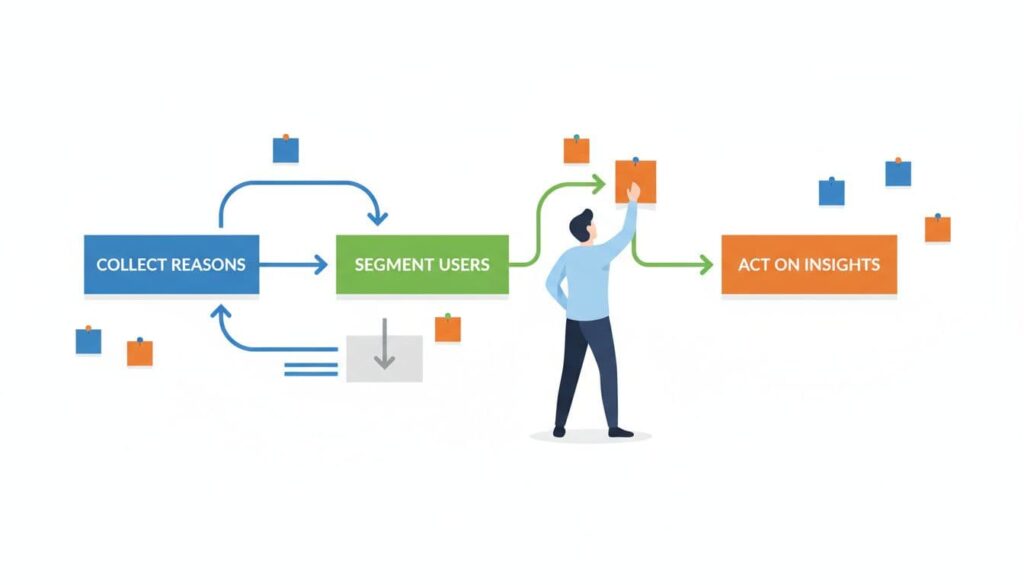
The dashboard shows reasons as a percentage breakdown and shows the cost of each reason. The setup guide says to click Total Cost or Number of Cancellations for a chart, and to switch the view between days, weeks, and months. Recovered customers appear as reactivations in the Baremetrics Control Center.
Rank reasons by lost revenue, not by count. Thirty cancellations on a starter plan citing price may cost less than three cancellations on a premium plan citing a missing feature. Both signals matter. The signals do not carry equal weight.
Segment before acting. Compare plan tier, customer age, signup cohort, and new versus reactivated subscribers. The Baremetrics churn analysis guide places cancellation reasons beside churn rate, LTV, and cohort trends.
| Reason trend | What to check next | Action to test |
|---|---|---|
| Too expensive on higher tiers | Recent packaging, discount expiry, usage depth | Test a downgrade path or clearer value messaging |
| Missing features from new accounts | Onboarding completion, sales promises, setup friction | Fix the handoff or close the product gap |
| Switched to a competitor from mature accounts | Support history, reliability, roadmap fit | Run interviews and targeted outreach |
If a reason spikes after a product or pricing change, compare the cohorts exposed to the change first. Otherwise the team may blame the wrong cause.
Keep voluntary churn apart from failed payments
A bad month can hold two separate problems. Customers who choose to leave are one problem. Customers whose cards fail are another. Mixing the two sends the next fix in the wrong direction.
Baremetrics explains the split in its article on Recover versus Cancellation Insights. Recover handles failed payments. Cancellation Insights handles chosen cancellations. See the companion guide on Baremetrics dunning emails for the failed-payment side.
The feature page also notes churn prediction is not part of Cancellation Insights. The page points to Baremetrics Forecast+ for churn prediction.
A weekly churn workflow
Insight goes stale without an owner. A short weekly loop keeps the work moving.
- Clean the reason set. Merge duplicates, trim vague labels, and keep one other option for comments.
- Review lost MRR by segment. Scan plan, tenure, and reactivated versus new customers. Find the most expensive churn pattern.
- Trigger a follow-up by reason. Price-sensitive users can receive a downgrade path. Competitor switchers can receive an interview invite. Feature-gap exits can feed product research.
- Measure the next cohort. Look for lower churn, more reactivations, and better MRR retention in the targeted segment. Drop a theory when the numbers do not move.
For further ideas after the report shows where the pain sits, read the Baremetrics article on ways to reduce SaaS churn. Find the pattern first. Pick the response second.
Design reasons the team can act on
The default reason list is a starting point. A useful list mirrors the real decisions behind cancellations. Group reasons by the team able to respond. Price and packaging reasons go to the pricing owner. Missing feature reasons go to product. Support and reliability reasons go to the customer team.
- Keep the list short. Too many choices produce muddy data.
- Use plain wording. Customers pick the label which matches their own words.
- Include one other option. A comment box catches reasons the list misses.
- Review the list each quarter. Merge duplicates and delete reasons nobody picks.
Remember the setup guide rule on reason boxes. Create a new box when meaning changes. Reusing an old box corrupts the trend line.
Common mistakes with cancellation data
Teams make a few predictable errors. Some count reasons without weighing revenue. Some act on one loud comment. Some forget to separate new subscribers from long-term subscribers, who often leave for different reasons.
Another mistake is acting too fast. A small sample can mislead. Wait until a reason shows up across several weeks and more than one segment before changing the product. Then test the response on a single cohort and compare results.
FAQ
How much does Baremetrics Cancellation Insights cost?
The feature page lists $129 per month as an add-on to a core Baremetrics subscription. Confirm the current price on the official pricing page.
When does the cancellation email go out?
The setup guide states the reason-collection email goes out one hour after cancellation. Reason-specific follow-ups can send instantly or after a delay.
Can the tool save a customer before cancellation?
Yes, through the in-app widget and retention offers. The email survey arrives after cancellation and cannot prevent the exit.
Do retention offers work with every billing platform?
The feature page ties accepted offers to Stripe coupons and the latest Baremetrics Stripe app. The page does not name other supported platforms.
Can a reason be required?
Yes. A widget setting can require a reason before the cancellation completes. The setting is optional by default.
Conclusion
Baremetrics Cancellation Insights turns a cancellation into data. The widget and email capture reasons, retention offers try to keep customers, and the dashboard ties each reason to lost revenue.
Collect reasons through both channels, rank them by lost MRR, and act on one pattern at a time. Verify the price, billing platform support, and setup steps on the official Baremetrics pages before rollout.
