How I Find Anyone’s Email Address by Name Using Hunter.io
Cold outreach fails when the first email bounces. To find email address details for a real person, you need a name, a company domain, and a way to check the result. Hunter.io handles all three in one workflow. This guide shows you how to ru...
Cold outreach fails when the first email bounces. To find email address details for a real person, you need a name, a company domain, and a way to check the result. Hunter.io handles all three in one workflow.
This guide shows you how to run a name search, read the confidence score, verify the result, and send within legal limits. You also get a plan comparison, a pattern table, and a fallback list for contacts Hunter cannot find.
Why Hunter.io works for work email search
Hunter focuses on professional addresses tied to company domains. You skip guesswork across ten formats and start from indexed data instead. The Email Finder takes a domain, company name, or LinkedIn handle plus a first and last name. Hunter documents automatic verification on returned results.
The platform uses credits. Per the Hunter pricing page, finding an email costs 1 credit and verifying an email costs 0.5 credit. Duplicate searches count once per billing period. Confirm current numbers on the pricing page before you buy, because plans change.
Hunter.io plans and credits compared
The table below reflects the Hunter pricing page at the time of writing. Monthly prices apply to month-to-month billing. Annual billing lowers the monthly rate.
| Plan | Monthly credits | Monthly price | Annual billing, per month |
|---|---|---|---|
| Free | 50 | $0 | Not applicable |
| Starter | 2,000 | $49 | $34 |
| Growth | 10,000 | $149 | $104 |
| Scale | 25,000 | $299 | $209 |
| Enterprise | Custom | Custom | Custom |
All plans include unlimited team members and CSV export. Auto-verification and lead enrichment appear on Starter. Advanced Discover filters appear on Growth. Check the official page for the latest limits.
How to find email address by name in five steps
Short processes get repeated. Follow these five steps for each contact.

- Confirm the company domain. Open the official website and copy the exact domain. A wrong domain breaks the whole search.
- Enter the full name. Use the real first and last name. Skip nicknames and initials.
- Read the result and the confidence score. Hunter describes the score as the probability the returned address is correct. Higher scores deserve more trust.
- Compare with the domain pattern. Run Domain Search on the same company. Check whether other staff use first.last, first, or another format.
- Verify before you save. Run the Email Verifier. Only export addresses marked valid.
Take a fictional example. You want Jane Miller at North Peak Labs. Confirm the domain is northpeaklabs.com. Search Jane Miller with this domain. Hunter returns jane.miller@northpeaklabs.com. Domain Search shows two other staff using first.last. The pattern fits, so the address looks natural.
Hunter publishes its own guide to finding someone email address with ten methods. Name plus company domain stays the strongest starting point.
Use Domain Search to learn the company email pattern
Domain Search returns addresses tied to one domain. The API returns 10 emails by default and supports filters for seniority, department, and decision-maker status. Pagination uses limit and offset.
Pattern knowledge helps you in two ways. First, you can sanity check a result from the Email Finder. Second, you can build a guess when the finder returns nothing. In its own analysis, Hunter reports 49.9 percent of companies use the first@example.com pattern. Treat this figure as a data point from Hunter, not a rule for every company.
| Pattern | Example for Jane Miller | Use when |
|---|---|---|
| first | jane@domain.com | Small teams and startups |
| first.last | jane.miller@domain.com | Mid-size and large companies |
| firstlast | janemiller@domain.com | Seen on other staff addresses |
| flast | jmiller@domain.com | Seen on other staff addresses |
Never send to a guessed pattern without verification. A wrong guess can reach a stranger or bounce.
How to verify an email and read the status
Finding an address is half the job. You still need proof the mailbox can receive mail. The Email Verifier checks format, domain information, and the response of the mail servers. Hunter documents a 20 second response window. When the check runs longer, the API returns a 202 status and you poll for the result.
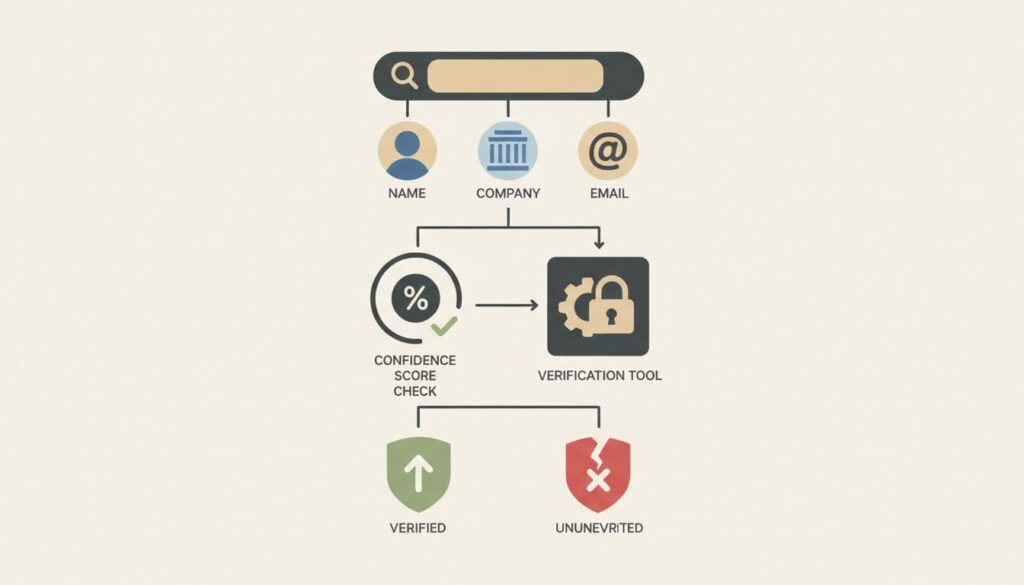
Hunter documents six verification statuses. Use the table to decide your next action.
| Status | Meaning | Your action |
|---|---|---|
| valid | Address is confirmed functional | Safe to contact |
| invalid | Address does not exist | Remove from your list |
| accept_all | Server accepts every address | Send with care and watch bounces |
| webmail | Provider such as Gmail or Outlook | Confirm the person uses this address for work |
| disposable | Temporary email service | Remove from your list |
| unknown | Verification failed | Retry later or find another source |
The accept_all status deserves attention. The server says yes to everything, so Hunter cannot prove the mailbox exists. Send a small batch first and track bounces.
Verification costs 0.5 credit per email, based on the pricing page. Verify before you export or add contacts to a sequence. This habit keeps your list small and clean.
\n\n\nA guessed address is not permission to send. Verification comes first.
\n\n\n
Check four signals before you send
Tools help, but you make the final call. Review these four signals for every contact.
| Signal | What you check | Why this matters |
|---|---|---|
| Company domain | Matches the official website exactly | Cuts false matches |
| Name pattern | Fits the format other staff use | Raises confidence |
| Verification result | Status reads valid | Reduces bounce risk |
| Role fit | Title and company match your reason for contact | Keeps outreach relevant |
When three or four signals line up, send a careful first message. When only one lines up, stop and re-check the inputs. One extra minute costs less than a bad first impression.
Bulk email finder and CSV workflows
Large lists need a different approach. Upload a CSV with first name, last name, and domain columns. Hunter processes the batch and returns addresses with verification results. Sort by status and confidence score before you export anything.
- Clean your domains first. Remove typos and parked domains.
- Split full names into first and last columns.
- Remove duplicates. Hunter counts duplicate searches once per billing period, but clean data still saves time.
- Export only valid results. Hold accept_all and unknown for manual review.
- Import to your CRM after the final check.
Teams with developers can call the Email Finder and Email Verifier through the Hunter API. The API documentation lists parameters and response fields. Read the Hunter API documentation before you build.
What to do when Hunter returns nothing
No result does not mean no address exists. Hunter documents several fallback methods in its own guide. Try these in order.
- Check the company website. About pages, contact pages, and author pages often list addresses.
- Search Google with quotation marks, such as the full name plus the word email.
- Open public social profiles. LinkedIn contact info appears for connections.
- Subscribe to the prospect newsletter. The welcome email header shows the sender address.
- Look up WHOIS records for small domains. Owners can hide contact details.
- Ask a mutual connection for an introduction.
- Use a generic address such as info@ or hello@ and ask for a referral.
Each method has limits. Use the finder first, then verify any guess you build from a pattern.

Use Hunter.io ethically and legally
Use Hunter for legitimate business purposes. Sales, partnerships, hiring, and press outreach qualify. Do not chase private addresses or build spam lists.
Follow the rules for your audience. CAN-SPAM covers commercial email in the United States. GDPR covers people in the European Union. CCPA covers California residents. Rules differ by country and by use, so confirm requirements with the official regulator pages or a qualified lawyer.
- State who you are and why you are writing.
- Include a clear opt-out in every commercial message.
- Remove anyone who asks to stop.
- Keep records of where you found each address.
- Skip contacts when your reason for outreach is weak.
\n\nA verified business address is not a free pass for spam.
\n\n\n
Respect improves response rates and keeps complaints low. Short, relevant notes beat volume.
Protect sender reputation after you find email address data
A clean list is only the first step. Mailbox providers judge your domain by bounces, complaints, and engagement.
- Warm new sending accounts before you scale volume.
- Send small batches and review bounces after each batch.
- Keep each message short and specific to the recipient.
- Avoid link-heavy first messages.
- Pause sending when bounces rise.
Hunter supports sequences and AI-assisted drafting on its platform. Plans differ in the number of connected email accounts and recipients per sequence, per the pricing page. Review the limits before you plan a campaign.
Frequently asked questions
Can Hunter.io find an email address with only a name?
The Email Finder needs a name plus at least one of domain, company, or LinkedIn handle. A name alone is not enough.
Is Hunter.io free?
Hunter offers a free plan with 50 credits per month, per the pricing page. Paid plans add more credits and features. Check the pricing page for current terms.
How accurate is the confidence score?
Hunter describes the score as the probability the returned address is correct, based on source quality and quantity. Treat the score as guidance and verify every address before you send.
What does accept_all mean?
The mail server accepts mail for any address at the domain. Hunter cannot confirm the individual mailbox. Send a small test batch and watch bounces.
How many credits does a search cost?
Finding an email costs 1 credit. Verifying an email costs 0.5 credit. Duplicate searches count once per billing period.
Is cold email legal?
Rules depend on your location and your recipient. CAN-SPAM, GDPR, and CCPA each set different duties. Confirm the rules for your case with official sources or a lawyer.
Conclusion
To find email address details by name, start with the company domain. Search with the full name. Compare the result with the domain pattern. Verify the status before you save or send. Use fallback methods when the finder returns nothing. Follow the privacy and anti-spam rules in your market. Start on the free plan with 50 credits, test the workflow on a few contacts, and review the pricing page before you upgrade.
