How to Execute Multi Step Form Testing on Mida.so
Most SaaS landing pages leak potential users before they ever touch your software. You drive traffic through paid ads, social media, and search engines, yet your visitor counts rarely translate into active accounts. Bumping up conversions i...
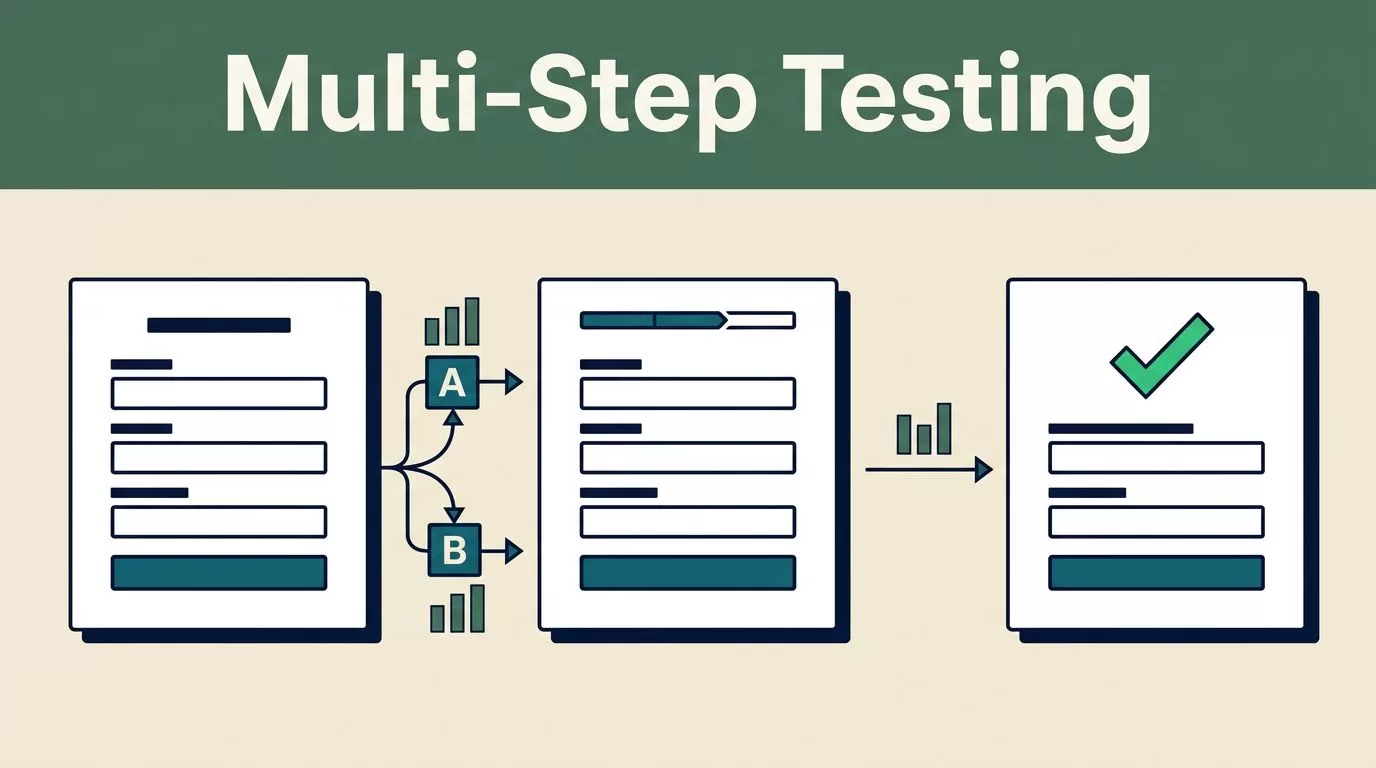
Most SaaS landing pages leak potential users before they ever touch your software. You drive traffic through paid ads, social media, and search engines, yet your visitor counts rarely translate into active accounts. Bumping up conversions isn’t about guessing what color button works best today. It requires a systematic approach to user behavior, rigorous testing, and structured experimentation. Mida.so gives you the testing infrastructure you need, but tools only work when you pair them with a disciplined process.
When you break a long checkout or trial signup into digestible screens, completion rates often jump. Research shows that breaking complex requests into smaller chunks can lift signups dramatically, as detailed in this analysis on why multi-step lead forms get up to 300% more conversions. Even so, you shouldn’t guess which fields belong on step one versus step two. You need live validation.
Key Takeaways
- Establish baseline conversion rates and traffic stability before launching any new experiment on your pages.
- Formulate clear hypotheses based on user friction points rather than random design tweaks.
- Monitor segment performance across mobile devices and paid traffic sources instead of relying solely on aggregate totals.
- Define strict decision rules and statistical confidence thresholds before checking live test results to prevent false positives.
- Document every completed test outcome to build a reliable internal knowledge base for future campaigns.
Setting Up Your Test Environment
You cannot improve what you refuse to measure. Before you touch a single line of code or draft a new headline, pull your current conversion metrics directly from Google Analytics 4. Industry research shows that average performance varies wildly by vertical, traffic source, and device type. Mobile visitors rarely convert at the same rate as desktop users, and paid search traffic behaves differently than organic social clicks. Look past your blended store average and inspect specific funnel steps. Calculate your drop-off rates from product views to cart additions, and from cart additions to completed checkouts.
Record your baseline speed, conversion rate, and traffic profile before you add any experiment script. Run several checks instead of relying on one automated scan. Lab tools can show how a page behaves on a fast connection, but real users face network jitter and older hardware.
Traffic allocation controls how visitors enter your test. A standard setup uses a fifty-fifty split, giving both experiences equal exposure. Keep your targeting rules precise. If your menu update specifically targets mobile visitors or paid search traffic, configure those audience parameters before launching. Keep your traffic distribution steady and avoid changing audience rules while the test is active. Altering the targeting mid-stream creates a new test condition, corrupting your sample purity and forcing you to restart the measurement period.
Formulating Your Optimization Hypothesis
Random changes waste development cycles. If you want to improve form completion, you need to understand where users drop off. Review support tickets, session recordings, and form abandonment data to find where visitors hesitate. Formulate your test using a direct structure. State the observed problem, the exact copy change you want to make, and the metric you expect to improve.
If visitors reach your pricing page but fail to request a demo, adding a clearer benefit-driven subhead above the form should increase completed submissions. Keep each variation focused on a single change. If you rewrite the headline, swap the subhead, and redesign the button all at once, you won’t know which element caused the conversion shift.
To explore broader design tactics, you can review expert guidance on optimizing form conversion rates. Isolating one variable at a time keeps your data clean and actionable.
Configuring the Experiment in Mida.so
Log into your Mida.so workspace and select the target URL you want to optimize. Create your control version first so you have a clean baseline. The control represents your live page without modifications. Next, build your variant by adjusting the form steps. You might split a six-field contact form into two distinct screens. Put low-friction fields like name and email on step one, and save company size or budget questions for step two.
Set your primary conversion goal to track successful submissions. If you want to learn more about defining these goals, consult the Mida form tracking guide for precise setup instructions.
Define your audience targeting rules carefully. You can split traffic by device, geography, or custom URL parameters. For instance, enterprise traffic can see a custom request demo prompt while self-serve visitors see a start free trial button. Keep each audience definition narrow enough to explain clearly. Exclude internal company traffic, automated bots, and visitors already enrolled in conflicting experiments to keep your data clean.
For additional context on platform capabilities, review the features outlined in this overview of A/B testing software.
Reading Test Results Without Chasing Short-Term Noise
A test can collect thousands of visits and still produce the wrong decision if you read the data too early. Real-time monitoring gives you visibility while an experiment runs, but live numbers need statistical discipline. Open your report after launch and inspect the data in a fixed order.
First, check the traffic split. If your plan is a fifty-fifty test, the visitor counts should remain reasonably close over time. Small differences are normal, while a large gap points to targeting rules, device restrictions, or implementation errors.
Next, check total exposures and conversion volume. A page with twelve visitors and three conversions shows an artificial spike that has no statistical reliability. Wait until you collect enough observations before drawing conclusions.
Keep an eye on secondary metrics and guardrail indicators. A shorter form might increase raw submissions while dropping lead quality downstream. You can review additional multi-step form conversion rate optimization strategies to refine how you evaluate secondary outcomes.
A report needs more than a winning percentage to justify a product change. Start by inspecting your primary metric and comparing your control version against the variant under identical test conditions. Check how many visitors entered each variation before drawing conclusions. A test cannot produce a reliable comparison if one variation receives the bulk of your traffic due to uneven routing.
Calculate your conversion rate accurately by dividing total conversions by total exposures, then multiplying by one hundred. Treat early results as directional rather than final. Review your sample size and experiment duration before choosing a winner.
Preventing Common Experimentation Mistakes
Growth teams often undermine their own experiments by making decisions too quickly or ignoring basic statistical rules. You need a pre-planned decision framework before looking at live data. Avoid checking your dashboard every hour and stop the test the moment a variant takes a temporary lead. Random traffic fluctuations can create false wins that vanish once you reach your required sample size.
Another frequent error is running multiple overlapping tests on the same page. If you test a new headline in one experiment and a shorter multi-step form in another, your visitor traffic overlaps and corrupts the results. Run sequential tests or use a planned multivariate structure when your visitor volume supports it.
Watch out for technical breakage after deployment. Test your form on multiple browsers and mobile devices yourself while monitoring your browser inspection tools. Confirm that the tracking pixel fires once and only once per successful action. If your form submission triggers duplicate events in your tracking platform, pause the experiment and adjust your trigger rules immediately.
Conclusion
Running successful optimization experiments requires patience, strict data hygiene, and a clear focus on downstream business outcomes. By establishing a solid baseline, isolating single variables, and waiting for statistical significance, you turn guesswork into predictable growth. Log into your workspace today, verify your tracking setup, and launch your next test with confidence.
