Rewardful Mass Payouts: Run Affiliate Payments Correctly
Stripe billing data and a commission balance do not equal a payment instruction. Rewardful mass payouts are not a native Stripe mass-payment command. Rewardful uses Stripe activity to track referrals and calculate affiliate commissions, but...

Stripe billing data and a commission balance do not equal a payment instruction. Rewardful mass payouts are not a native Stripe mass-payment command. Rewardful uses Stripe activity to track referrals and calculate affiliate commissions, but the Stripe connection does not send affiliate money.
That distinction matters when finance needs to pay dozens or thousands of affiliates without creating duplicate payments, incomplete records, or tax problems. Start with the payout route, then build the approval and reconciliation process around it.
How Rewardful mass payouts actually work
Rewardful tracks commissions, Stripe tracks billing
Rewardful connects to Stripe so it can read the customer and payment activity needed for referral attribution and commission calculation. Its Stripe integration permissions support that data flow.
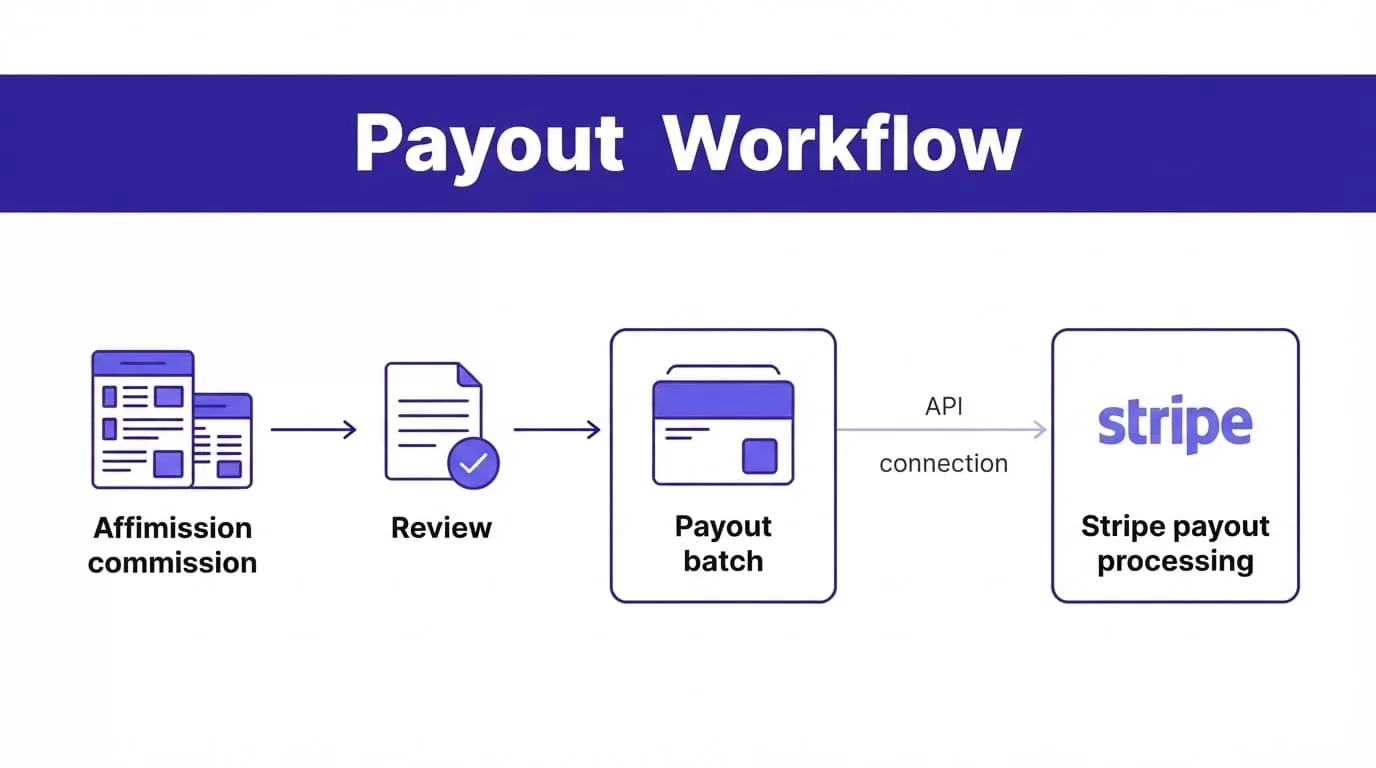
A Rewardful commission is not a Stripe Transfer, Stripe Payout, or Stripe recipient record. Don’t assume a due commission can move to Stripe with one button.
The payout record in Rewardful can move through states such as pending, due, processing, and paid. The status gives your team a workflow to manage. It does not remove the need to verify who gets paid, how they get paid, and whether the payment actually settled.
The diagram shows the approval boundary. It does not show a native Rewardful-to-Stripe payout route.
A due commission is not automatic approval
Rewardful commonly makes commissions due after a 30-day delay, or a delay you configure, once the affiliate reaches the minimum payout amount. Review the current Rewardful commission and payout rules in your account before setting a payment calendar.
Treat the Due view as a payable candidate list. Finance still needs to remove disputed sales, recent refunds, manual adjustments, inactive payment profiles, and affiliates under review.
A provider upload proves that a file left your system. It does not prove every affiliate received money.
Pick the payment rail before you export anything
Rewardful documents three practical affiliate payment paths: Managed Payouts, PayPal or Wise batch payments, and individual PayPal payments. Its affiliate payment workflow makes the division clear: Rewardful calculates what is owed, while the selected payout method controls how funds reach affiliates.
Use the route that matches your payout volume, countries, entity structure, and compliance process.
| Payment route | What Rewardful handles | What your team still owns |
|---|---|---|
| Managed Payouts | It collects selected commissions into one funding request and distributes funds after funding. | Approve the batch, fund it, review exceptions, and retain payment records. |
| PayPal or Wise mass payments | It creates a CSV for due payouts based on your selected payment method. | Validate the export, upload it to the provider, inspect results, and update payout status. |
| Stripe Global Payouts or Connect | It continues to track affiliate commissions from Stripe billing activity. | Build and operate the Stripe recipient, payment, compliance, error, and reconciliation workflow. |
Rewardful says its PayPal and Wise batch process can support up to 5,000 affiliates in one batch. Read its PayPal and Wise mass payout guidance before building your operating procedure.
Stripe also offers Global Payouts for sending funds to third parties. That is a separate Stripe product and workflow. It does not convert Rewardful’s Due payouts into Stripe payment instructions.
Configure the payout record before money moves
Set payout policy in writing
Set the commission maturity period, minimum payment threshold, payment date, approved currencies, and review owner. Document how your team handles refunds, chargebacks, duplicate referrals, account closures, and manual commission corrections.
A clear policy stops the most common month-end problem: operations sees a due balance, finance sees a risky payment, and neither team knows who can decide.
Keep the original commission record intact. Store any correction, exception reason, reviewer, and final decision separately. Your team needs that history when an affiliate disputes a balance three months later.
Collect payment and compliance data early
Don’t wait until the payout date to discover that an affiliate has missing payment details. Payment providers may require legal names, verified email addresses, bank information, country details, or other onboarding data.
Managed Payouts has its own onboarding and funding process. Rewardful’s Managed Payouts merchant FAQ explains that merchants connect and verify a bank account, fund the payment, and Rewardful distributes the money.
Payment method, affiliate location, and legal entity can change the required tax, identity, sanctions, and reporting checks. A payout tool does not bypass those obligations. Get accounting or legal review when your affiliate program spans countries or contractor classifications.
Run a pre-payout review
A payout file should have an owner, an approval date, a fixed payout period, and a known total. Don’t use an export from last week after commissions, refunds, or affiliate details have changed.

Use one controlled checklist
Before release, have the payout owner verify:
- The payout period, legal entity, payment currency, and approved funding account are correct.
- Each selected affiliate has valid payment details for the chosen provider and country.
- Commission totals exclude refunds, chargebacks, duplicates, and unresolved support cases.
- The selected total matches the Rewardful export, internal approval record, and provider upload total.
- The batch has a unique internal ID and one named approver.
- The raw export is stored in restricted access storage, not a shared folder or personal device.
- Finance has confirmed that no earlier batch already paid the same commission IDs.
Use least-privilege access. Affiliate managers may need to review commissions. They don’t need permission to release a provider payment. Protect Stripe and payout-provider credentials with multi-factor authentication and approved secrets storage. Never place API keys, bank files, or tax documents in chat threads.
Send the batch and reconcile the result
Follow the documented PayPal or Wise export path
For the PayPal or Wise route, open Rewardful, go to Payouts, filter for Due payouts, select the approved records, and download the CSV for the payment method configured in your account.
Check the row count, total amount, currency, and affiliate identifiers before upload. Save the original export with the payout period and batch ID. Then upload that same approved file to PayPal or Wise.
Don’t mark a payout as paid when the file is created or uploaded. Wait for the provider to confirm the payment result. A batch can contain successful rows, rejected rows, pending rows, and rows that need corrected recipient details.
Reconcile from payment evidence
Store the Rewardful export timestamp, commission IDs, affiliate IDs, provider batch reference, amount, currency, operator, approver, and final payment status. Keep payment evidence with the related accounting entry.
If a row fails, isolate the failed affiliate. Correct the cause and create a replacement payment only for the confirmed unpaid amount. Never resend the full batch because one affiliate reports a delay.
| Problem | Next action |
|---|---|
| A due total is lower than expected | Check the maturity delay, minimum threshold, refunds, reversals, and excluded records. |
| The provider rejects the CSV | Confirm the selected Rewardful payout method and fix only the missing or invalid payment details. |
| The provider shows processing for too long | Check the provider dashboard and support process. Do not create another payment yet. |
| Rewardful still shows a payout as due | Confirm the provider result first, then update Rewardful through the current workflow available to your account. |
Measure settled and accurately reconciled payouts, not uploaded files. A batch that takes five minutes to send but creates two hours of correction work is not an efficient process.
Use Stripe only with a separate payment design
Know which Stripe workflow applies
Stripe Connect payouts move funds held in a connected account balance to that account’s external bank account or debit card. Stripe’s connected account payout documentation covers those platform controls.
Stripe Global Payouts is built for sending money to third parties. Both options require their own recipient setup, funding model, payment status handling, and compliance controls.
Neither workflow is a documented native execution layer for Rewardful affiliate payouts. Rewardful tracks affiliate commission data. Your Stripe payment system needs to receive an approved payment instruction from your own workflow.
Build an audit trail, not a one-way automation
If you build a custom Stripe payout process, use Rewardful’s due payouts as input records only. Your system should create one internal batch ID, prevent repeat execution, capture the Stripe payment reference, and wait for a confirmed result before changing the affiliate’s payment status.
Run a small approved pilot before expanding. Compare selected commissions, provider results, failed rows, support requests, review time, and correction time. Keep the last trusted reconciliation file available if an integration, permission, or provider process changes.
If your workflow crosses multiple entities, countries, or payment systems, Book A Call to map the approval, data, and exception process before release.
Final payout control
Rewardful mass payouts work best when Rewardful remains the commission system of record and your selected provider remains the money-movement system. Don’t blur those roles.
Review the due list, approve a fixed batch, confirm the provider result, then reconcile every row. Payment accuracy matters more than how quickly a CSV leaves your account.
