How I Calculate SaaS Churn Rate With Baremetrics
Every subscription business has a quiet drain. Customers leave, plans shrink, and cards fail. The leak is churn, and the SaaS churn rate measures the leak. Baremetrics calculates churn automatically, but the team still needs to know which f...


Every subscription business has a quiet drain. Customers leave, plans shrink, and cards fail. The leak is churn, and the SaaS churn rate measures the leak. Baremetrics calculates churn automatically, but the team still needs to know which formula sits behind each number.
This guide covers the customer and revenue formulas, the way Baremetrics counts churn, worked examples with real arithmetic, the monthly to annual conversion, and the mistakes which distort the result. Definitions come from the official Baremetrics help article on user and revenue churn and the Baremetrics post on ways to reduce SaaS churn.
Two kinds of churn, two formulas
Churn is lost customers or lost money over a set period. Keep people and dollars apart. User churn counts accounts. Revenue churn counts recurring revenue. A company can lose few customers and still lose a lot of money when one large account leaves.
Baremetrics defines both measures over a 30-day window. The table also lists the standard gross and net revenue variants used in finance. Baremetrics help does not define those two variants, so confirm in the product which one a chart shows.
| Metric | Formula | What the result shows |
|---|---|---|
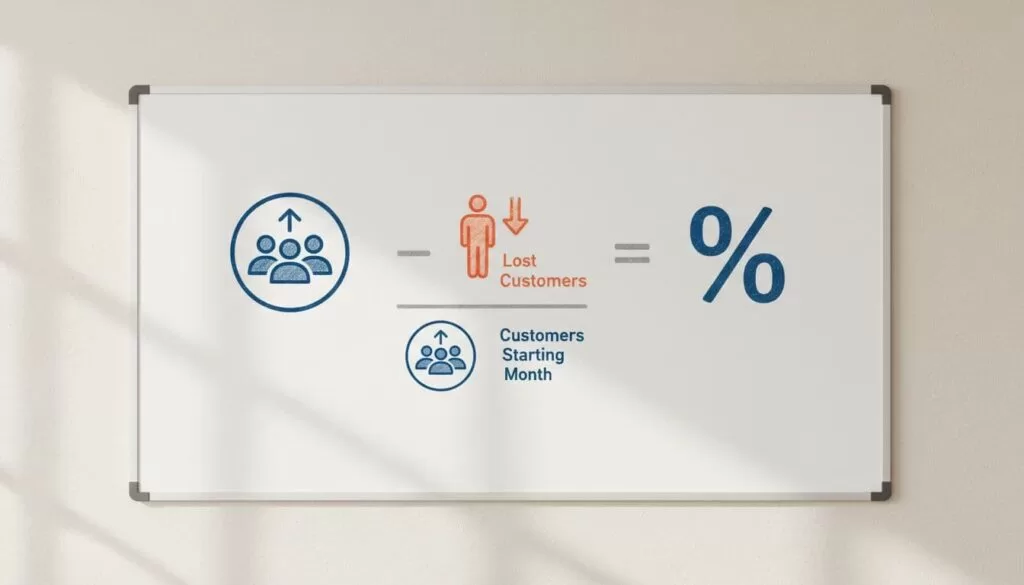
| User churn (Baremetrics) | Cancelled customers in the last 30 days divided by active customers 30 days ago, times 100 | How fast accounts leave |
| Revenue churn (Baremetrics) | MRR lost to downgrades and cancellations in the last 30 days divided by MRR 30 days ago, times 100 | How much recurring revenue left |
| Gross revenue churn (standard) | Cancelled MRR plus downgraded MRR, divided by starting MRR, times 100 | The raw revenue leak |
| Net revenue churn (standard) | Cancelled MRR plus downgraded MRR minus expansion MRR, divided by starting MRR, times 100 | Whether upgrades offset the loss |
Use the starting base in the denominator, never the ending base. Keep new sales out of the numerator. The Baremetrics help article also says revenue churn is generally the measure to watch, especially with many plans. A revenue churn rate above the user churn rate means the business is losing higher-value customers.

Worked example with customers
A company starts April with 200 customers and loses 10 during the month. The user churn rate equals 10 divided by 200, times 100, which is 5 percent.
Worked example with revenue
The same company starts April with $20,000 in MRR. Cancellations remove $1,200 and downgrades remove $300. Gross revenue churn equals $1,500 divided by $20,000, which is 7.5 percent. Existing customers also expand by $400. Net revenue churn equals $1,500 minus $400, divided by $20,000, which is 5.5 percent.
Track both. Gross churn shows the raw leak. Net churn shows how well expansion cushions the loss. One can look healthy while the other tells a harder story.
How Baremetrics counts churn
Baremetrics follows rules which differ from a spreadsheet. Learn the rules before comparing numbers across tools.
- Customers delinquent for more than 30 days count as cancelled.
- Auto-cancellation occurs 31 days after the first failed invoice, according to the Stripe setup article.
- Paused subscriptions count as churned, then as reactivations when payments resume.
- Annual and other non-monthly plans use the same formulas with a 365-day window.
- Annual plans younger than one year do not appear on churn dashboards until a year passes, and their rates then take time to stabilize.
The Stripe help article lists these behaviors, and several are configurable. Read the Baremetrics Stripe article before treating a mismatch as an error. The guide to Baremetrics Stripe analytics explains how to verify the sync.
Monthly churn versus annual churn
Monthly data gives faster signals. When churn jumps in May, check pricing, onboarding, support, and billing right away. Annual churn matters for yearly contracts, but do not multiply monthly churn by 12. Compound the rate instead. The annual rate equals 1 minus the monthly survival rate raised to the 12th power.
| Monthly churn | Survival per month | Annual churn (compounded) |
|---|---|---|
| 1% | 0.99 | About 11.4% |
| 2% | 0.98 | About 21.5% |
| 3% | 0.97 | About 30.6% |
| 5% | 0.95 | About 46.0% |
A 5 percent monthly rate is not 60 percent a year. The compounded loss equals about 46 percent, because churn applies to a shrinking base. The result is still brutal, which is why a small monthly figure can hide a large yearly loss. The Baremetrics post on reducing churn calls an annual churn rate of 3 to 7 percent strong for B2B SaaS. Use the range as a rough comparison, not a target, and compare against peers with similar customer size and pricing.

Voluntary and involuntary churn
Not every cancellation is a decision. Involuntary churn comes from failed payments, such as expired cards or insufficient funds. The Baremetrics post says involuntary churn makes up 20 to 40 percent of total churn. Separate the two types, because the fixes differ. Voluntary churn needs product, onboarding, and support work. Involuntary churn needs payment recovery.
Baremetrics sells Payment Recovery as an add-on at $129 per month flat or 10 percent of recovered revenue, and Cancellation Insights at $129 per month. Verify current terms on the Baremetrics pricing page. Annual billing can cut up to 35 percent from the listed price on Growth and Scale plans.
A monthly churn review loop
- Connect billing data and check the sync against real customers.
- View user churn, gross revenue churn, and net revenue churn side by side.
- Segment the period by plan, source, and signup month to find where the loss concentrates.
- Read cancellation reasons for the same period.
- Check failed payments, because accidental churn looks like real churn.
- Record one action for each finding and review the result next month.
Pair the review with a clean MRR figure. The guide to Baremetrics MRR explains the movement types which feed churned MRR. The guide to a Baremetrics dashboard shows where to place churn beside diagnostic tiles.
Tactics to reduce churn
The Baremetrics post lists eleven tactics. The table groups the most useful ones.
| Tactic | What to do |
|---|---|
| Improve onboarding | Guide users to the first valuable moment with checklists and milestone messages |
| Automate payment recovery | Use pre-dunning emails, automatic retries, and grace periods |
| Optimize cancellation flows | Collect feedback and offer pauses or downgrades before users leave |
| Segment customers | Use acquisition and behavior cohorts to see why each group leaves |
| Encourage annual plans | The post says annual subscribers churn 3 to 5 times less than monthly ones |
| Set warning alerts | Flag usage drops of 30 percent or more and payment failures |
| Score risk | Combine financial, behavior, and support data into a 0 to 100 risk score |
Treat the figures as the vendor claims. Test each tactic on a segment before rolling the tactic out to everyone.
Mistakes which distort churn
- Using ending customers instead of starting customers in the denominator.
- Comparing a customer count metric with a revenue metric as if both answer one question.
- Hiding downgrades inside net churn and never checking gross churn.
- Counting failed payments as normal cancellations.
- Ignoring contract length when reading annual plans.
- Multiplying monthly churn by 12 instead of compounding.
Segment churn to find the cause
An average hides the story. One weak plan, one acquisition channel, or one signup month can drive most of the loss. Baremetrics lets you save segments and apply segments to metrics. Break churn down along four lines.
- Plan: a cheap plan may churn fast while a premium plan stays stable.
- Source: paid traffic may cancel sooner than referrals.
- Signup month: a cohort from a rushed launch may show weak onboarding.
- Billing type: monthly subscribers and annual subscribers follow different clocks.
Pick the segment with the highest revenue churn and read the cancellation reasons for the group. Fix the largest cause first. A small change in onboarding for one segment often beats a broad discount campaign.
Set a churn target your team can act on
A target without a plan becomes a slogan. Start from the current figure, not a benchmark. Write the current user churn and revenue churn for the last three months. Choose a modest improvement for one segment. Name the tactic, the owner, and the review date. Then compare the segment against the rest of the base after one full billing cycle.
Keep the target tied to money. If revenue churn falls by one point on a $20,000 MRR base, the business keeps $200 of monthly recurring revenue each month. Across a year, the saved revenue compounds because retained customers keep paying. This arithmetic makes the case for onboarding and payment recovery work far better than a general call to reduce churn.
FAQ about SaaS churn rate
What is a good SaaS churn rate?
The Baremetrics post calls 3 to 7 percent annual churn strong for B2B SaaS. Rates vary by customer size, price, and contract length, so compare with similar companies.
Which churn metric matters more?
Baremetrics says revenue churn generally matters more, because losing valuable customers hurts more than losing small ones.
How does Baremetrics treat unpaid customers?
Customers unpaid for more than 30 days count as cancelled.
Does a pause count as churn?
Yes. Baremetrics counts a paused subscription as churned, then as a reactivation when payments resume.
How do I convert monthly churn to annual churn?
Subtract the monthly churn rate from 1, raise the result to the 12th power, then subtract the answer from 1. A 3 percent monthly rate gives about 30.6 percent a year.
Conclusion
Treat the SaaS churn rate as a set of linked numbers, not one figure. Separate user churn from revenue churn, and gross from net. Learn how Baremetrics counts delinquent and paused customers, compound monthly rates when you need annual views, and split voluntary from involuntary loss. Review the numbers monthly, act on one finding at a time, and the leak gets smaller.

