How to Set Up Twin.so RSS Automation Effectively
Twin.so RSS automation works best as an integration design, not a blind toggle. You capture new feed items, pass clean data into Twin, then let the agent perform a controlled action. Twin.so is a general AI agent platform with API connectio...

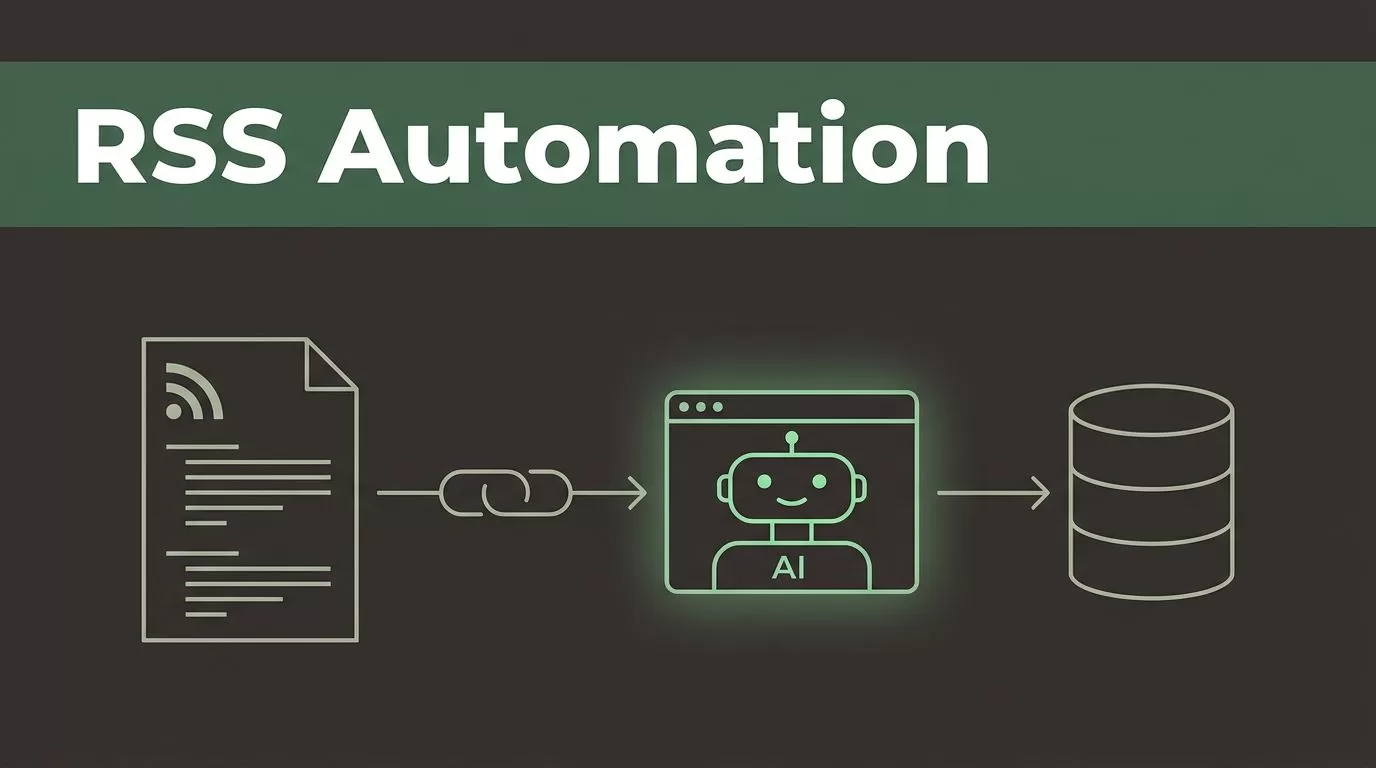
Twin.so RSS automation works best as an integration design, not a blind toggle. You capture new feed items, pass clean data into Twin, then let the agent perform a controlled action.
Twin.so is a general AI agent platform with API connections, browser automation, scheduled runs, and Zapier support. The available product information doesn’t clearly document a native RSS trigger. Build your workflow around an RSS relay or webhook, then connect that input to Twin.
The setup is simple when you separate feed collection, decision logic, and the final destination.
What Twin.so RSS Automation Can Handle
An RSS feed is a structured stream of updates. Each item usually includes a title, URL, publication date, summary, author, and unique identifier. Your automation can use those fields to create tasks, update records, prepare drafts, or send alerts.
Twin.so can fit into this process in three ways:
- An external RSS service detects the new item and sends the data to Twin through an API or webhook.
- Twin receives the item and applies instructions, filters, or enrichment steps.
- Twin sends the result to a connected destination, such as a spreadsheet, document, CRM, messaging tool, or browser-based application.
The RSS layer detects change. Twin handles the work that follows.
You can use a service such as Make’s RSS workflow integrations to watch a feed and pass new entries into another system. Zapier is another option if your team already uses its RSS trigger and Twin connection.
Twin also supports browser-based actions for websites without a usable API. That can help when the final destination is an internal portal, publishing system, or research tool that doesn’t offer a direct connection. The agent can open the site, sign in, locate the correct area, and complete the defined task, subject to the permissions and setup in your workspace.
Don’t treat every RSS item as an instruction to publish. Use Twin to classify and prepare content before a human or downstream system approves it.
A basic workflow might look like this:
RSS feed -> RSS relay -> Twin -> filter or enrichment -> destination
The destination changes by use case. A marketing team may store qualified articles in Google Sheets. A content team may create draft records. A sales team may log news mentions against company accounts.
Prepare the Feed Before Connecting Twin
Start with the feed URL. Use the publisher’s official RSS address whenever possible. Avoid scraping a webpage when a stable feed is available.
Test the feed in a browser or RSS reader before building the workflow. Confirm that it returns recent items and that the fields contain useful information. Some feeds provide only a headline and link. Others include a full summary, categories, author details, and publication timestamps.
Create a small field map before configuring the connection:
| Feed field | Use in Twin |
|---|---|
| Title | Identify and classify the item |
| Link | Open the source or store the canonical URL |
| Summary | Create a short brief or route the item |
| Published date | Apply time-based filters |
| Author | Preserve attribution |
| GUID or item ID | Prevent duplicate processing |
| Categories | Apply topic rules |
The GUID, URL, or another stable item ID is important. Without a unique value, the same article may enter the workflow more than once when the feed refreshes.
Keep the first test feed narrow. Use one company blog, industry publication, or podcast feed. Don’t connect ten sources before you know whether the output is correct.
If you monitor news mentions, define the matching rule before you connect the source. A feed may contain the target company name in unrelated articles. Decide whether Twin should match the title, summary, source domain, or a combination of fields.
For podcast episodes, store the episode URL, show name, release date, and description. Don’t ask Twin to summarize missing transcript content. If the feed includes only an audio link, the workflow needs a separate transcription step.
Use a dedicated destination for early tests. A staging spreadsheet or review folder gives your team a safe place to inspect results before you send anything to customers or publish content.

Build Twin.so RSS Automation Around a Clear Trigger
The trigger is the event that starts the workflow. For RSS, that event is usually a new feed item detected by an outside service.
Set up the RSS watcher first. Select the feed URL and configure the polling or event settings available in that service. Then send a test item to Twin through the connection method supported by your workspace.
Twin’s documented integration paths include native app connections, webhooks and APIs, and browser automation. Select the path based on the destination action:
- Use a native connection when the destination is already supported in your Twin workspace.
- Use a webhook or API when the destination accepts structured requests.
- Use the browser agent when the target system has no reliable API.
Don’t write broad instructions such as “process this article.” Give Twin a defined input and output. A better instruction is:
Review the RSS item. Keep it only when the title or summary relates to customer data security. Return the title, source URL, publication date, matched topic, and a 60-word business summary. Save approved items in the research table. Do not publish or contact anyone.
This instruction has a clear filter, output format, and restriction. It also prevents the agent from taking an action that wasn’t requested.
Add a duplicate check before the final action. Compare the feed’s GUID or canonical URL against existing records. If the value already exists, stop the run. If it doesn’t exist, continue.
Then add error handling. A failed run should create a visible error record or notification. It shouldn’t silently disappear.
Twin agents can run on a schedule and can also be triggered through an API. Use scheduled processing when a delay is acceptable. Use an event-driven webhook when the item needs fast handling, such as a time-sensitive product recall or urgent security notice.
The exact setup fields and labels may vary by Twin workspace and connected service. Follow the available connection flow rather than assuming an RSS-specific menu exists.
Choose the Right Action for Each Feed Type
The final action determines how much control your workflow needs. Capturing an item is low risk. Publishing it automatically is not.
For new blog posts, start with a structured research workflow. Twin can classify the article, extract the source details, and add a row to a content research sheet. Include the original URL so every summary remains traceable.
For news mentions, add a confidence rule. For example, require the target company name in the title or summary and reject items from irrelevant categories. Send uncertain matches to a review queue instead of discarding them.
For podcast episodes, create a record with the episode title, show, release date, description, and link. If you have a transcript source, pass that text to Twin for summarization. Keep the original audio and episode URL in the record.
For content publishing, use a draft-first process:
- Receive the new feed item and check for duplicates.
- Ask Twin to create a summary or draft using the source URL and available feed text.
- Save the result as a draft in the selected content system.
- Send a review notification with the source link and draft link.
- Publish only after approval.
A direct publish action can be appropriate for a controlled internal feed, but it needs strict formatting rules. Define the permitted source, content length, categories, author, and publication status. Reject missing titles, broken URLs, and empty summaries.
If WordPress is your destination, an RSS-to-WordPress publishing example shows the general pattern. Treat that pattern as a reference, not proof that your Twin workspace has the same fields or publishing actions.
Add Filters, Scheduling, and Human Review
RSS automation becomes useful when it removes low-value work. It becomes noisy when every item reaches your team.
Create filters that match the business purpose of the feed. Useful conditions include:
- The item contains a target keyword in the title or summary.
- The source domain belongs to an approved publisher.
- The item was published within a defined time window.
- The category matches a campaign, market, or product area.
- The item has not been processed before.
Use multiple conditions when a single keyword creates false positives. A security workflow might require both a vendor name and a security-related category.
Choose the run schedule based on urgency. Daily processing works for newsletters and research collections. More frequent checks fit competitive intelligence or incident monitoring. Don’t use high-frequency runs for a feed that updates once a week.
Set a maximum action scope. Twin should process one new item at a time during testing. This makes errors easier to isolate and prevents a malformed feed from creating dozens of bad records.
Keep human review for actions that affect customers, brand reputation, or public content. Twin can prepare the work without owning the final decision.
Store the original feed data with the generated output. This gives you a basic audit trail. When someone questions a summary or classification, your team can inspect the source fields used by the agent.

Test and Monitor the Workflow Before Scaling
Run a controlled test with several feed items. Include one valid item, one irrelevant item, one duplicate, and one item with missing fields.
Check five results:
- The RSS relay sends the expected fields to Twin.
- Twin applies the filter correctly.
- Duplicate items stop without creating new records.
- The destination receives the right format.
- Failed runs produce a visible error or alert.
Review the generated output against the source. Summaries should preserve the original meaning and avoid claims that aren’t present in the feed or linked page.
Test long titles, special characters, empty summaries, changed URLs, and future publication dates. These cases expose field-mapping problems quickly.
Monitor the workflow after launch. Track the number of items received, rejected, processed, duplicated, and failed. A sudden increase in accepted items may indicate a changed feed format or weak filter.
Review access permissions as well. Give Twin only the destination access required for the workflow. A research collector doesn’t need permission to publish, delete records, or contact customers.
When the basic flow is stable, add sources one at a time. Keep separate rules for separate feeds. A podcast workflow and a news-monitoring workflow usually need different fields, filters, and review steps.
Conclusion
Twin.so RSS automation works best when an RSS service detects new items and Twin applies the business logic. Use stable feed fields, preserve a unique item ID, add duplicate checks, and route uncertain results to review.
Start with one feed and one low-risk destination. Test valid items, irrelevant items, duplicates, and missing data before adding more sources. A controlled workflow gives you reusable research records, cleaner content drafts, and fewer manual checks without assuming Twin has a native RSS trigger.

