MemberSpace Webhooks: How I Trigger Member Automations
MemberSpace webhooks save me from watching a dashboard for every member change. When someone signs up, upgrades, or cancels, I want my other tools to react right away. That matters because membership work moves in small, important steps. A...

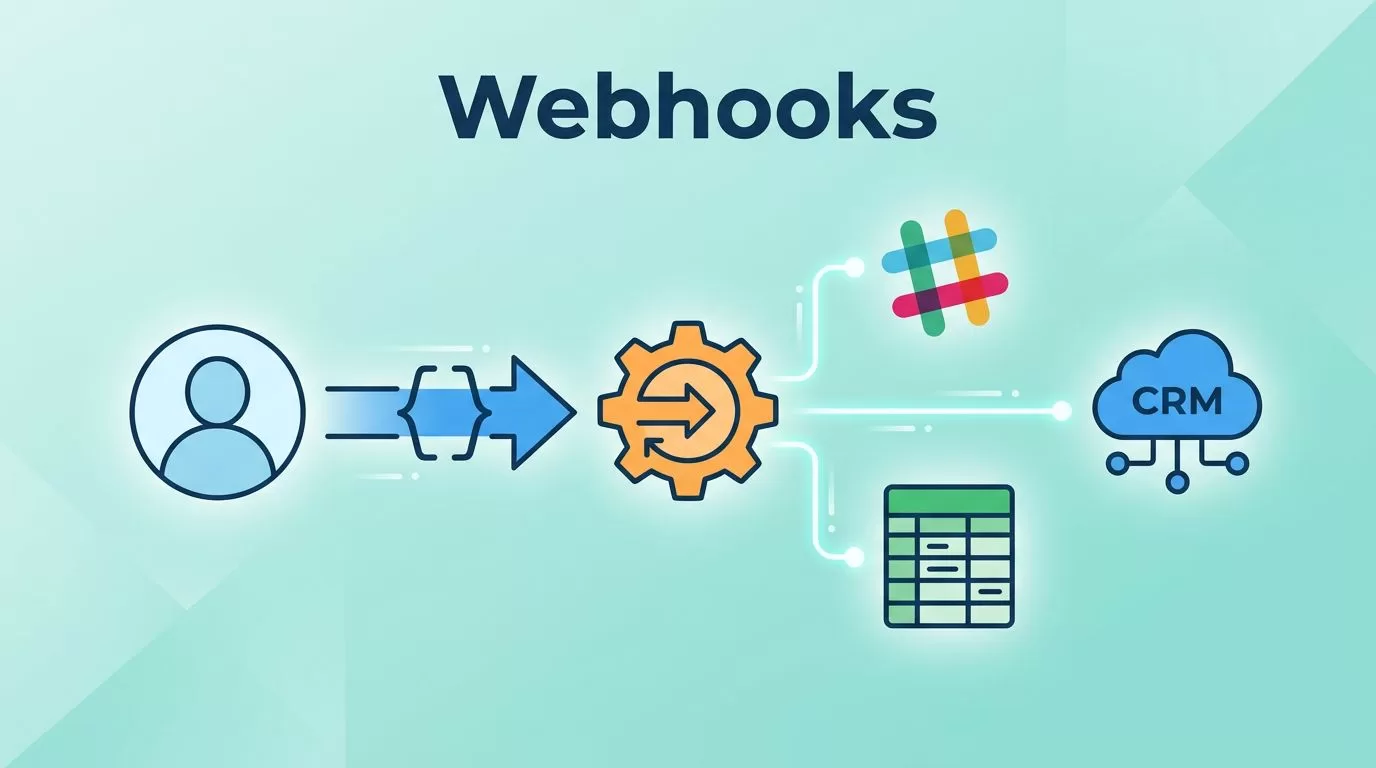
MemberSpace webhooks save me from watching a dashboard for every member change. When someone signs up, upgrades, or cancels, I want my other tools to react right away.
That matters because membership work moves in small, important steps. A late CRM update, a missed Slack alert, or a stale spreadsheet can make the whole system feel messy.
I use webhooks as the handoff between MemberSpace and the rest of my stack. Here’s how I set them up and the automations I trust most.
Table of Contents
- How MemberSpace Webhooks Work
- What I Need Before I Start
- Step-by-Step: I Connect MemberSpace Webhooks
- Automations I Trigger with MemberSpace Webhooks
- Troubleshooting MemberSpace Webhooks
- Best Practices for MemberSpace Webhooks
- FAQ
How MemberSpace Webhooks Work
MemberSpace webhooks send a message when a member event happens. In practice, that means MemberSpace sends a POST request to the URL I give it, and the receiving app takes the next step.
The message usually includes the event type and data tied to that event. I treat that payload like a live record, not a vague alert. If a member joins, the next app can tag them, update a list, create a task, or send a welcome note.
I like this setup because it keeps member activity in sync without manual work. If I want a plain view of event-driven automation, Make’s webhooks integration page is a good reference for the trigger-and-action model.

What I Need Before I Start
I keep the setup simple before I touch MemberSpace. The first thing I need is a receiving endpoint. That can come from a no-code tool, a custom app, or an internal service.
If I want a broader view of tool choices, I keep my no-code automation tools guide nearby. It helps me choose whether I need speed, control, or both.
Before I connect anything, I check for four basics:
- A live endpoint that accepts POST requests
- One clear event to start with, like signup or cancellation
- A test member or sandbox path
- A simple plan for what should happen after the trigger fires
I also make sure the receiving app can read the fields I care about. Email, plan name, status, and timestamps are the values I usually want first. If the payload contains more, I ignore it until I need it.
Step-by-Step: I Connect MemberSpace Webhooks
I do the setup in a straight line. I do not start with five events and three destinations. One clean path is enough.
- I choose one trigger.
I start with a single member action, usually a signup. That gives me a clean test and a clear result. - I create the endpoint.
In a no-code tool, that often means a webhook module. In a custom app, it means a route that listens for POST requests. - I paste the endpoint into MemberSpace.
I copy the URL exactly, then I pick the event I want. A small typo here wastes time later. - I run one live test.
I trigger the event with a real member action if I can. Then I watch for the request in the receiving app and inspect the payload. - I map the data.
I connect each field to the right place. If the next step needs only name and email, I do not send extra clutter through the flow. - I turn on the automation and log the result.
I keep a note of the event, destination, and outcome. That helps when I revisit the flow in a month.
When I want to create a more layered workflow, I use the same event-to-action pattern inside webhook-based task automation in ClickUp. It is the same idea, just pointed at a different job.
Automations I Trigger with MemberSpace Webhooks
I get the best results when I tie one member event to one useful action. That keeps the logic easy to trust.
| MemberSpace event | Automation I trigger | Why I use it |
|---|---|---|
| New signup | Add the member to a CRM, tag them in email, and alert Slack | I want onboarding to start right away |
| Plan upgrade | Update the lifecycle stage and notify the account owner | I want expansion revenue visible fast |
| Cancellation | Create a retention task and send a follow-up survey | I want one place to handle save work |
| Membership change | Update a spreadsheet or internal database | I want reporting to stay current |
I like these automations because they reduce delay without creating noise. A signup should not sit in a queue until someone notices it. A cancellation should not hide in a dashboard until the end of the week.
If I need a multi-step path, I route the webhook through a tool that can branch. If I need a narrow task, I keep it direct. That choice matters more than people think.
Troubleshooting MemberSpace Webhooks
Webhook problems usually come from the same few places. I check them in the same order every time.
- Nothing arrives at the endpoint.
I check the URL first, then I confirm the event is turned on in MemberSpace. A small copy-paste mistake is common here. - The request arrives, but nothing happens.
I look at field mapping next. The payload may be fine, but the receiving app may not be reading the right keys. - The automation fires twice.
I check whether I created duplicate tests or whether the destination app ran the same event more than once. When possible, I add a dedupe rule. - The app rejects the request.
I look for HTTPS issues, auth problems, or endpoint rules that block incoming requests. - Test data works, live data does not.
I compare the event type. Test paths and production paths often differ in small ways.
I keep logs on both sides when I can. That gives me a clear trail from the original member event to the final action. When I need the same kind of discipline around access and permissions, I use the habits I describe in safe server automation strategies.
Best Practices for MemberSpace Webhooks
I keep the setup lean so it stays useful later.
- I start with one event and one destination.
- I send only the fields the next app needs.
- I name each automation after the outcome, not the tool.
- I write a short note for every flow, so I know why it exists.
- I review the logs after I change anything in the path.
- I treat member data with care and keep access tight.
I also avoid building around guesswork. If I do not know what the payload looks like, I test it before I wire in more steps. That saves me from fixing the same problem in three places.
Conclusion
MemberSpace webhooks give me a clean bridge between a member action and a business action. When I keep the setup focused, the whole stack feels easier to manage.
I start with one event, one endpoint, and one outcome. After that, I add more only when the first flow is stable and boring.
That is the real win. The best webhook setup is the one I can trust without checking it twice.
FAQ
What can I trigger with MemberSpace webhooks?
I can trigger CRM updates, email sequences, Slack alerts, spreadsheet rows, task creation, and custom scripts. I choose the next step that needs to happen right away.
Do I need to code?
I do not need to code if I use a no-code tool with a webhook endpoint. If I want more control, I can connect MemberSpace to a custom app or internal service.
Which event should I start with?
I start with new signups. It is easy to test, easy to verify, and useful enough to prove the flow works.
How do I know the webhook worked?
I check the receiving app’s logs, then I compare the payload with the action it triggered. If the data arrived but the action did not run, the mapping is usually the issue.
What if the webhook fires twice?
I look for duplicate tests, repeated retries, or a destination rule that runs the same event more than once. A simple dedupe check usually fixes it.

