Building and Running Online Course Automation Workflows on Twin.so
Running an educational business involves endless administrative tasks that drain your teaching energy. Manual student onboarding, spreadsheet updates, and repetitive emails steal hours from content creation. Implementing online course autom...
Running an educational business involves endless administrative tasks that drain your teaching energy. Manual student onboarding, spreadsheet updates, and repetitive emails steal hours from content creation.
Implementing online course automation solves this friction by turning routine tasks over to autonomous digital systems. You free up your schedule and keep your operations running smoothly.
Let’s look at how you can build and scale these workflows using Twin.so.
Mapping Your Online Course Automation Architecture
Course creators often try to automate every single student interaction on day one. That mistake leads to broken funnels and frustrated learners who receive robotic responses to nuanced questions.
You need a clear boundary between operational tasks that require zero human judgment and touchpoints that demand personal empathy. Administrative work like database syncing, invoice tracking, and tag updates belong in your automated queue.
Strategic mentorship, community moderation, and personalized essay feedback require a human touch. Operations teams should audit existing manual bottlenecks before building any automated sequence.
If a task happens on a fixed schedule or relies on predictable data inputs, hand it over to your agent platform. Twin.so operates as an AI agent platform that translates plain language descriptions into executable workflows.
Non-technical creators can write out their desired sequence in plain English without writing custom code. Operations teams can deploy these agents to bridge gaps where traditional software APIs fail or require complex integration logic.
When platforms lack native integrations, browser-based execution steps in to handle repetitive web tasks. You configure your agent to read source databases, update CRM records, and move files across cloud storage providers.
Structuring your architecture correctly prevents wasted software spend and keeps your tech stack lean. Every automated rule must serve a direct operational goal.
Core Triggers and Actions for Course Creators
Effective online course automation relies on precise triggers and reliable actions. A trigger tells your system when to start, while an action dictates what happens next.
Common triggers include new student registrations, form submissions, completed modules, and failed payments. When one of these events occurs, your platform initiates the predefined sequence instantly.
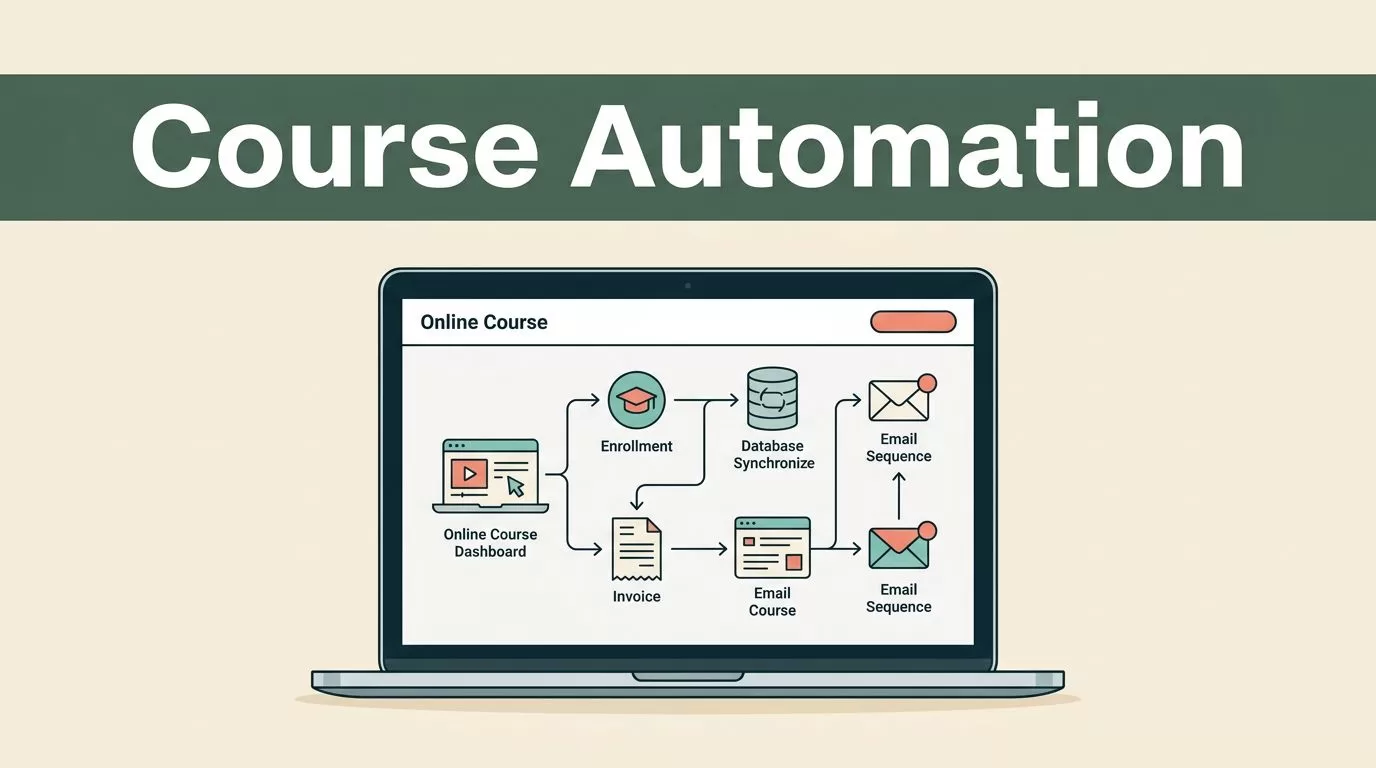
For example, when a new buyer completes checkout, your system needs to enroll them in the learning portal and update your student database simultaneously. If you want to compare how different platforms handle these task sequences, review the best workflow automation tools for market options.
Twin.so handles these cross-tool sequences by leveraging both direct APIs and embedded browser automation. If an API connection is unavailable, Twin’s web agent navigates login-protected interfaces just like a human operator would.

You configure your agent to check schedule intervals, monitor webhooks, or respond to real-world events. Operations teams should test every trigger in a sandbox environment before launching live campaigns to paying students.
Reliable actions depend on clean data passing from one application to the next without corruption. Your agent must validate email formats, check phone numbers, and confirm account keys before executing database writes.
Executing Real-World Workflow Examples
Theory matters little if you cannot apply it to your daily operations. Let’s examine three practical workflows that transform how you manage your educational enterprise.
First, consider student onboarding. When a user registers through your website, the system creates their profile, sends welcome credentials, and adds them to your communication channel.
Second, look at progress tracking and data enrichment. As learners submit assignments, your agent reads source records, updates grading spreadsheets, and flags inactive accounts for review. For broader insights on deploying these systems across enterprise environments, read workflow automation software options to understand architectural patterns.
Third, tackle inbound inquiries and lead follow-up. When prospective students submit contact forms, your agent enriches lead data, updates your CRM, and assigns follow-up tasks to your support staff.
These cross-tool routines remove manual data entry errors entirely. Your team stops wasting hours moving CSV files between disconnected browser tabs.
Managing multi-step document generation also benefits from clear agent orchestration. Your workspace can compile completion certificates, generate custom PDF receipts, and email them to graduates automatically.
Best-Practices Checklist for Operational Teams
Deploying autonomous agents requires strict quality control to prevent silent failures. Operations teams must establish clear monitoring protocols before handing complex workflows over to live systems.
Use this concise checklist to guide your deployment process:
- Audit all manual administrative bottlenecks before building agents.
- Verify API availability before resorting to browser-based automation.
- Test every trigger and action sequence using sample student data.
- Set up error notifications to alert staff when an agent encounters unexpected layout changes.
- Review execution logs weekly to catch minor friction points early.
For a broader look at how automated routines improve organizational efficiency, consult workflow automation tools and software for foundational principles. Keep your agent instructions clear and specific to ensure reliable daily execution.
Exception handling remains critical when dealing with dynamic website layouts or third-party API downtime. Build fallback routines into your agents so they pause and notify your operations team instead of executing erroneous edits.
Final Thoughts
Running a profitable educational program requires moving past repetitive administrative busywork. By separating automated tasks from human touchpoints, you reclaim valuable hours for content development and student engagement.
Twin.so provides a flexible platform for orchestrating these cross-tool operations without writing complex code. Audit your current administrative bottlenecks today, configure your initial triggers, and deploy your first workflow with confidence.
