How to Scrape Google Maps Data with Twin.so
Tracking down business information across thousands of map pins is a tedious manual task. You might spend hours clicking through profiles, copying phone numbers, and pasting addresses into a spreadsheet. Automation changes this process enti...
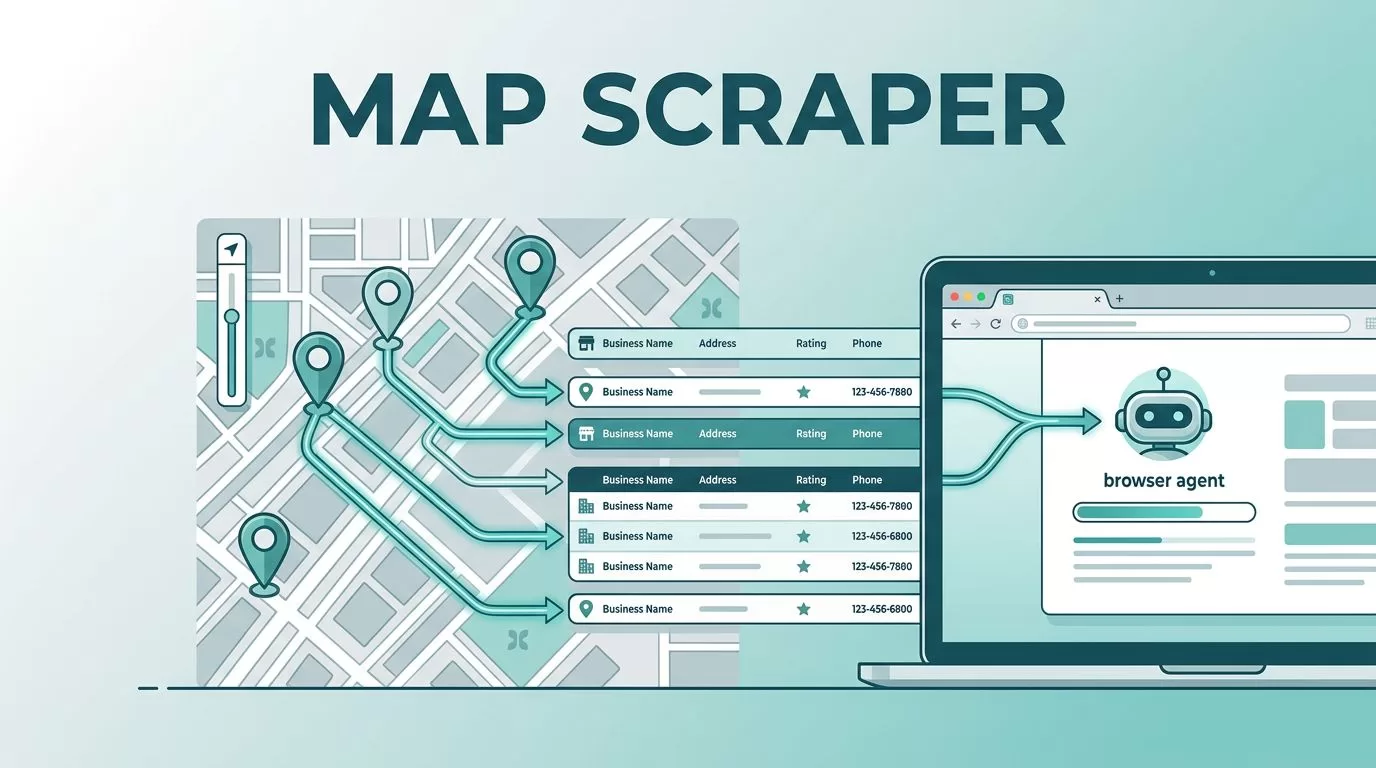
Tracking down business information across thousands of map pins is a tedious manual task. You might spend hours clicking through profiles, copying phone numbers, and pasting addresses into a spreadsheet. Automation changes this process entirely. By using an intelligent agent, you can extract business details directly from Google Maps and move that data into your CRM or internal tracking systems without writing a single line of code.
Twin.so simplifies this by utilizing cloud-based browser agents. These agents mimic human behavior on the web. They navigate maps, click on listings, and extract the specific fields you need. Instead of manually recording every local coffee shop or plumbing business, you define the parameters and let the software gather the records for you.
Defining Your Data Extraction Workflow
Before you start, identify the specific business categories you want to collect. Google Maps holds a massive amount of public information, but you get the best results when your search is narrow. Start by determining whether you need broad coverage, such as “all hair salons in Austin,” or highly targeted lists like “industrial solar installers in Phoenix.”
Once you know your target, describe the request in plain English within the Twin.so interface. The AI agent interprets your goal and maps out the necessary steps. It navigates to the search results, scrolls through the list, and opens individual business profiles. During this phase, you define the fields you want to collect. Common data points include:
- Business name and category
- Verified phone numbers
- Physical address and service area
- Star ratings and total review counts
- Website links for lead nurturing
- Operating hours
By focusing on these specific data points, you build a clean, usable list that serves your business goals. For those building larger pipelines, it is helpful to look into structured data extraction tools that allow you to compare your current map findings with changes in business status over time.
Setting Up Your Automated Agent
After describing your target list, Twin.so builds the browsing agent. This digital helper operates in a cloud environment, which means it doesn’t slow down your local machine. You can observe the agent as it interacts with Google Maps in real-time. It handles the repetitive clicking and scrolling that usually consumes your workday.
The agent is smart enough to handle pagination, ensuring it doesn’t stop at the first twenty results. It continues to load more listings as it moves down the search feed. If you have specific requirements for volume, you can configure the agent to iterate through different neighborhoods or specific search filters.
For teams that rely on recurring data, these agents can be set on a schedule. You might choose to refresh your lead lists every Monday morning. Alternatively, you can use webhooks to trigger an extraction when a specific event occurs, such as a new project request hitting your inbox. This flexibility allows you to build automated scraping workflows that keep your databases updated with minimal oversight.
Compliance and Responsible Usage
When you collect data from public sources, you should act with caution. While business contact details are public, the way you use them matters. Google has specific terms of service regarding automated access. Legal discussions often distinguish between harvesting personal data and collecting factual business information.
It is wise to implement reasonable delays between requests. Rapid-fire requests can flag your IP address. By setting a slight pause between listing extractions, you ensure that your agent behaves like a human user. This approach keeps your project stable and reliable over the long term.
For those interested in the details of safe data collection, you can read more about the risks and best practices associated with these activities. Always ensure that the volume of your extraction aligns with your specific use case, and avoid republishing protected user-generated content, such as individual reviews. Focus your efforts on the core business metadata, which is generally safer and more valuable for your B2B operations.
Practical Use Cases for Map Data
The information you pull from map services finds its way into many business workflows. Many companies use this data for lead generation. If you sell commercial cleaning supplies, you can generate a list of local offices that are likely to need your products. You can then route this data directly to your sales team’s CRM.
Market research is another popular application. You can track how competitor density changes in specific zip codes over time. This helps you identify underserved markets before your competitors do. By monitoring star ratings and review counts, you also gain a quantitative view of how well businesses in your category are performing in the eyes of their customers.
Directory building is a third common use case. If you are creating a curated list of local businesses for a newsletter or a specialized service, you can automate the entire update process. Instead of manually vetting every entry, your agent periodically updates the status, hours, and contact details of every business in your directory. This keeps your content fresh and accurate for your audience without requiring daily administrative work.
Managing and Exporting Collected Records
Once your agent completes a run, the data lands in a structured format. Twin.so allows you to export this information to various destinations. You can send records to Google Sheets if you prefer a simple view, or push them into a professional database if you need more scale.
The advantage of a cloud-based agent is that the formatting is consistent. You no longer have to worry about mismatched columns or missing data. If a phone number is missing from a listing, the agent leaves that field empty rather than shifting the entire row, which helps keep your data integrity intact.
If you eventually scale beyond map data, you will find that the same logic applies to other types of web collection. Being able to turn websites into APIs is a core skill that makes your operations more flexible. You start with map data, but soon you find other sources of information that benefit from the same level of automation.
Automation is about reclaiming your time. Every hour you spend scraping data is an hour taken away from business strategy and client interaction. By offloading these tasks to an intelligent agent, you turn a chore into an automated asset. You now have a repeatable process that works while you focus on higher-level decisions. When you combine this efficiency with a responsible approach to data collection, you create a powerful, sustainable system for growing your business.
