How To Auto Charge Monthly Fees Using Skool In 2026
Recurring billing should sound like a steady clock, not a smoke alarm. When I set up skool monthly fees, I want members charged on time, access tied to payment status, and no manual chasing. Skool can do that without a pile of add-ons. The...
Recurring billing should sound like a steady clock, not a smoke alarm. When I set up skool monthly fees, I want members charged on time, access tied to payment status, and no manual chasing.
Skool can do that without a pile of add-ons. The trick is knowing what I set inside Skool, what runs through Stripe Express, and where people usually trip.
Where recurring billing lives in Skool
As of March 2026, Skool’s official docs show that paid groups can use subscription pricing through the Skool pricing setup guide. Payouts connect through Skool’s payout instructions. For standard monthly memberships, I don’t need a second billing platform.
This is the simple split I use:
| Task | Where I handle it |
|---|---|
| Add a monthly plan | Skool, in the Pricing tab |
| Connect bank payouts | Stripe Express flow opened from Skool |
| Charge cards and renew subscriptions | Skool with Stripe Express in the background |
| Track churn and MRR in depth | Optional outside tool |
Inside Skool, I control the offer. That includes free groups, subscriptions, freemium setups, one-time payments, and tiered pricing, based on current help docs. Inside Stripe Express, I handle identity checks and the bank account connection.
Outside tools only matter if I want deeper finance reporting or a separate checkout. I don’t add extra billing software unless Skool’s native flow can’t support the business model. If I later want better reporting on recurring revenue, I may add something like launching Baremetrics for SaaS analytics, but that’s optional, not required to auto-charge members.
Skool’s setup is simple, but simple doesn’t mean foolproof. One missed step can leave the lights on but the register closed.
My setup flow for Skool monthly fees
I set this up in one pass, then I test it like a stranger.
- I open my profile picture, choose Settings, then open Admin settings for the correct group.
- I go to Payouts, click the settings gear, choose my bank country, and start the Stripe Express onboarding.
- I verify my identity and connect the bank account that should receive payouts. I treat this as a separate Stripe Express connection, not my regular Stripe account.
- Next, I open the Pricing tab and click Add price.
- I enter my monthly amount and save it.
- If I also want yearly billing, I add that separately using Skool’s annual payments setup article.
- Finally, I open the group’s About page in an incognito window and make sure the paid join flow shows the right offer.

Once a member enters a card and joins, Skool renews the subscription each month until the member cancels. Current public guidance also shows Skool handling the recurring charge flow, receipts, and purchase history within the platform experience.
If I need both monthly and annual options, I don’t fake it with invoices or reminders. I add the supported pricing options in Skool and let the checkout do its job. That keeps renewals automatic and access rules cleaner later.
I never invite paid members before payouts are fully connected and the live join page looks right in incognito mode.
I also keep the first offer plain. One monthly price is easier to test than a messy stack of options. If I want a trial, I only use what Skool officially supports in the Pricing screen.
How I handle cancellations, failed payments, and member access
After billing goes live, the quiet details matter most. Good recurring revenue doesn’t come from the first charge alone. It comes from what happens when a card expires, a member cancels, or a renewal hits a wall.
Current public info shows that members can cancel from their own profile settings. That makes the cancel flow self-serve. When they cancel, access continues through the end of the paid billing cycle, then ends. I like that because it avoids awkward same-day removals and keeps the rules predictable.
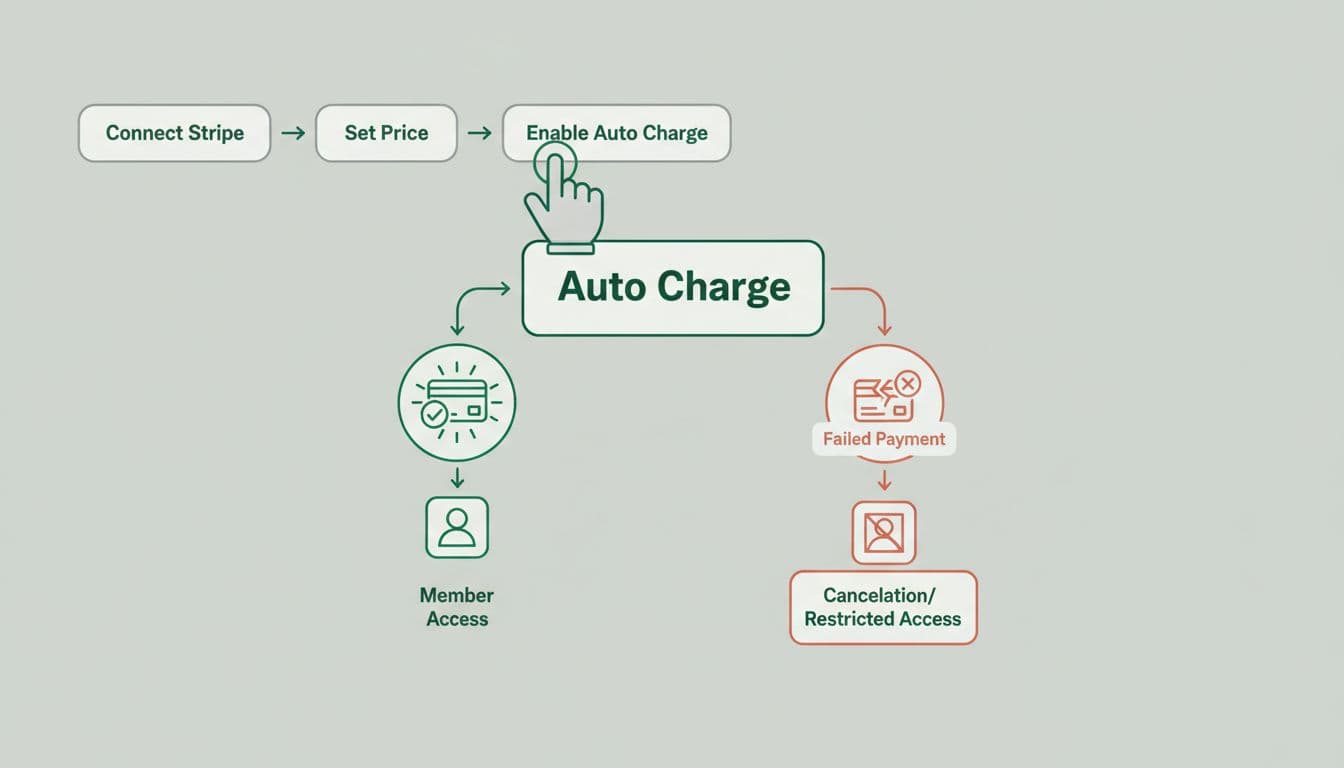
For failed payments, Skool’s current flow retries the charge over several days, usually about 7 to 10, and alerts the member to update the card. Members may see a payment warning when they log in. If the payment still fails after retries, access is removed automatically.
I also write my cancellation policy in plain English on the sales page. When billing rules are fuzzy, support tickets pile up fast.
Common mistakes I avoid
A few errors cause most billing trouble:
- Payouts were never finished, so pricing exists but money can’t flow.
- The wrong group was edited.
- The bank country was chosen incorrectly during Stripe Express onboarding.
- I assumed my regular Stripe account was already connected.
- I changed pricing without testing the public join page.
Quick fixes when a charge doesn’t go through
When auto-charging breaks, I start small. I check whether payouts were approved, whether the monthly price still exists, and whether the member sees the card-update prompt.
If access looks wrong, I compare the member’s billing status with the cycle end date. A canceled member may still have valid access until the term ends. On the other hand, an unpaid member can lose access after retry attempts finish, which is expected behavior.
If I want a clearer view of how failed renewals affect revenue, I sometimes pair Skool with calculating SaaS churn rate in Baremetrics. Still, for standard skool monthly fees, I stick with the native setup first.
Recurring billing feels magical when it works, but it’s really a row of small doors that must all latch. In Skool, those doors are payouts, pricing, and testing.
If I want skool monthly fees to run cleanly, I connect Stripe Express first, add the monthly price second, and test the join flow before I sell anything. Do that once, and the monthly charge stops feeling like a gamble.
