Deploy a No-Code Rewardful Affiliate Integration
An affiliate program only works when every sale has a clear owner. If the referral disappears before Stripe creates the customer, your affiliate sees no commission and your team gets a support problem. A Rewardful affiliate integration conn...
An affiliate program only works when every sale has a clear owner. If the referral disappears before Stripe creates the customer, your affiliate sees no commission and your team gets a support problem.
A Rewardful affiliate integration connects referral links, Stripe payments, and commission records without building custom tracking logic. You still need a controlled checkout path and a proper test plan.
Start with the payment flow you already use. Then connect the parts in the right order.
START WITH THE STRIPE ACCOUNT AND CHECKOUT PATH
Rewardful needs access to the Stripe account that collects subscription payments. Connect the same account your customers use at checkout. Don’t connect a sandbox, test, or secondary account by mistake.
Rewardful requests access needed for referral tracking and commission automation. It doesn’t get permission to move money or run your financial operations. Review the current Stripe permissions Rewardful requests before you approve the connection.
Map one customer journey first
Write down the real path a buyer takes:
- An affiliate shares a referral link.
- A prospect lands on your site.
- The prospect starts checkout.
- Stripe creates or updates the customer and payment record.
- Rewardful records the conversion and calculates the commission.
This looks simple because it is simple. The risk sits between steps two and four. A visitor can click an affiliate link, leave your site, return through another channel, or buy through a checkout page that never receives the referral value.
Keep one checkout route for the first launch. Don’t add a second payment tool, custom coupon flow, or separate landing-page builder until the first route tracks correctly.
Set access rules before inviting affiliates
Decide who can create campaigns, edit commission terms, approve affiliates, and release payouts. Small teams often skip this step. Then one marketing change creates a finance correction later.
Keep your Stripe account owner, Rewardful admin, and payout reviewer separate where possible. At minimum, one person should review commission changes before money leaves the business.
Referral tracking records the source of a customer. It doesn’t remove the need to review refunds, duplicate subscriptions, and suspicious self-referrals.
HOW A REWARDFUL AFFILIATE INTEGRATION WORKS
Rewardful tracks the referral before the buyer pays. Stripe then supplies the billing events that let Rewardful create and adjust commissions.
The basic chain is affiliate link, landing page, checkout, Stripe customer, conversion, commission, payout. Your job is to stop the referral from falling out of that chain.
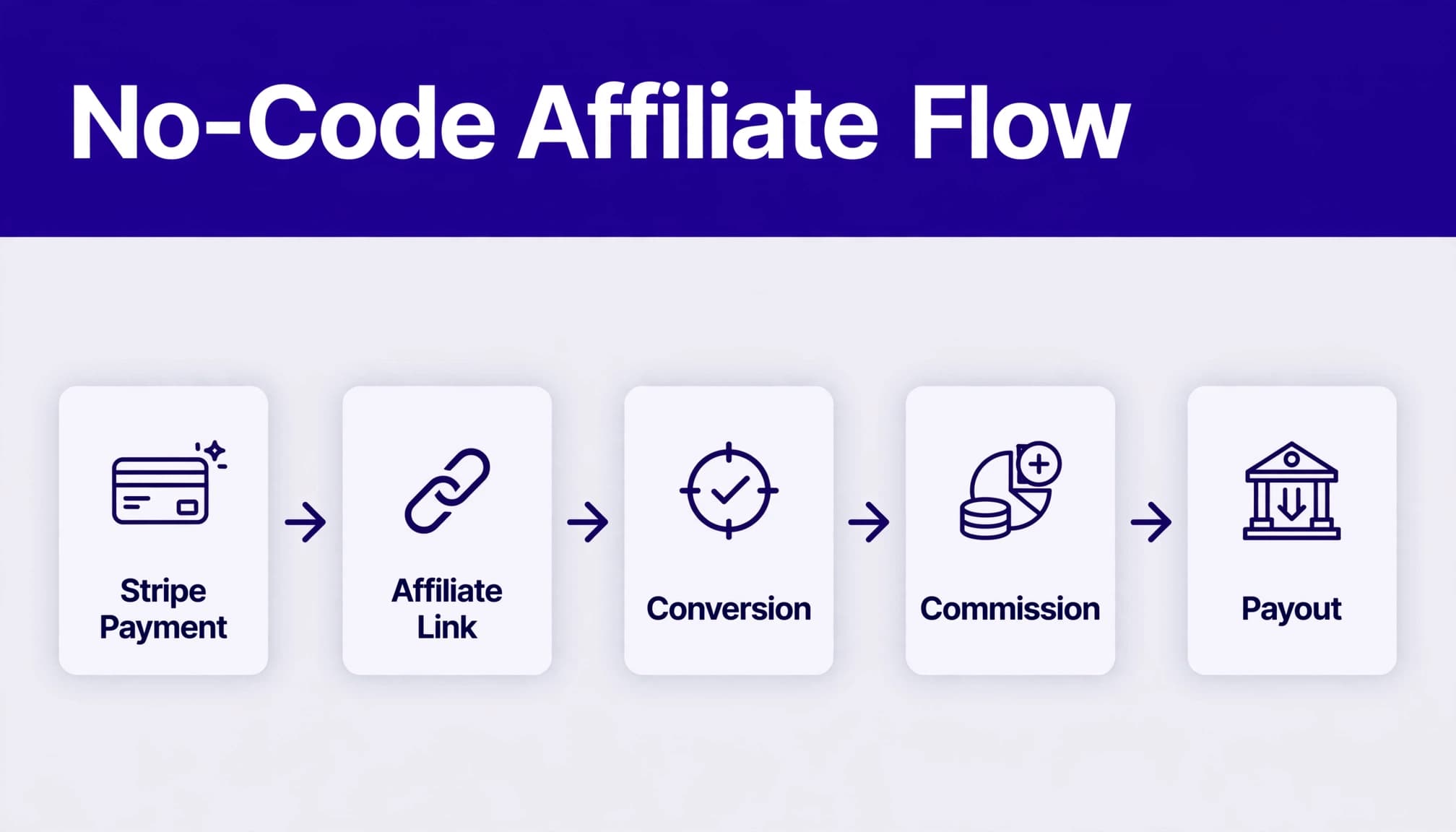
For supported Stripe Checkout flows, Rewardful can pass the referral value into checkout as a client reference value. Rewardful then uses the referred customer record and Stripe billing activity to calculate commission changes after renewals, upgrades, cancellations, or refunds.
That is why a working referral link alone isn’t enough. The checkout must receive the attribution data, and the Stripe customer must remain connected to that data.
CREATE THE CAMPAIGN BEFORE YOU RECRUIT
Connect Stripe first. Create your first campaign next. Then invite affiliates. This order gives every new partner a defined offer instead of a vague promise.
Your account screens can differ by plan, account setup, or product updates. Use the campaign settings shown in your account and confirm the terms before you publish an affiliate application page.
Set rules affiliates can price into their work
A commission percentage without conditions creates disputes. State the operating rules in writing:
- Say whether commission uses collected revenue, invoice value, or another approved amount.
- State whether rewards apply to the first payment, recurring payments, or a limited number of billing cycles.
- Define the attribution window and eligible products.
- Explain when commissions can reverse after refunds, failed payments, cancellations, or fraud reviews.
- State when approved commissions become payable.
Don’t promise recurring commission if you haven’t checked how plan changes and refunds affect it. Rewardful can adjust commissions as Stripe billing events change the customer relationship. Your written terms need to match that behavior.
Give each affiliate one clean link
Start every affiliate with a direct link to the page where your product decision happens. For most SaaS products, that is a pricing page, product page, or focused landing page.
Don’t send new prospects to a generic homepage if the affiliate is promoting a specific feature. Extra clicks create drop-off. A direct destination also makes attribution testing easier.
CHOOSE A NO-CODE STRIPE CHECKOUT METHOD
Use the supported checkout method that matches your existing site. Don’t force a custom implementation because it sounds more flexible.
Use Stripe Payment Links for the fastest launch
Stripe Payment Links work well when you need a hosted payment page and don’t want developers involved. Your affiliate sends traffic to your landing page, Rewardful records the referral, and the customer continues to the Payment Link.
Rewardful’s Stripe Payment Links setup method includes an important requirement: enable “Save Payment Details for Future Use” on the relevant Stripe Payment Link. Without it, the customer record may not contain what the attribution flow needs.
Check the exact setting on every link you use. A monthly plan can work while an annual plan fails if the links aren’t configured the same way.
Use a Buy Button only when it matches your site
A Stripe Buy Button can fit a simple sales page. It is not a full checkout strategy for every SaaS company. Test it on the same pages affiliates will promote, not on a private page with different scripts.
Follow Rewardful’s current Stripe Buy Button instructions instead of copying an old snippet from a blog post. Tracking scripts and supported patterns can change.
If your checkout already uses client-side Stripe Checkout, use Rewardful’s client-side integration guidance. That path may require developer help. It is not the no-code option to choose when you can use Payment Links or a supported Buy Button.
INSTALL TRACKING ON EVERY AFFILIATE LANDING PAGE
Place the Rewardful tracking script on every page where an affiliate can send a visitor. This includes pricing pages, feature pages, comparison pages, and any campaign landing pages.
If your website platform has a site-wide tracking area, add the script there. For custom script placement, Rewardful’s setup guidance calls for the footer tracking area rather than header tracking. Don’t paste it into multiple page blocks unless the platform requires that approach.
Check the pages that bypass your main template
Missed conversions often come from pages outside the normal site structure. Common examples include:
- A Webflow landing page that uses a different project template.
- A Framer page published on a campaign subdomain.
- A WordPress page builder template with separate footer settings.
- A pricing page hosted by another tool.
- A checkout link placed in an email flow without a referral-preserving landing page.
Create a small page inventory. Record the URL, page owner, checkout method, tracking status, and date last tested. This saves time when a new campaign launches six months later.
Don’t mix referral systems without a rule
A prospect may arrive through an affiliate link, a partner coupon, paid search, or an internal sales link. Decide which source gets credit when those paths overlap.
Use one documented policy. Then configure campaigns and coupons to support it. A team that changes attribution rules during a promotion will create manual commission reviews later.
TEST ATTRIBUTION BEFORE YOU GO LIVE
Don’t recruit ten affiliates and hope the first sale appears. Run a controlled test for each checkout path.
Use a fresh browser session. Rewardful recommends testing tracking in an incognito window because saved cookies and prior referrals can hide the real result.

Run one clean test transaction
Use this sequence:
- Open an incognito browser window.
- Open a real affiliate referral link.
- Confirm the landing page loads and the intended checkout button works.
- Complete a test purchase through the same Stripe route customers will use.
- Check the Stripe customer and payment record.
- Check Rewardful for the referred customer, conversion, and expected commission result.
- Record the date, affiliate, campaign, destination URL, Stripe customer ID, and outcome.
Use Stripe test mode when your Rewardful and Stripe setup supports that environment. Otherwise, use a controlled live transaction only if your refund policy and internal approval process allow it.
Stripe’s Billing testing guide covers test cards, payment failures, subscriptions, trials, and webhook testing. Run a successful-payment test first. Then test the exceptions that create real commission corrections.
Test renewals, refunds, and failures
A first conversion proves only the first payment path. Subscription programs need more checks.
Test a refund. Test a failed renewal if your billing setup allows it. Test an upgrade or downgrade when recurring commissions apply. Stripe’s test clocks and simulations can help teams simulate billing time and lifecycle events before they affect real customers.
Confirm the affiliate commission follows the customer outcome. Don’t calculate commissions from list price when the customer paid less after credits or discounts.
PREVENT DUPLICATE AND MISSED CONVERSIONS
Duplicate conversions are usually a process problem. Missed conversions are usually a tracking-path problem. Treat both as records to investigate, not guesses.
Keep one conversion source of truth
Rewardful relies on the referred Stripe customer and related billing events. Don’t create manual conversions for a customer already connected to Stripe unless you have checked the original record.
Before adding a manual adjustment, search by customer email, Stripe customer ID, affiliate, and purchase date. A customer can have multiple invoices. That doesn’t mean they have multiple first-sale conversions.
If a payment is retried, don’t assume it needs a second commission. Check whether it belongs to the existing subscription and whether Rewardful already processed the event.
Keep an adjustment history
Use a spreadsheet, Airtable base, or finance database alongside your dashboard. Create one row per affiliate, campaign, customer, and reporting period.
Track the original commission, payment status, refund or reversal, approval date, payout date, and reviewer. Keep the first entry intact. Add a separate adjustment row when the amount changes.
Use this operating formula:
Net approved affiliate cost = approved percentage commissions + approved fixed commissions – reversals
This gives you an audit trail. It also stops a common error: overwriting a commission after a refund and losing the reason for the change.
REVIEW COMMISSIONS BEFORE PAYOUTS
Clicks and signups are activity. Approved commissions are a financial obligation. Paid commissions are cash movement. Keep those three stages separate.
Review commissions on a fixed schedule, usually once each month. Check refunds, cancellations, chargebacks, failed payments, duplicate customer details, and unusual conversion rates before marking commissions ready for payout.
Measure accepted results, not dashboard activity
A large affiliate program can create plenty of records and still waste your team’s time. Track the number of commission records that pass review without correction.
Review these signals by affiliate and campaign:
- Referred customers and paid invoices.
- Approved commissions and reversals.
- Refund rate and subscription retention.
- Manual corrections and review time.
- Total paid commissions matched to the payout record.
If one affiliate produces short-lived subscriptions or repeated refund patterns, pause payout review for that account. Check the traffic source and your affiliate terms before you expand the relationship.
FINAL CHECKS BEFORE YOU INVITE PARTNERS
A Rewardful affiliate integration works when the referral survives the path to Stripe and the commission record matches the actual payment outcome.
Launch with one campaign, one supported checkout method, and one documented test. Keep a permanent record of conversions, reversals, and payouts. Then add affiliates after your team can explain every result.
Clean attribution beats a large affiliate list.
