Automate B2B Partner Tracking in Rewardful
Partner revenue gets disputed when a referral link, CRM account, invoice, and commission record don’t match. B2B partner tracking fixes that problem only when every system uses the same IDs and approval rules. Rewardful can capture re...

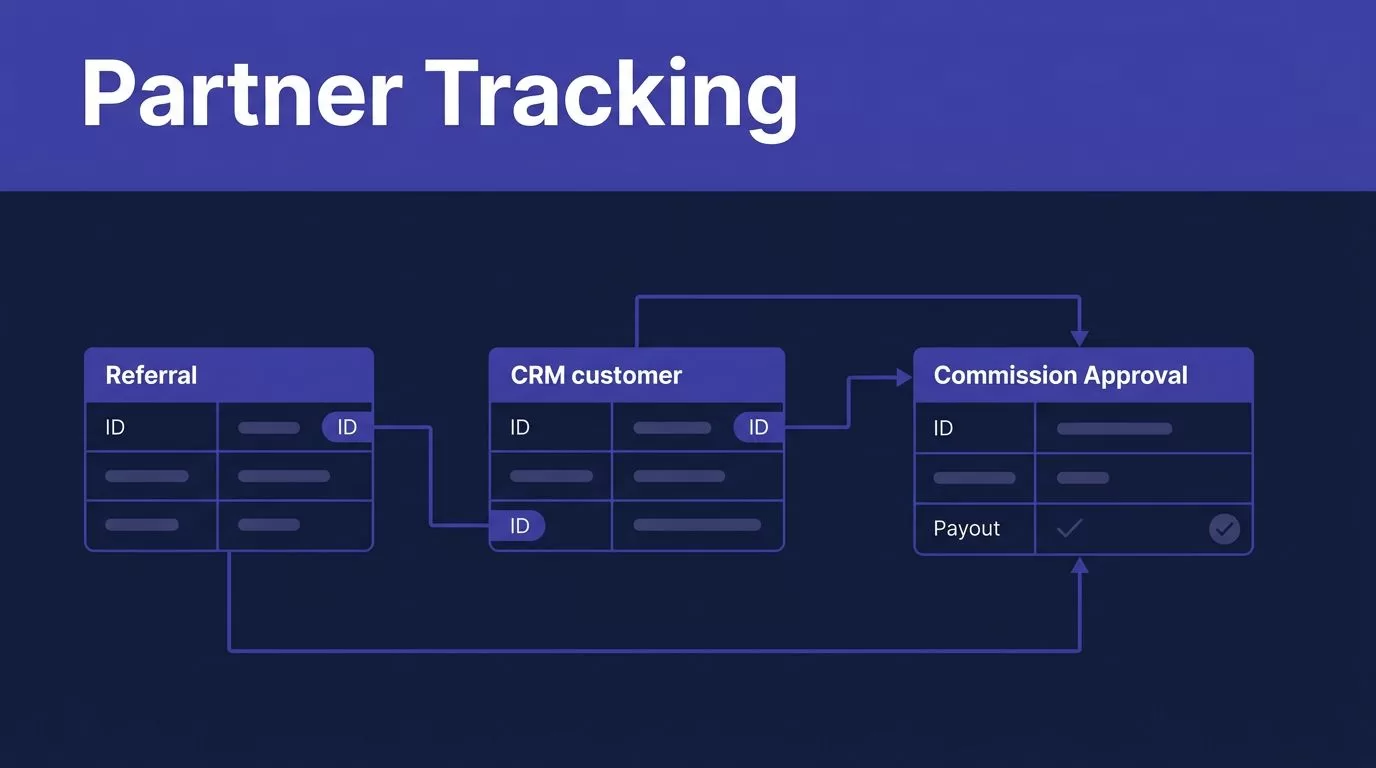
Partner revenue gets disputed when a referral link, CRM account, invoice, and commission record don’t match. B2B partner tracking fixes that problem only when every system uses the same IDs and approval rules.
Rewardful can capture referral attribution and commission activity, but it shouldn’t become an isolated report. Connect it to billing, your CRM, and a review process that catches refunds, duplicate conversions, and ownership conflicts before a payout runs.
Start with the data model. Then automate the handoffs.
START WITH A PARTNER DATA MAP
A partner click is not a conversion. A conversion is not a commission. Keep these records separate.
A click shows referral intent. A conversion connects that referral to a customer. A commission records what your program owes after the customer pays under the campaign rules.
Give Every Record a Stable ID
Your workflow needs stable keys before you connect automation. Email alone is not enough. People change emails, use aliases, and sign up under a personal address before moving to a company domain.
Store these fields in your CRM, warehouse, or reporting sheet.
| Field | Why it matters |
|---|---|
| Rewardful affiliate ID | Identifies the partner across program records |
| Referral ID or link token | Connects a visit to the partner attribution record |
| Campaign name or ID | Shows which commission and attribution rules applied |
| CRM account ID | Connects partner-sourced revenue to the company record |
| Billing customer ID | Links the customer to Stripe or Paddle activity |
| Subscription or invoice ID | Separates recurring payments from one-time charges |
| Conversion ID | Prevents reporting the same customer twice |
| Commission ID | Gives finance a record to approve, void, or pay |
| Paid amount and currency | Sets the commission base for reconciliation |
| Commission status | Separates pending, due, paid, refunded, and voided records |
Use the IDs as your join keys. Don’t match records by company name unless a reviewer confirms the match.
Define What Counts as an Accepted Conversion
Your team should accept a conversion only after it passes clear checks. The record needs a valid partner, a known campaign, a billing customer, and a paid event.
Count accepted conversion records, not completed automation runs. A workflow that creates correction work has failed.
Set an exception status for missing IDs, conflicting partners, duplicate billing customers, and unknown campaigns. Don’t let the automation guess which record is correct.
This gives your revenue team a trusted dataset to protect when a connector fails or campaign rules change.
SET B2B PARTNER TRACKING RULES IN REWARDFUL
Good B2B partner tracking starts with campaign rules that your sales, finance, and partnership teams can explain in one sentence.
Open each active Rewardful campaign and document the commission type, eligible product, cookie window, attribution model, and time before a commission becomes due. Rewardful documents a 60-day default cookie window, but campaigns can use a different value. Check the live campaign setting before you publish a partner promise.
Choose First Touch or Last Touch Deliberately
First-touch attribution gives credit to the first eligible partner in the window. Last-touch attribution gives credit to the most recent eligible partner.
Neither option is automatically right. First touch may fit long partner-led sales cycles. Last touch may fit content affiliates or short self-serve trials. Problems start when the written partner terms say one thing and the campaign uses another rule.
Write down how direct traffic, paid campaigns, customer referrals, coupon codes, and sales-assisted deals interact with partner credit. Clear marketing attribution measurement starts with the same question: which touchpoint gets credit, and under what rules?
Verify the Active Billing Connection
Rewardful can work with Stripe and Paddle setups. Confirm which processor is active in your account before you build a workflow around billing events.
For Stripe, Rewardful’s two-way Stripe sync uses webhook notifications for customer changes, invoice payments, and refunds. That connection helps, but your team still needs to test the actual customer and invoice path used by your checkout.

Check the active campaign, connected processor, and test mode settings after any billing migration. A campaign can look correct while the wrong integration receives the events.
PASS REFERRAL DATA INTO BILLING
The referral ID must survive the trip from the partner’s link to the payment record. If it disappears at checkout, Rewardful has nothing reliable to attribute.
For a custom Stripe Checkout flow, pass the referral ID through the supported checkout reference path and test a full purchase in Stripe test mode. Then inspect the resulting customer and checkout records. The value should be present where your Rewardful integration expects it.
Keep the Referral ID Intact
Don’t replace a referral ID with a display name, partner email, or an internal campaign label. Those values change. The referral token is the attribution key.
Test these paths separately:
- A visitor clicks a standard partner link, starts a trial, and pays later.
- A buyer starts on one device and completes checkout on another.
- A salesperson creates the Stripe customer after a partner-generated demo.
- A customer uses an approved partner coupon without clicking a link.
Rewardful’s Stripe Marketplace listing confirms support for both link and coupon-code tracking, but you need to test how your own partner link and coupon setup behaves with your checkout.
Treat Direct Attribution as an Override
Direct page tracking can assign a source when a visitor lands on a controlled partner page. It can also overwrite an existing referral cookie.
Use that option only when your policy allows the override. Log the source, timestamp, campaign, and person or system that initiated it. A partner manager should not be able to overwrite another partner’s referral history without an audit record.
Keep raw click data separate from approved revenue attribution. Your reporting layer can show both without treating every click as earned commission.
AUTOMATE PARTNER EVENTS WITHOUT NOISE
Automate the record handoffs, not the business judgment. Rewardful webhooks can notify your system when referral and commission activity changes. Your receiver can then create tasks, update CRM fields, or send approved records to a finance queue.
Use HTTPS for every endpoint. Confirm the current endpoint URL, enabled events, and authentication method inside your live Rewardful account before you switch on production automation.
Send Webhooks to a Staging Layer First
Don’t send every event directly into Salesforce, HubSpot, or a payout process. Send it to a staging table first.
Store the webhook event ID, event type, received time, affiliate ID, referral ID, conversion ID, commission ID, and raw payload reference. Mark each event as received, processed, ignored, or failed.
Rewardful event types include referral and commission activity, such as created, converted, updated, paid, voided, and deleted records. Your workflow should accept repeated deliveries without creating duplicate CRM tasks or duplicate commission rows.
Build Two Useful Automation Workflows
A practical setup usually starts with two workflows.
- New referred customer workflow: When a referral becomes a lead or conversion, create or update the CRM account. Add the partner ID, campaign, referral date, and attribution status. Route account conflicts to an exception queue.
- Commission review workflow: When a commission is created or updated, send it to a commission table. Add the invoice ID, paid amount, currency, commission amount, payout date, and review state. Do not issue payment automatically.
Restrict write access. Your automation can add records to staging, but it shouldn’t delete billing data or modify unrelated customer fields. Keep the last trusted export before a broad rule change.
RECONCILE COMMISSIONS BEFORE PAYOUT
Commission reconciliation is where a neat dashboard meets real billing activity. B2B invoices can be discounted, partially refunded, paid late, or credited against an account balance.
Rewardful calculates commission from the amount actually paid, not a nominal invoice total. Its explanation of the commission payout data flow also covers the role of Stripe payment and refund events.
Reconcile on a Fixed Cutoff Date
Set a monthly cutoff. Freeze the commission cohort, then compare each due commission with the billing record.
Check these items before finance approves a payout:
- The customer and invoice IDs match the approved conversion record.
- The paid amount matches the billing system after discounts, credits, and refunds.
- The commission has not already been paid, voided, or replaced.
- The affiliate remains eligible under the campaign terms.
- The payout method and tax details meet your program requirements.
Keep manual adjustments visible. Store the reviewer, reason, date, and supporting billing reference. A hidden spreadsheet edit creates the next dispute.

Handle Duplicates and Refunds as Exceptions
Don’t assume duplicate conversion rules will catch every edge case. Test the live behavior when the same buyer starts multiple checkouts, changes an email address, upgrades a plan, or appears under two partner referrals.
Put uncertain cases into a review queue. Compare the referral timestamp, attribution model, billing customer ID, and campaign rule before crediting anyone.
Refunds need the same discipline. A full refund, partial refund, credit note, or failed renewal can change the valid commission amount. Reconcile before payout, then keep a post-payout adjustment log for late changes.
TEST THE WORKFLOW UNDER CONTROL
Start with a small approved batch. Use test records plus a few realistic edge cases. Include one clean referral, one missing referral ID, one duplicate customer, one refund, and one partner conflict.
Run the workflow in report-only mode first. Compare every output with the source records before it writes to your CRM or finance system.
Measure Accuracy, Not Activity
Track accepted records, exception records, duplicate alerts, webhook failures, and correction time. These measures show whether B2B partner tracking is dependable.
A high event count doesn’t prove the system works. A small number of verified records is more useful than a large queue of questionable commissions.
Protect Customer and Partner Data
Referral data can become personal data when paired with names, emails, IP addresses, or account details. Send only required fields to automation tools. Keep raw payloads in a restricted location and set retention rules.
Review access quarterly. Remove former employees, rotate credentials after a role change, and separate test data from live billing data. Your partner program should not expose customer data just to prove attribution.
FINAL CHECK
Rewardful automation works when attribution, billing, and commission records tell the same story. Start with stable IDs, document campaign rules, and pass the referral ID through checkout without changing it.
Treat every payout as a reviewed financial record. Accurate partner attribution protects partner trust, revenue reporting, and your finance team’s time.

