Build a Repeatable Content Repurposing Workflow in Twin.so
Most teams don’t have a content shortage. They have a distribution problem. A single webinar, research report, or blog post often contains enough material for several useful assets, but the manual work stops them from producing those...
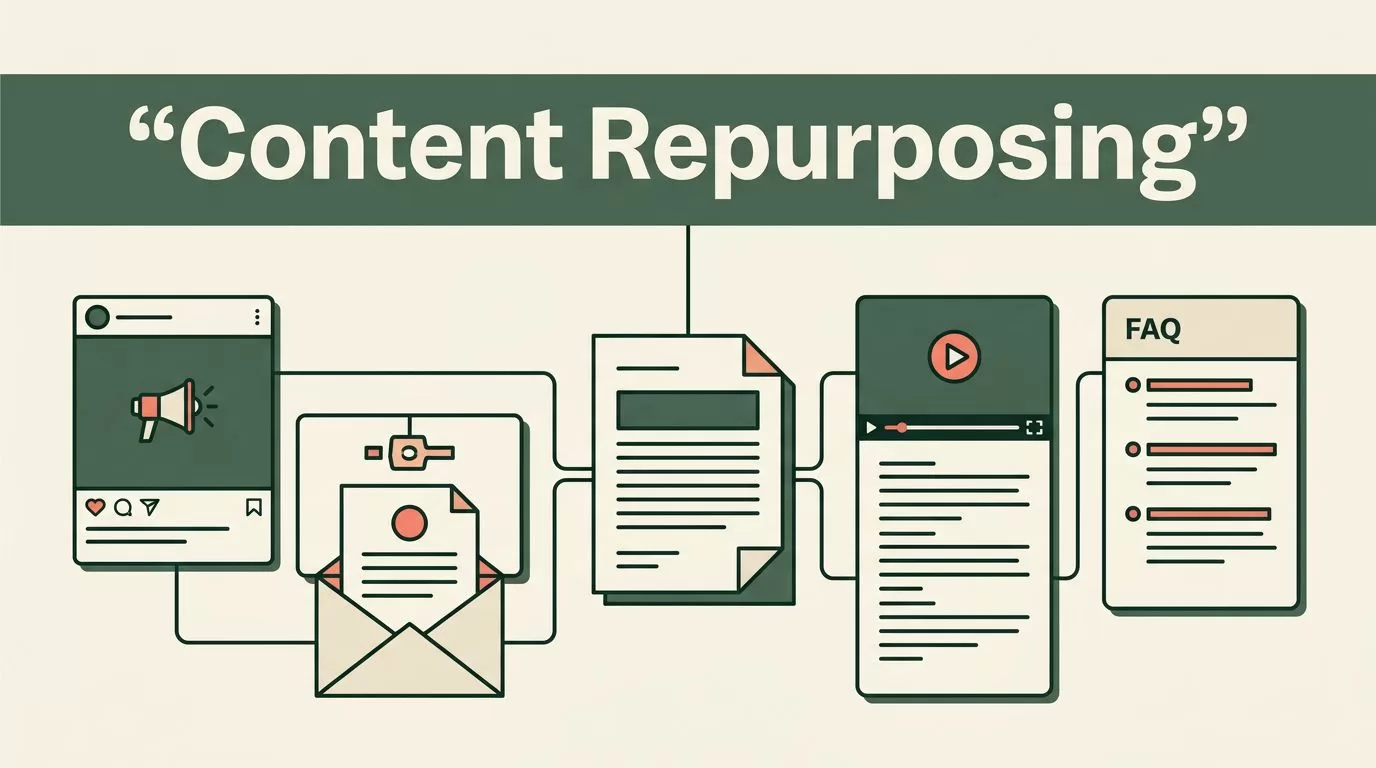
Most teams don’t have a content shortage. They have a distribution problem. A single webinar, research report, or blog post often contains enough material for several useful assets, but the manual work stops them from producing those assets.
A content repurposing AI workflow in Twin.so gives you a repeatable way to turn one source into multiple drafts. Twin.so manages the workflow, while your team controls the source material, brand voice, review process, and final approval.
The goal isn’t to publish more low-quality content. The goal is to reduce repetitive drafting without removing human judgment.
Why Content Repurposing Works Better as a Workflow
Content repurposing means adapting an existing asset for a new channel or audience. A long-form article can become a LinkedIn post, email brief, video script, sales enablement note, or FAQ. The information stays related, but the format and intent change.
That distinction matters. Copying and shortening a blog post rarely creates a good social post. Each format has different requirements. A LinkedIn post needs a strong opening and compact argument. An email needs a clear reason to continue reading. A sales note needs specific business outcomes and fewer editorial flourishes.
Digital.gov’s overview of content treats content as more than written text. It can include pages, images, video, forms, and social media. Your repurposing system should use the same broad view.
Twin.so is useful as the workflow platform because it gives each transformation a defined input, instruction set, output, and review stage. You aren’t asking AI to “make more content” with no operating rules. You are routing a source asset through controlled steps.
A reliable workflow has five parts:
- A clean source document with a clear audience and purpose.
- A transformation prompt for each target format.
- A human review stage for accuracy and judgment.
- A brand-voice editing stage.
- A final fact-check and publishing decision.
AI can produce a first draft quickly. It can’t approve claims, understand every internal preference, or accept responsibility for an incorrect statement.
Build a content repurposing AI Workflow in Twin.so
Start with one source asset. Don’t connect your entire content library on the first attempt. Pick a recent article, webinar transcript, product guide, or research report that already performed well.
Create a dedicated Twin.so workflow for that asset type. Name it clearly, such as “Blog to Distribution Pack” or “Webinar to Campaign Assets.” The name should tell the operator what enters the workflow and what comes out.
1. Prepare the source material
Clean the source before sending it into the workflow. Remove duplicated headings, navigation text, broken paragraphs, speaker timestamps, and irrelevant footnotes. AI output quality depends heavily on the quality of the source.
Store source files in folders by project, campaign, or content type. This keeps the working queue organized and prevents the workflow from using an outdated version. It also makes later audits easier.
Add source fields that Twin.so can pass through the workflow:
- The original title and URL.
- The target audience.
- The publication date.
- The primary topic.
- The desired formats.
- The subject matter expert or owner.
- Any claims that require extra verification.
Your source should also include the intended action. A product article may aim to generate demo requests. A technical guide may aim to increase product adoption. Without that context, AI tends to produce drafts that sound acceptable but don’t support a business goal.
2. Create separate output paths
Don’t use one broad prompt for every format. Give each output its own instructions inside Twin.so.
For example, a blog article can produce:
- A 150-word LinkedIn post with one clear business lesson.
- A short email with a practical takeaway and one call to action.
- Three social post variations for testing.
- A six-part video script.
- Five FAQ answers for a website or sales team.
- A short internal summary for customer-facing staff.
Each path needs a format limit, audience description, tone rule, and output structure. Tell the workflow what to exclude as well. Useful restrictions include no unsupported statistics, no invented customer examples, no new product claims, and no repeated introduction.
A transformation prompt should explain the job in direct language:
Convert the source into a LinkedIn draft for B2B marketing managers. Keep the central argument intact. Use short paragraphs. Include one concrete example from the source. Don’t add statistics, customer results, or product capabilities that aren’t in the source.
This gives the model a defined task. It also gives the reviewer a clear standard.

3. Add an extraction step before drafting
A strong Twin.so workflow should identify the source facts before it creates new formats. Ask the first AI step to extract the main argument, supporting points, examples, statistics, named products, dates, and limitations.
This creates a reference layer for later drafts. The generation step can use that extracted material instead of scanning an unstructured document every time.
Ask the workflow to label uncertain items. For example, it can mark a claim as “needs source check” when the source contains an unclear number or broad statement. This is better than allowing the model to fill gaps with plausible language.
Use summaries as maps, not as final evidence. A generated overview can help a reviewer understand a long source quickly, but the original source remains the authority for exact wording, citations, and claims.
Add Human Review Before Anything Gets Published
AI-generated first drafts are useful because they remove blank-page work. They are not final content.
Your first review should check whether the draft stayed faithful to the source. Compare important claims against the original article, transcript, or report. Pay close attention to numbers, dates, product names, customer results, legal language, and technical instructions.
Use a simple status system in Twin.so:
- Drafted means the AI created an output.
- Source checked means a reviewer compared the draft with the source.
- Voice edited means the draft matches your publication or company style.
- Fact checked means claims were verified against reliable references.
- Approved means an owner accepted the final version.
This separation prevents a common error. A draft can sound polished while still containing a wrong figure or an exaggerated conclusion.
Review for brand voice
Brand-voice editing is a separate task from proofreading. Proofreading fixes grammar, spelling, and punctuation. Voice editing changes how the message sounds.
Give reviewers a short voice guide. Include preferred sentence length, words to avoid, formatting rules, audience assumptions, and examples of approved copy. A practical guide is more useful than vague instructions such as “sound professional.”
For a direct B2B publication, the guide might require:
- Short paragraphs with one main point.
- Concrete software names and implementation steps.
- Plain explanations for technical terms.
- No unsupported performance promises.
- No filler introductions.
- No exaggerated claims about AI.
The reviewer should also check whether the adapted format fits its channel. A social post may need a sharper opening. An email may need more context. A sales asset may need a clear objection and response.

Fact-check the final claims
Fact-checking should happen after voice editing. Otherwise, a reviewer may spend time polishing a sentence that needs to be removed.
Check external claims against primary or authoritative sources. Check internal claims against the current product documentation, pricing page, analytics report, or approved customer record. Do not treat AI confidence as evidence.
For research-heavy content, bookmark the exact source passage or URL for important claims. A useful content workflow keeps the evidence attached to the draft. That helps later editors update an asset when the source changes.
AI should make the first version faster. It should not make the approval standard lower.
Use Twin.so for a Full Repurposing Pack
Once the basic flow works, expand it into a campaign workflow. Start with one approved source and produce a connected set of assets.
For a technical article about software deployment, the workflow could create:
- A plain-language executive summary.
- A LinkedIn post focused on the operational problem.
- An email for existing customers.
- A checklist for implementation teams.
- A short sales enablement brief.
- FAQ entries for support or product marketing.
Keep the source relationship visible. Each output should retain the original asset name, owner, date, and source link. Add a revision field when the source changes.
You can also route outputs by risk. A general social draft may need one reviewer. A security guide, legal explanation, or pricing document needs subject matter review before approval.
A simple routing model works well:
| Output type | First reviewer | Additional check |
|---|---|---|
| Social post | Content editor | Source claim review |
| Email campaign | Content editor | Marketing owner approval |
| Technical guide | Technical writer | Subject matter expert |
| Legal or compliance copy | Content editor | Legal or compliance review |
| Sales enablement asset | Product marketer | Product claim verification |
This prevents every asset from using the same review burden. It also prevents high-risk content from moving through a casual approval path.
Measure the Workflow, Not Just the Output
Track operational results inside your content process. The most useful metrics are not the number of drafts created. They are the time saved, revision rate, approval rate, and performance by format.
Record how long each asset takes from source upload to approval. Then compare AI-assisted production with your previous manual process.
Also track:
- The percentage of drafts approved after one review.
- The number of factual corrections per asset.
- Which formats require the most editing.
- The time between source publication and repurposed distribution.
- Engagement or conversion by channel.
High output with heavy correction is not a successful workflow. If every draft needs a complete rewrite, improve the source preparation, format prompt, or voice guide.
Review the workflow monthly. Remove output types nobody uses. Update prompts when reviewers repeat the same correction. Replace old source documents when product details or policies change.
Conclusion
A useful content repurposing AI system does more than turn one article into several drafts. It connects clean source material, structured Twin.so steps, format-specific instructions, human editing, and fact verification.
Start with one source type and a small distribution pack. Store the source cleanly, extract its verified points, generate separate drafts, and route each output through the right reviewer.
Twin.so can reduce repetitive production work, but your team still owns the standard. The best workflow is the one that produces publishable drafts faster without weakening accuracy, brand voice, or accountability.
