Google Workspace Starter Vs Business Standard For Small Teams
Most small teams do not outgrow email first. They outgrow storage, meetings, and shared work. The cheapest plan then starts to feel like an overstuffed backpack. This guide compares Google Workspace Business Standard with Business Starter,...
Most small teams do not outgrow email first. They outgrow storage, meetings, and shared work. The cheapest plan then starts to feel like an overstuffed backpack. This guide compares Google Workspace Business Standard with Business Starter, the plan buyers often call Google Workspace Starter.
The short answer: choose Business Standard for teams sharing files often, meeting with clients, or expecting growth. Choose Business Starter when the workflow stays light. Prices, limits, and features below come from the official Google Workspace pricing page. Confirm every figure there before you buy.
Business Starter vs Business Standard, quick answer
The naming trips people up. Buyers who say Google Workspace Starter mean Business Starter. The official page lists three business tiers: Starter, Standard, and Plus. This guide covers the first two and mentions Plus for context.
The table below shows the figures Google displays on its Google Workspace pricing page. Prices are in US dollars per user per month and exclude tax.
| Category | Business Starter | Business Standard | Business Plus |
|---|---|---|---|
| Listed price per user per month | $7 | $14 | $22 |
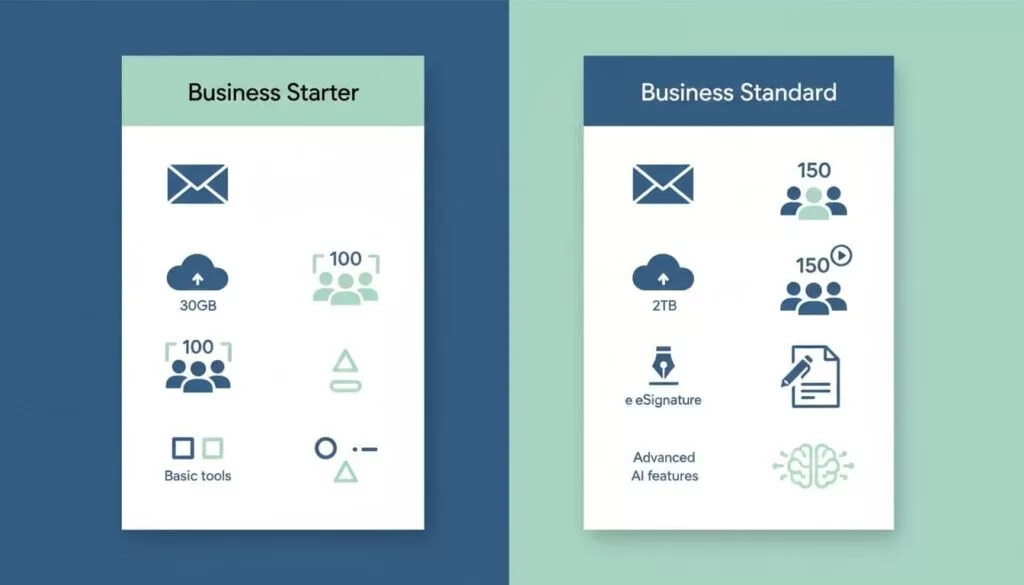
| Storage per user | 30 GB pooled | 2 TB pooled | 5 TB pooled |
| Google Meet participants | 100 | 150 | 500 |
| Email and AI | Custom business email, Gemini in Gmail, Gemini chat, Google Vids | Adds Gemini across Docs, Meet, and other apps | Everything in Standard |
| Workflow extras | Security and management controls | Custom email layouts, mail merge, appointment booking pages, eSignature for Docs and PDFs, Migrate tool | Adds eDiscovery, Meet attendance tracking, Vault, Secure LDAP, advanced endpoint management |
Google states annual billing saves 16 percent with a one-year commitment. The page does not spell out which billing term applies to each displayed price, so check the billing option before you compare plans. Google also shows introductory offers for new customers. Compare regular prices, not first-month deals.
What every business plan includes
All three tiers share a core. Each plan provides custom business email on your own domain, Gemini in Gmail, a Gemini chat app, Google Vids, and security and management controls. The differences start above this base. Buyers who only need professional email on a custom domain rarely need more than Starter.
Domain email also supports extras such as aliases for addresses like support@ and sales@. The guide on Google Workspace email aliases explains how to add them without buying extra seats.
Why Business Standard pulls ahead for growing teams
Storage
Storage is the biggest gap. Business Starter gives each user 30 GB in a pooled model. Business Standard gives each user 2 TB, also pooled. A team handling decks, PDFs, recordings, and shared folders fills 30 GB quickly. The jump to 2 TB changes how the team works.
Pooled storage means the organization shares the total. One heavy user can consume space meant for others. Plan folder ownership and cleanup rules, whichever plan you choose. A solid Google Workspace file storage setup prevents surprise limits.
Google Meet
Starter allows up to 100 participants in a meeting. Standard raises the limit to 150. Plus raises the limit to 500. Most small teams never reach 100 participants, so the limit alone rarely decides the purchase. Check the pricing page for recording and other Meet features per plan, because Google updates these lists.
Workflow extras
Standard adds tools saving time every week. Google lists custom email layouts, mail merge, appointment booking pages, eSignature for Docs and PDFs, and the Migrate tool for moving data. None of these looks flashy alone. Together, they turn email plus docs into a working office.
Appointment booking pages help consultants and agencies who schedule client calls. eSignature removes a separate subscription for simple agreements. Mail merge helps small sales teams send personal messages in bulk.
AI features
Google lists Gemini in Gmail and a Gemini chat app on Starter. Standard extends Gemini across Docs, Meet, and other apps. AI packaging changes often, so read the current feature list before you decide.
Security and admin
Every business tier includes security and management controls. Plus adds eDiscovery, Vault for retention and search, Secure LDAP, and advanced endpoint management. Teams in regulated industries should review Plus before they settle on Standard.
Business Standard vs Business Plus
Some teams skip Standard and land on Plus. The gap between the two is about control and compliance, not daily productivity. Plus lifts storage to 5 TB per user and the Meet limit to 500. Plus also adds Vault, eDiscovery, Meet attendance tracking, Secure LDAP, and advanced endpoint management.
Ask three questions before you pay for Plus. Must the company retain and search email and files for legal reasons? Must the technology lead manage laptops and phones with advanced endpoint controls? Does the team run large webinars or town halls with attendance reports? Three no answers point to Standard.
Cost over a year for different team sizes
Plan cost scales per user. Multiply the listed price by the number of users and by twelve months. A five-person team on Starter pays five times the Starter price each month. The same team on Standard pays five times the Standard price. The difference shows the real cost of the extra storage and tools.
- Count the people who need a licensed account today.
- Add the people you expect to hire in the next twelve months.
- Multiply each tier price by the total number of users.
- Compare the yearly difference against the cost of a separate eSignature, booking, or storage tool.
If a separate tool costs more than the plan gap, Standard pays for itself. Google caps these plans at 300 users, so growing companies must review enterprise options later.
Which plan fits which team
| Team type | Likely fit | Reason |
|---|---|---|
| Solo founder or two-person shop | Business Starter | Work stays on email, calendar, and light documents |
| Team of 3 to 10 sharing client files | Business Standard | Shared folders and signed documents grow fast |
| Client-facing, remote, or hybrid team | Business Standard | Booking pages, eSignature, and larger Meet limits help daily work |
| Regulated or compliance-driven team | Business Plus | Vault, eDiscovery, and endpoint management address audit needs |
Collaboration habits matter as much as headcount. Teams building shared documents together benefit from the tips in the guide on remote team productivity with Google Workspace.
Common mistakes when choosing a plan
- Buying for today only: A team of two becomes a team of eight within a year. Storage habits formed on 30 GB are hard to reverse.
- Comparing promo prices: Introductory offers end. Budget with the regular price.
- Ignoring pooled storage: One user storing video can use the allowance of several colleagues.
- Paying for Plus by default: Compliance tools matter only for teams with compliance duties.
- Skipping a trial of real workflows: Test booking pages, signatures, and mail merge with real clients before you commit.
After you buy: first-week setup
A plan only helps when the team configures the account well. Spend the first week on a short list of tasks.
- Verify the domain and set mail records so email flows to Gmail.
- Create accounts for each user and assign a clear naming pattern.
- Set sharing rules for Drive, including who can share files outside the company.
- Create shared drives for client work instead of personal folders.
- Turn on two-step verification for every account.
- Document who owns billing and who owns administration.
The full walkthrough lives in the guide to complete Google Workspace email setup. Following the steps early prevents most support problems later.
How to switch plans later
Admins change plans through billing settings in the Admin console. Plan the move before storage fills, because cleaning a crowded drive under pressure wastes time. Downgrading requires the data to fit within the lower storage limit, so avoid the cycle by choosing the right plan first.
Review the official Google Workspace pricing page for current plan details.
Buying checklist
- Map one month of meetings, recordings, and file growth.
- Decide whether you need booking pages or eSignature.
- Check the billing term behind each displayed price.
- Confirm user count against the 300 user cap.
- Read the live pricing page on the day you buy.
FAQ
Is Google Workspace Starter the same as Business Starter?
Usually yes. Buyers use Google Workspace Starter as shorthand. The official plan name is Business Starter.
Does Business Standard pay off for a three-person team?
Often yes. If three people share files, meet with clients, or need signatures and booking pages, Standard makes sense early.
How much storage does each plan include?
Google lists 30 GB pooled per user on Starter, 2 TB pooled per user on Standard, and 5 TB pooled per user on Plus.
How many people can join a Meet call?
Google lists 100 participants on Starter, 150 on Standard, and 500 on Plus.
Can I upgrade from Starter to Standard later?
Yes. Admins change plans through billing settings. Choose early so storage habits stay clean.
Does Standard include better security?
Every business tier includes security and management controls. Business Plus adds Vault, eDiscovery, Secure LDAP, and advanced endpoint management.
Conclusion
Treat price as the second decision. The first question is how your team works every day and whether 30 GB per user will still feel fine in six months. Choose Starter when the team is tiny and the work stays light. Pick Business Standard when you want room to grow, booking and signature tools, and fewer limits. Verify every price and feature on the official Google Workspace pricing page before you buy.
