Automate Rewardful Partner Payments Without Losing Control
Affiliate payouts rarely fail at the payment button. They fail earlier, when an unreviewed refund, stale payout detail, or duplicate file reaches the release queue. Rewardful partner payments work best as a controlled financial process. Rew...
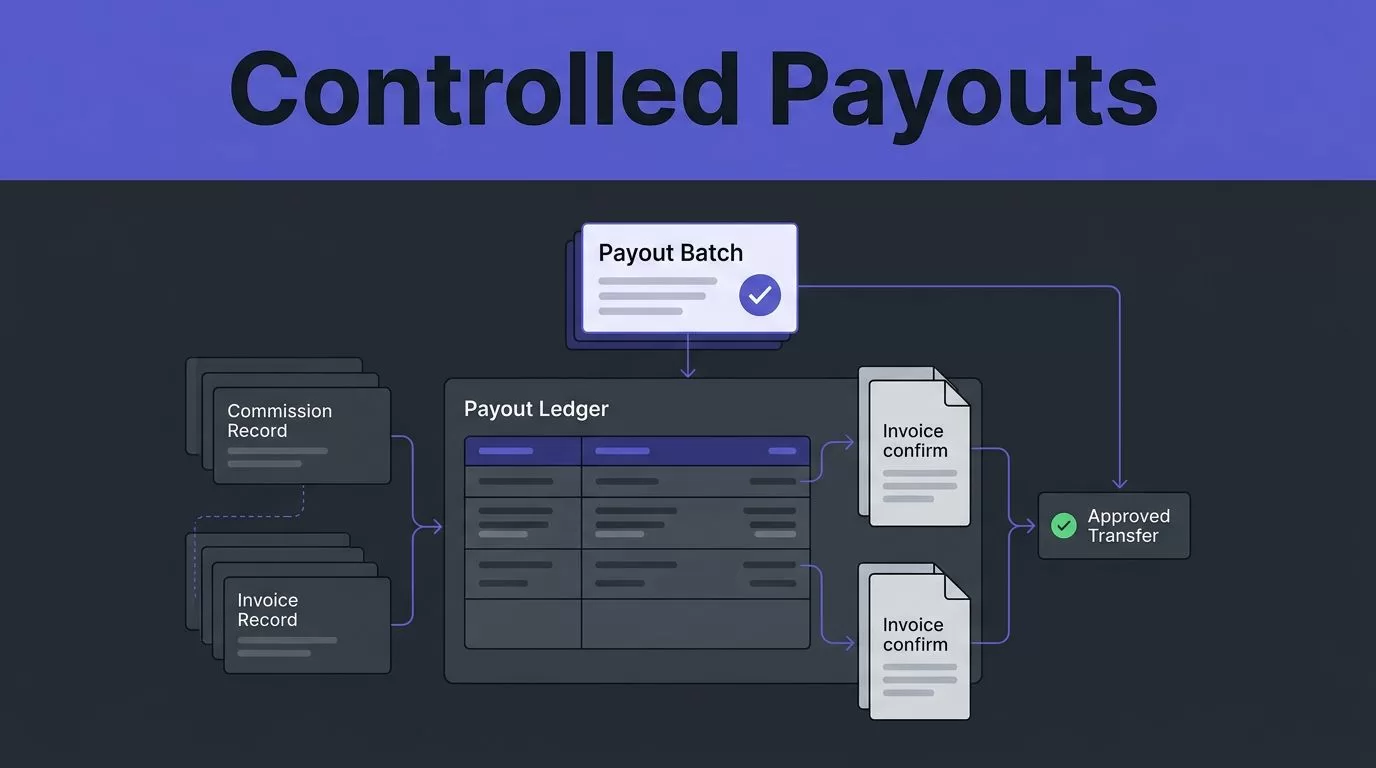
Affiliate payouts rarely fail at the payment button. They fail earlier, when an unreviewed refund, stale payout detail, or duplicate file reaches the release queue.
Rewardful partner payments work best as a controlled financial process. Rewardful tracks commissions from Stripe billing activity, but your team still owns approval, funding, and reconciliation.
Set the rules first. Then automate the repeatable handoffs around them.
BUILD A CONTROLLED REWARDFUL PARTNER PAYMENTS SYSTEM
Do not treat commission tracking and money movement as one job. Split the workflow into four records: the revenue event, commission record, payout batch, and transfer confirmation.
| Record | System | Required control |
|---|---|---|
| Customer payment | Stripe and Rewardful | Match each commission to a paid invoice ID. |
| Commission maturity | Inside Rewardful | Hold commissions in Pending until they are eligible for review. |
| Payout batch | Rewardful and finance ledger | Assign one batch ID, owner, currency, and total. |
| Fund transfer | External payout tool or Managed Payouts | Require approval and store the transfer reference. |
Rewardful records commissions based on paid Stripe invoices and moves qualified amounts through Pending and Due stages. Its commission-to-payout workflow is useful for understanding that path.
Automation sits around the decision points. It should prepare data, flag exceptions, and create review tasks. It should not send money before a person approves the batch.
SET PAYOUT RULES BEFORE YOU CONNECT ANYTHING
Automation repeats the rules you give it. Poor rules repeat faster.
MATCH THE PENDING PERIOD TO YOUR REFUND WINDOW
Rewardful’s default pending period is 30 days. Match your setting to the refund period you offer customers, then add a longer internal hold if your business has frequent disputes or delayed payment reviews.
A commission should reflect money collected, not list price. Discounts, account credits, plan changes, cancellations, and refunds can change the amount you owe a partner.
Do not move a commission to payment because it looks old. Review the invoice status, refund status, and referred customer before release. A 30-day hold is not proof that a sale is final.
ASSIGN THREE OWNERS
Operations prepares the payout data. Finance approves the release and moves funds. The partnership owner resolves attribution questions and partner disputes.
One person should not prepare, approve, and mark the same payout batch complete. A small team can still use a second review. The founder or finance lead can approve a prepared batch before it reaches PayPal, Wise, or Managed Payouts.
Write this rule down. It prevents rushed end-of-month decisions.
CONFIGURE COMMISSION TRACKING INSIDE REWARDFUL
Set up tracking before you automate payment operations. A bad commission rule creates a bad payout file every month.
CONNECT STRIPE AND TEST A REALISTIC SALE
Inside Rewardful, connect your Stripe account and create the campaign rules that define each partner’s commission. Rewardful supports fixed and percentage-based commissions, including recurring structures where your campaign terms allow them.
Run a controlled test before inviting partners. Use a test affiliate or internal referral path, complete a realistic checkout, and compare four fields:
- The Stripe invoice amount actually paid.
- The affiliated customer and partner record.
- The commission amount created in Rewardful.
- The expected Pending status and maturity date.
Save the Stripe invoice ID, Rewardful commission ID, partner ID, and expected amount in your test record. Repeat the test after changing pricing, coupons, billing intervals, or campaign terms.
KEEP PAYEE DATA OUTSIDE COMMISSION LOGIC
Rewardful tells you what you owe. Your payment provider and finance records confirm where money goes.
Collect legal payee details, payment emails, bank instructions, and tax information through your approved finance process. Do not accept a changed PayPal address from an unverified email thread. Require the partner to update details through the approved channel, then have a team member verify the change.
Restrict who can edit payout details. Any change should delay the next payment until someone confirms it.
CHOOSE HOW MONEY LEAVES THE BUSINESS
Your payout method affects the final control step. Pick one payment rail for each batch and keep a clear record of what happened.
USE PAYPAL OR WISE FOR MANUAL BATCHES
Inside Rewardful, review the commissions that are Due. Outside Rewardful, download the payment data, validate it, and upload it to the payout provider.
Rewardful’s payment guidance lists PayPal and Wise as common ways to pay commissions. Its mass payout process explains the basic workflow of downloading payment details and uploading them to the selected provider.
Before upload, lock the file and record its batch ID, export time, row count, currency, and total amount. Do not regenerate the file after approval unless you void the original batch first.
USE MANAGED PAYOUTS WITH A FUNDING CHECKPOINT
Managed Payouts puts more of the payout process inside Rewardful. Partners can withdraw earnings through their Rewardful dashboard using available methods, which can include bank transfer, PayPal, Wise, wire transfer, or check depending on location.
The Managed Payouts overview describes the partner-facing payout options. Funding still needs a control point. Rewardful does not automatically debit your bank account. You receive an invoice for commissions and fees, then pay it manually using the required funding method.
Treat that invoice as a finance approval step. Reconcile the invoice total against the approved batch before payment. Do not send the same Due commissions through both Managed Payouts and a manual PayPal or Wise batch.
RUN EACH PAYMENT CYCLE AS A BATCH
Use a fixed payout calendar. Monthly works for many SaaS programs, but the schedule matters less than consistency.
- Freeze the batch at a stated cutoff date and export only commissions that are Due.
- Review each partner total against commission IDs, Stripe invoices, refunds, cancellations, and open attribution disputes.
- Create an immutable batch ID, such as
2026-08-AFF-01, then record the amount, currency, partner count, reviewer, and payment route. - Send the batch to finance for approval. Finance should approve the total and the payment file, not only a dashboard screenshot.
- Release funds, save the provider confirmation, then mark the matching payout as complete in Rewardful if you used the manual route.
Rewardful partner payments are easier to audit when one batch has one file and one transfer reference. If a partner needs support, your team can locate the answer without searching multiple tools.
A CSV export can be generated twice. A confirmed transfer reference cannot. Reconcile against the transfer reference before you mark a batch as paid.
AUTOMATE THE HANDOFFS, NOT THE RELEASE DECISION
The useful automation is not “send money with no review.” It is “prepare a clean batch before finance opens the payment provider.”
USE A SMALL, REVIEWABLE WORKFLOW
Outside Rewardful, use an approved automation tool or scheduled task to create the review reminder, collect the current Due data, and write the proposed batch into a protected ledger.
Your validation step should reject:
- A commission ID that appeared in an earlier paid batch.
- A blank or changed payment destination.
- A negative or unexpected partner total.
- Mixed currencies in one payment file.
- Commissions linked to a refund, cancellation, or open dispute.
After validation, send the exception list to the partnership owner. Send only the clean batch to finance. Do not let a scheduled workflow create a live transfer without an approver.
KEEP A REAL AUDIT TRAIL
Record the batch ID, Rewardful export time, commission IDs, partner IDs, invoice IDs, payment file name, total, approver, transfer reference, and completion date.
Keep the last accepted payout ledger separate from the latest run. A completed export does not prove the data is complete or correct. A changed field mapping, missing row, or stale payout address can still create a payment error.
Measure accepted payout rows, not exports created. A process that saves ten minutes but creates thirty minutes of finance corrections has failed.
HANDLE REFUNDS, DISPUTES, AND FAILED TRANSFERS
Payment automation needs a stop process. Most overpayments happen when teams retry before checking the record.
HOLD REFUNDS AND DISPUTED COMMISSIONS
Rewardful adjusts commissions when Stripe reports refunds. A full refund removes the related commission, while a partial refund recalculates it.
Check that status before every batch release. Do not assume a commission that was Due yesterday is still payable today.
Treat chargebacks and attribution disputes as exception cases. Hold the related commission, record the invoice and partner IDs, assign an owner, and wait for a documented decision. Do not recover a previous payout by offsetting future commissions unless your partner agreement and finance policy allow it.
STOP DUPLICATE AND FAILED PAYMENTS
If PayPal, Wise, or another payout provider rejects a transfer, do not upload the full batch again. First search the provider by batch ID, transfer reference, recipient, and amount.
Mark the item as failed in your finance ledger. Confirm whether the transfer was rejected, pending, returned, or completed. Verify any corrected payout detail through your approved process before retrying.
A retry needs a new transfer reference. The original batch ID should remain linked to both the failed attempt and the replacement payment.
PAYMENT AUTOMATION CHECKLIST
Before each release, confirm the following:
- Stripe payment data and Rewardful commission records match the approved campaign terms.
- Only eligible Due commissions are included in the batch.
- Refunds, cancellations, disputes, and payout-detail changes are removed or held.
- The batch has one ID, one currency, one owner, and one approved total.
- Finance has approved the payment file or Managed Payouts invoice.
- The transfer confirmation is stored before the batch is marked complete.
If you need to map the owners, exception rules, and payment records for your program, Book A Call.
FINAL THOUGHTS
Rewardful partner payments become predictable when commission tracking, payment approval, and reconciliation remain separate controls.
Let Rewardful track the revenue-linked commission data. Let finance approve the money movement. Keep a permanent record of every payout batch and transfer.
Automation should reduce repeated work, not remove financial judgment.
