Stripe Referral Tracking With Rewardful: Setup and Testing
A referral click has no value if it never reaches the paid Stripe customer record. With Stripe referral tracking, Rewardful can connect an affiliate visit, a checkout, and a subscription payment. The connection only works when your site, ch...

A referral click has no value if it never reaches the paid Stripe customer record.
With Stripe referral tracking, Rewardful can connect an affiliate visit, a checkout, and a subscription payment. The connection only works when your site, checkout flow, and Stripe Customer data use the same referral ID.
Build the process before you recruit affiliates or publish a referral link. Fixing attribution after commissions appear in a dashboard is slower and harder.
Set up Stripe referral tracking before you promote
Start with the payment flow. Map the path from referral link to landing page, signup form, checkout, Stripe Customer, subscription, and invoice.
A Stripe subscription is tied to a Customer record. Your referral data needs to reach that record before the first paid event. Review Stripe’s subscription documentation if your billing flow includes trials, recurring invoices, usage charges, or plan changes.
Confirm the account and site prerequisites
Use this checklist before connecting anything.
| You need | Check before configuration |
|---|---|
| Stripe account access | Confirm you can view customers, payments, subscriptions, and account connections. |
| Rewardful account | Create the account and prepare your first campaign. |
| Website access | Add the Rewardful tracking script to every referral entry page. |
| Checkout map | Identify whether you use Stripe Checkout, Payment Links, the Stripe API, or a custom form. |
| Test path | Use a controlled signup and purchase path with a unique test email. |
Don’t treat clicks as successful referrals. Count paid conversions that your team can reconcile with Stripe and Rewardful.
Store the records you will need later
Record the referral URL, referral UUID, Stripe Customer ID, Checkout Session ID, subscription ID, campaign name, and conversion date.
This gives your support, finance, and growth teams one shared record. It also stops a common problem: someone sees a commission in Rewardful but cannot identify the related Stripe payment.
Keep the original event details unchanged. Store review decisions and correction notes separately.
CONNECT REWARDFUL AND CREATE THE PROGRAM
Connect Rewardful to the Stripe account that receives your SaaS payments. Rewardful’s connection flow starts with Stripe authorization, so use an account role that can approve the requested connection.
Review Rewardful’s Stripe permission requirements before authorization. Confirm you are connecting the correct Stripe account, not an old test account or a separate business entity.

Create a campaign with clear commercial rules
A campaign is the operating rule for a group of affiliates or referral partners. Define the offer before you create links.
Write down:
- Which product or plan qualifies for a referral.
- Whether a trial, first invoice, renewal, or upgrade can trigger a commission.
- How refunds, failed payments, cancellations, and chargebacks affect credit.
- When a referral partner becomes eligible for payout.
- Which countries, customer types, or internal accounts are excluded.
Do not advertise recurring commissions until you have tested a recurring invoice. The campaign terms need to match the billing behavior you can verify.
Set a single owner for program changes
Give one person authority to edit campaign rules, approve exceptions, and review referral disputes. Growth can own acquisition. Finance can approve payouts. Engineering can own the checkout handoff.
Those roles can be separate. The decision history should not be.
If you use affiliate coupon codes, review Rewardful’s two-way Stripe sync before launch. Coupon attribution needs a documented rule when a customer also arrives through another affiliate link.
PASS REFERRAL DATA THROUGH YOUR CHECKOUT FLOW
The tracking script detects the referral value in the visitor’s browser. Your checkout method determines where that value goes next.
Load the Rewardful script on landing pages, pricing pages, and signup pages before the visitor starts checkout. A script that only loads after checkout cannot attribute the purchase.
Use the right field for client-side Checkout
For client-side Stripe Checkout, Rewardful documents passing Rewardful.referral into Stripe Checkout through clientReferenceId.
That field connects the referral click ID to the Checkout Session. Follow Rewardful’s client-side Checkout integration steps rather than copying a generic Stripe snippet.
Treat the referral ID as attribution data. It is not an authorization token and should never grant account access or discounts by itself.
Use customer metadata for direct Stripe API flows
For Stripe API endpoint users, Rewardful instructs you to write the value of Rewardful.referral to Stripe Customer metadata with the key referral.
Create or update the Customer before you create the subscription or charge. Rewardful’s Stripe API endpoint guidance shows the required metadata mapping.
For server-side Checkout, pass the referral click ID as client_reference_id when your server creates the Checkout Session. The field uses snake case in the Stripe API and camel case in many browser integrations.
Configure Payment Links before sharing them
Stripe Payment Links need a Customer object for Rewardful to attribute referrals correctly. In Stripe Payment Link settings, turn on “Save payment details for future use.”
Rewardful lists that setting in its Payment Links integration instructions. Some hosted-site setups also require the tracking script in Footer Tracking instead of Header.
Test the exact Payment Link your partners will share. A copied link, a redirect, or a separate pricing domain can break the handoff.
SET ATTRIBUTION RULES YOUR FINANCE TEAM CAN AUDIT
Attribution is not only a technical setting. It is a payment policy.
Define what happens when a visitor clicks two referral links, applies a coupon, starts on one device, and pays on another. Your answer needs to be consistent before the first dispute appears.
Define the event that earns credit
Use plain language. For example, a referral earns credit after the first successful paid invoice, not when a visitor submits an email address.
Then define the exceptions. A refunded invoice may reverse credit. A failed card payment should not create a payable conversion. An upgrade might count only when the customer reaches a new recurring amount.
Stripe sends event notifications for subscription changes, payment failures, trials, and invoice activity. Your application should use Stripe subscription webhooks to manage product access and internal records.
A completed signup is not a completed referral. Reconcile the referral only after the Stripe payment state matches your campaign rule.
Handle privacy and browser tracking early
Rewardful attribution begins in the browser. Your privacy notice and consent process need to explain the analytics, affiliate, or marketing technology you use.
Cookie rules differ by jurisdiction. Review your legal basis and configure your consent tool to block non-essential tracking where required. Do not publish a cookie duration or data-retention claim based on an assumption.
Keep referral IDs separate from sensitive customer data. A referral UUID may look anonymous, but it can become personal data when linked to a named Stripe Customer.
TEST STRIPE REFERRAL TRACKING BEFORE LAUNCH
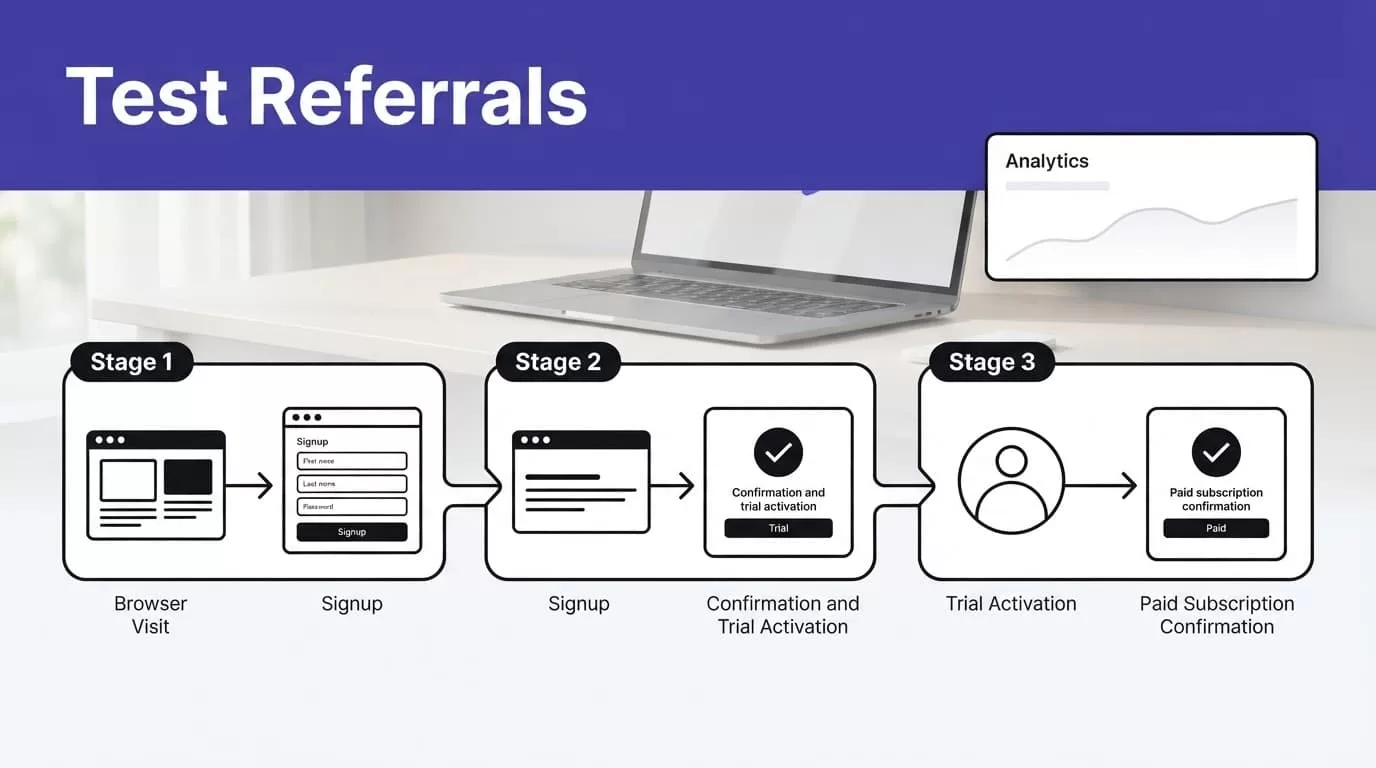
Run full tests before you give anyone a referral link. Use a private or incognito browser window so prior cookies, sessions, and affiliate clicks do not contaminate the result.
Disable ad blockers during the test. Rewardful recommends isolated browser testing because blocked scripts and existing browser state can hide the real failure.
Run one controlled end-to-end conversion
Use this sequence for every checkout method:
- Open an incognito window and visit a real affiliate link with a unique referral value.
- Confirm the landing page loads the Rewardful tracking script.
- Start checkout with a new email address that has no prior Stripe Customer record.
- Complete the approved test purchase or test subscription flow.
- Inspect the Stripe Checkout Session and Customer record for the expected referral value.
- Refresh Rewardful and confirm the campaign, referral, and conversion match the Stripe transaction.
Then test the events your campaign covers. For a subscription program, test a trial conversion, a failed renewal, a cancellation, and a refund where your test process permits it.
Approve reconciled referrals, not completed runs
A dashboard event only proves a system received an event. It does not prove the commission is correct.
Compare the Rewardful conversion with the Stripe customer, invoice, subscription, and campaign rule. Mark the result as approved, rejected, or needs review.
Track accepted referrals, missing referral values, duplicate conversions, failed test runs, review time, and correction time. A system that creates more referral disputes than paid conversions is not ready for scale.
FIX COMMON TRACKING AND ATTRIBUTION FAILURES
Most failures come from a missing handoff, not a broken payment.
Start with the referral click. Then inspect the script, checkout request, Stripe Customer, and Rewardful conversion in that order. Do not change five settings at once.
Fix missing referral clicks and conversions
If clicks do not appear, check that the script loads on the first landing page. Confirm the referral link points to the right domain and that no redirect strips its query parameter.
If clicks appear but conversions do not, inspect the checkout mapping. Client-side Checkout needs clientReferenceId. Server-side Checkout needs client_reference_id. Direct API flows need Customer metadata under referral.
Payment Links often fail when “Save payment details for future use” is off. That setting gives Stripe the Customer object Rewardful needs for attribution.
Keep webhook and billing logic separate
A webhook is an automatic event message from Stripe. It tells your application that a payment, subscription, or invoice changed state.
Rewardful can use Stripe payment data for referral records, while your application still needs its own billing logic for account access. Review how Rewardful processes commission events from Stripe data when matching referral status with payments and refunds.
Verify Stripe webhook signatures in your application. Save the event ID and process duplicate events safely.
Create a recovery procedure before production
Retry temporary network failures with a fixed limit. Stop when permissions change, a field mapping changes, or a checkout request returns unexpected data.
Keep the last reconciled referral report available. Route incomplete records into a review queue instead of forcing them into a commission payout.
If your team has multiple Stripe accounts, custom billing logic, or disputed attribution rules, Book A Call before changing production payment flows.
FINAL CHECK BEFORE YOU LAUNCH
Good Stripe referral tracking has one job: connect a real referral to a real Stripe customer and a verified paid event.
Connect Rewardful, pass the referral ID through your actual checkout path, and test every billing event your campaign promises to reward. Keep the IDs, approval record, and refund rules available for your finance and support teams.
A referral program grows when its conversion data is accurate enough to pay partners with confidence.
