Automate Knowledge Base Scraping in Twin.so
Documentation changes faster than most support teams can update AI workflows. If you rely on manual exports, knowledge base scraping becomes a recurring operations task instead of a reliable data pipeline. Twin.so can automate repeated brow...
Documentation changes faster than most support teams can update AI workflows. If you rely on manual exports, knowledge base scraping becomes a recurring operations task instead of a reliable data pipeline. Twin.so can automate repeated browser and data-handling steps, but you need clear source, output, and update rules first.
The goal is simple: collect approved pages, remove page noise, preserve useful structure, and push clean content into the system your agents or search workflows use. You also need controls for authentication, privacy, rate limits, failures, and stale pages. Start with the workflow design, then configure the Twin.so run.
What Knowledge Base Scraping Does Inside Twin.so
Knowledge base scraping collects documentation from web pages and converts it into structured records. Those records can support AI agents, internal search, support workflows, or automated responses.
A Twin.so workflow can handle the repeated process for browser-accessible sources. It can open permitted URLs, extract page content, transform the result, and send it to your selected destination. The exact action names depend on your Twin.so plan and workspace configuration.
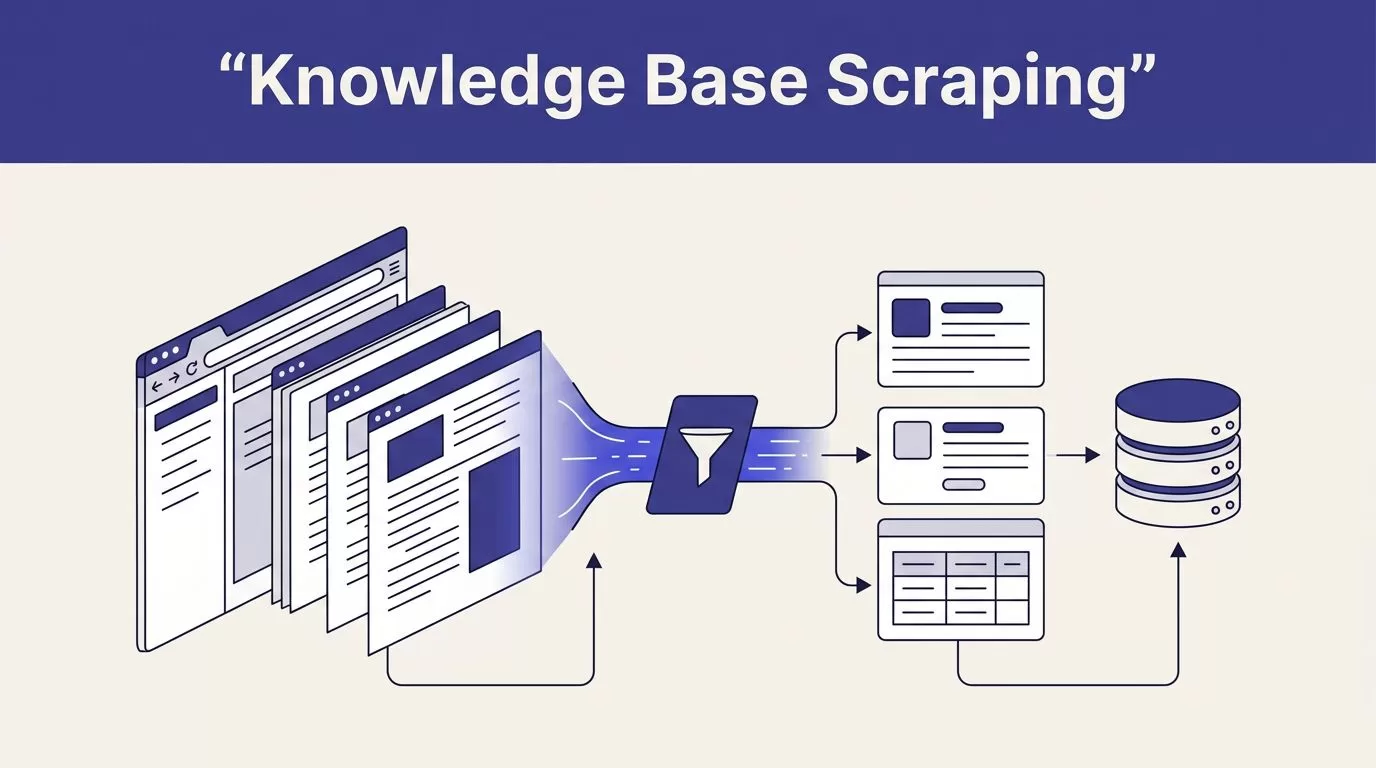
A reliable workflow normally follows this sequence:
- Find approved URLs through a sitemap, seed list, or documentation index.
- Open each page with the correct access method.
- Extract the main article, headings, links, and relevant code examples.
- Remove navigation, cookie notices, sidebars, and repeated page elements.
- Store the cleaned content with source metadata and an update timestamp.
The result should be more than a block of copied text. Each record needs a stable source URL, page title, section headings, content body, and version information. These fields help your AI system return useful answers and let your team trace an answer back to the original page.

An AI knowledge base guide describes the same core principle: AI responses improve when the underlying information is organized, current, and grounded in trusted sources. Scraping is only the collection step. Content quality determines what happens after ingestion.
Prepare Your Documentation Before Automating
Start with a source inventory. List every knowledge base, help center, product manual, and internal documentation site you want Twin.so to process.
Do not begin with an entire domain. Broad crawling often captures login pages, search results, duplicate URLs, expired articles, and unrelated marketing content. Begin with one documentation section and confirm the output before expanding.
Use a source plan like this:
| Source type | Typical content | Main control |
|---|---|---|
| Public help center | Product guides and FAQs | URL allowlist |
| Internal knowledge base | Policies and operating procedures | Approved account and permissions |
| JavaScript-based app | Dynamic support content | Browser session and extraction test |
| Export or API feed | Structured articles and records | Field mapping and access token |
Public pages still need review. Check the site’s terms, crawling rules, and published usage limits. For internal or paid content, get written authorization from the owner before collecting anything. Access permission for a person doesn’t automatically grant permission for an automated process.
Create an allowlist of domains and URL patterns. Exclude query parameters that create duplicate pages. Block account settings, customer records, admin pages, and any path that contains personal information.
Then define the fields Twin.so should keep. A practical record includes:
- The canonical URL and page title.
- The heading path for the extracted section.
- The cleaned article content.
- The source name and content category.
- The date fetched and source version.
- A content hash or other change identifier.
Remove page elements that add no value to retrieval. Navigation menus, footer links, related-article panels, cookie banners, and repeated legal copy can crowd out the actual answer.
Build a Twin.so Knowledge Base Scraping Workflow
Create one dedicated workflow for each source family. Keep product documentation, internal policies, and customer-facing FAQs separate when they have different access rules or update schedules.
Configure the workflow in this order:
- Set the source configuration. Add the approved starting URLs, domain restrictions, excluded paths, and maximum page depth. A small, controlled crawl is easier to test than an open-ended one.
- Add the access method. Public documentation may need no login. Private documentation needs an approved user account or supported authentication method. Store credentials in the secure configuration available to your workspace. Never place passwords or tokens in prompts, page content, or logs.
- Discover pages. Use a sitemap, documentation index, or maintained URL list when possible. These sources usually provide cleaner coverage than guessing links from page markup. If the site uses infinite scrolling or client-side routing, test several pages before scheduling a full run.
- Extract the main content. Capture the article title, headings, paragraphs, lists, tables, and code blocks. Exclude navigation and repeated page components. Preserve links when they point to required setup steps or related reference material.
- Normalize the output. Convert each article into a consistent format, such as Markdown or structured JSON. Keep one logical record per article. For long pages, split content by heading and use chunks of roughly 300 to 800 words as a starting point. Adjust the size after retrieval testing.
- Deduplicate records. Use the canonical URL and heading path to create a stable record identifier. Update an existing record when the source changes. Do not append a new copy every time the workflow runs.
- Send the records to the destination. Map the cleaned fields to the database, search index, agent context, or workflow input used by your team. Keep the source URL attached to every record so operators can verify the content.
- Add scheduling and failure handling. Choose a run frequency that matches the source. Product documentation may need daily checks. Stable internal policies may need weekly or event-based updates. Set the workflow to report failed pages instead of silently skipping them.
The extraction step needs special attention. A successful browser run doesn’t prove that Twin.so captured the article. It may have returned a login screen, an empty client-rendered shell, or a generic error page.
A successful browser run only proves Twin.so reached a page. It doesn’t prove the extracted record contains the article.
Run the workflow against a small test set first. Include a short article, a long article, a page with code, a page with tables, and a page that requires authentication. Review the raw output and the final stored record before adding more URLs.
Make Automated Updates Reliable
Automation isn’t useful when it creates stale or duplicated information. Your update process needs a clear rule for detecting change and handling bad results.
Store the fetch time, HTTP status, canonical URL, and content hash for every record. When the hash hasn’t changed, skip the write operation. When it has changed, create a new version or update the existing record based on your retention policy.
Use the source’s last-modified data or an equivalent change signal when available. This can reduce unnecessary page loads and help you prioritize recently changed documentation. It doesn’t replace content validation because a page can change without meaningful updates.
Add checks before publishing new content:
- Reject records below a minimum content length.
- Reject pages with login, error, or access-denied text.
- Confirm that a title and at least one heading exist.
- Flag records with a large drop in content size.
- Detect duplicate URLs and repeated article bodies.
- Confirm that required metadata is present.
Keep failed output separate from production content. If the destination supports staging, send new records there first. Otherwise, write failures to a review queue and keep the last valid version available.
Test the knowledge base with real support questions after each major update. Check whether the agent finds the right article, uses the latest instructions, and includes a source reference where your workflow requires one.
Knowledge base systems can also process files, scans, audio, and video through methods such as OCR and transcription. Decagon’s overview of knowledge base AI systems explains why each source type needs its own extraction and validation path. Don’t treat a PDF export and a dynamic help center as the same input.
Apply Security and Compliance Controls
Only scrape knowledge bases your team is authorized to access. That includes public sites you have permission to automate and private systems covered by your company’s policies or contract.
Review the source terms before deployment. Respect rate limits and add delays between requests when the source requires them. Use backoff after errors. Stop the workflow when the site returns repeated failures or access challenges.
Protect the data after collection. Restrict Twin.so workflow access to the people who need it. Redact personal information before sending content to an AI agent or shared search index. Customer tickets, employee records, and account-specific pages often contain data that shouldn’t enter a general-purpose knowledge base.
Keep credentials outside prompts and extracted content. Audit who can start the workflow, change its URL allowlist, and publish records. Add a manual stop control so an operator can halt a run when the source changes or returns unexpected content.
Before production launch, confirm four things:
- The source owner approved the collection.
- The workflow uses least-privilege access.
- The destination has matching retention and access rules.
- The update logs show what changed and when.
If you need help mapping source permissions, retrieval tests, and deployment ownership, you can Book A Call before rolling the workflow out.
Conclusion
Knowledge base scraping in Twin.so works best as a controlled ingestion pipeline. Define approved sources, extract only useful content, attach source metadata, and update existing records instead of creating duplicates.
The strongest setup is not the one that visits the most pages. It’s the one that gives your agents and search systems clean, current, traceable information without bypassing access rules. Start with one source, test every stage, then expand the workflow when the output is reliable.
