Vendor Management Automation With Twin.so
Vendor requests become expensive when they move through email, spreadsheets, and disconnected approval queues. Missing tax forms, unclear ownership, and expired compliance documents create delays that finance and procurement must fix manual...
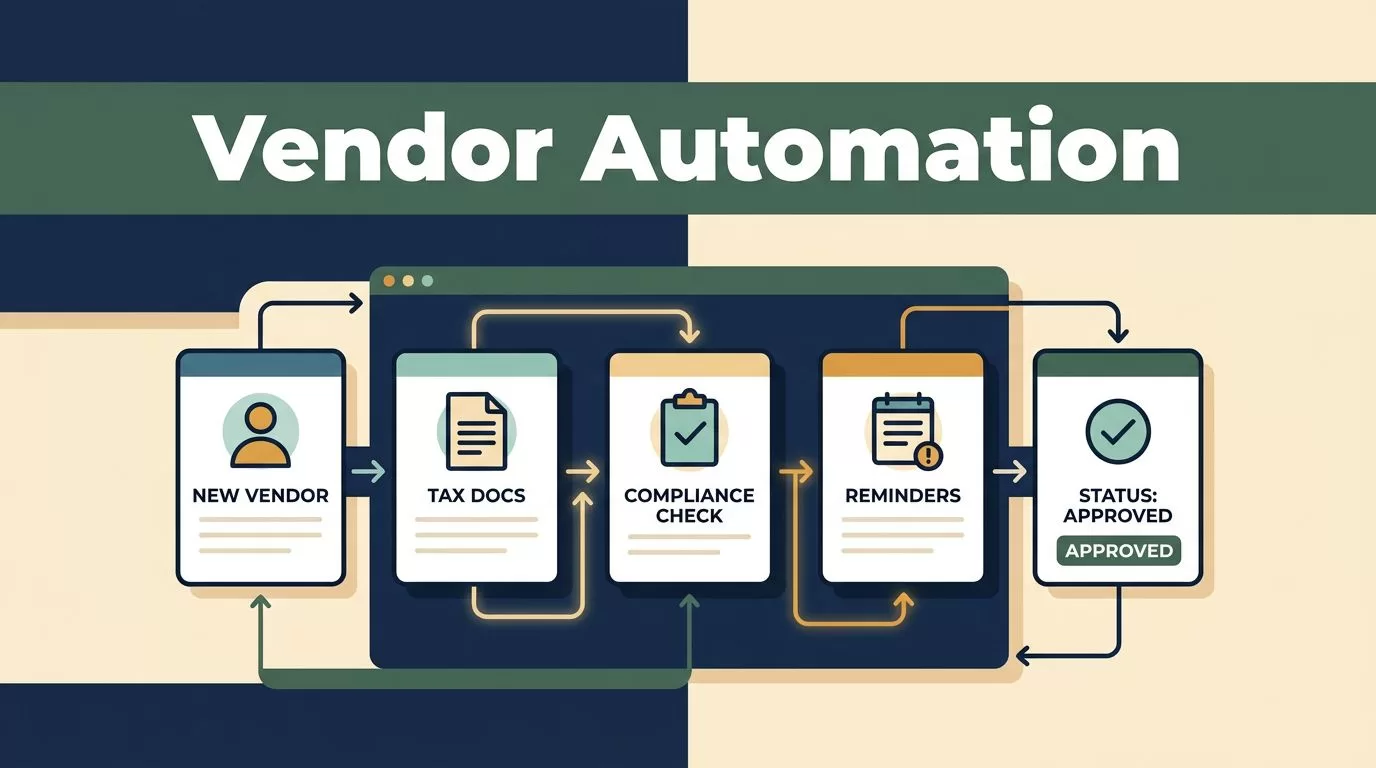
Vendor requests become expensive when they move through email, spreadsheets, and disconnected approval queues. Missing tax forms, unclear ownership, and expired compliance documents create delays that finance and procurement must fix manually.
Vendor management automation gives each request a defined path. Twin.so can help you configure that path around vendor intake, document collection, approvals, reminders, and status tracking. The goal is not to automate every decision. The goal is to remove repetitive coordination while keeping higher-risk decisions with the right people.
Why Vendor Management Automation Starts With Process Design
Manual vendor management usually breaks in the handoffs. Procurement collects the request. Legal asks for contract information. Security requests an assessment. Finance waits for banking and tax details. Each team may track its own part of the process.
The vendor receives repeated questions. Internal stakeholders ask for updates. Nobody has a complete view of the request.
The first step is to define the process before configuring Twin.so. Write down:
- What starts a vendor request.
- Which information is required at intake.
- Which documents each vendor type must submit.
- Which teams approve the request.
- What conditions trigger additional review.
- What status means that a vendor is ready for payment.
This process map becomes the foundation for vendor management automation. It also prevents a common mistake: automating a vague process and creating faster confusion.
A strong workflow has one record for each vendor. That record holds the request details, submitted documents, approval history, responsible owners, and current status. Team members shouldn’t need to search several inboxes to understand what happens next.
For a wider view of the capabilities buyers compare, review these supplier onboarding software reviews before finalizing your workflow requirements.
Automation only works when every exception has a clear owner and a defined next action.
How Twin.so Enables Vendor Management Automation
Twin.so works best when you treat it as the execution layer for a documented vendor process. You define the inputs, rules, routing, and outcomes. Twin.so then applies those instructions consistently across each request.
Start with a small number of vendor statuses. For example, use:
- New request
- Information requested
- Under review
- Pending approval
- Approved
- Rejected
- Active
- Renewal required
Avoid creating a separate status for every minor event. Use comments, fields, or activity history for detail. The main status should tell anyone what action is currently blocking progress.
A practical workflow can look like this:
| Workflow stage | Automated action | Primary owner |
|---|---|---|
| Vendor intake | Create a vendor record and assign an owner | Procurement |
| Data collection | Request missing tax, banking, insurance, or security documents | Vendor |
| Initial review | Check required fields and route the request | Procurement or operations |
| Approvals | Send the request to legal, security, and finance based on rules | Assigned approvers |
| Activation | Mark the vendor ready for purchasing or payment | Finance or procurement |
The workflow should also record timestamps. Capture when the request started, when documents arrived, when approvals were issued, and when the vendor became active. These fields give you reliable cycle-time data later.

Supplier onboarding tools vary widely in their focus. This supplier onboarding software comparison can help you compare common workflow requirements. Use it as a reference, then test your own process in Twin.so with real vendor records.
Automate Vendor Documents, Approvals, and Collaboration
Document collection is one of the easiest places to create immediate workflow improvements. Instead of sending a general email, configure Twin.so to request the documents required for that vendor category.
A software vendor may need a completed tax form, banking details, a signed contract, and security documentation. A facilities supplier may need insurance certificates, licenses, and safety records. The request should change based on vendor type, location, service category, and risk level.
Required fields should block progression when information is missing. Optional fields should remain optional. This distinction prevents teams from treating every vendor as if it has the same compliance burden.
Approvals also need rules. A low-value vendor with no access to company systems may need procurement and finance approval. A supplier handling customer data may require security and legal review. A high-spend contract may need an additional budget owner.
Configure these routes with explicit conditions. Avoid sending every request to every stakeholder. Broad approval chains create delays and make accountability unclear.
Stakeholders also need a shared view of progress. Twin.so can organize updates around the vendor record instead of separate email threads. Owners can see what has been submitted, who has approved the request, and what remains open. Vendors can receive focused requests instead of repeated messages from different employees.
The result is a cleaner collaboration model:
- Procurement owns the request and vendor relationship.
- Finance validates payment and tax details.
- Legal reviews contractual obligations.
- Security handles access and data risk.
- The vendor supplies information and responds to exceptions.
Each team gets the information it needs without taking ownership of the entire process.
Use Twin.so for Compliance Reminders and Status Tracking
Vendor approval is not the end of vendor management. Documents expire. Insurance coverage changes. Contracts renew. Banking details may need revalidation. A vendor record that was complete last year may be incomplete today.
Configure Twin.so to store expiration dates and review intervals for documents that require renewal. Set reminders before the deadline, not after it. The timing depends on the document and your internal policy. A 30-day reminder may work for routine certificates. Higher-risk reviews may need earlier escalation.
Separate reminders from enforcement. A reminder tells the owner to act. An enforcement rule determines what happens when the owner doesn’t act. For example, an expired document may move the vendor to “Renewal required” and notify procurement. A critical failure may pause new purchasing until the issue is reviewed.
Risk tiers help keep this process manageable:
- Low-risk vendors follow a short intake and approval path.
- Medium-risk vendors require additional business and compliance checks.
- High-risk vendors receive deeper security, legal, or financial review.
This structure allows low-risk requests to move through a repeatable path while exceptions reach experienced reviewers. It also creates a consistent record for audits.
Track every important event. Store document submission dates, approval decisions, reminder history, status changes, and exception notes. If a reviewer changes a decision, record the reason. A complete activity history is more useful than a spreadsheet with a final status and no supporting evidence.
For another example of how vendor onboarding platforms handle intake, qualification, risk checks, and data collection, see this vendor onboarding automation overview.

Implement Twin.so Without Rebuilding Every Process
A controlled rollout gives you better results than trying to automate the entire vendor base at once.
- Choose one vendor category. Start with a process that has regular volume and visible delays. Software vendors, contractors, or marketing suppliers often provide enough repetition for a useful pilot.
- Document the current workflow. Record each field, document, approval, handoff, exception, and notification. Include the actual questions teams ask today. Do not design around an ideal process that nobody follows.
- Configure the minimum viable workflow. Create the vendor record, required fields, document requests, status values, approval routes, and reminder rules. Keep the first version narrow.
- Test normal and exceptional requests. Submit complete information, missing information, expired documents, conflicting approvals, and rejected requests. A workflow isn’t ready if it handles only the clean path.
- Review access and audit controls. Limit sensitive banking, tax, and security documents to approved roles. Confirm that status changes and decisions create a usable activity record.
Run the pilot with procurement, finance, and at least one reviewing function. Give each group a specific test task. Procurement should test intake. Finance should verify payment data. Legal or security should test approval routing and exception handling.
The cleanest pilot is not the most complex one. It is the smallest workflow that exposes real approval and compliance delays.
After the pilot, remove fields nobody uses and add rules for recurring exceptions. Then expand to another vendor category. Keep the core status model consistent so reporting remains comparable across departments.
Measure the Operational Results
Track the baseline before turning on the workflow. Compare it with the results after implementation.
| KPI | How to measure it | What it shows |
|---|---|---|
| Onboarding cycle time | Request date to active date | Overall process speed |
| First-pass completeness | Complete submissions divided by total submissions | Quality of vendor intake |
| Approval SLA rate | Approvals completed within target time | Stakeholder responsiveness |
| Document renewal coverage | Active vendors with current required documents | Compliance control |
| Exception rate | Requests requiring manual escalation | Process clarity and risk volume |
Don’t measure only the number of automated steps. A workflow with many actions can still create delays if it sends requests to the wrong owner or requires unnecessary reviews.
Review the KPIs by vendor category and risk tier. A high-risk vendor should take longer than a low-risk supplier. That difference isn’t automatically a problem. The useful question is whether each request follows the correct path and whether avoidable waiting time is falling.
Also track supplier response time. Internal automation cannot fix unclear requests or missing instructions. If vendors regularly submit incomplete documents, revise the intake form and explain the required fields more clearly.
Conclusion
Vendor management automation works when it connects intake, documents, approvals, compliance, and status tracking in one controlled process. Twin.so gives you a practical way to define that process, route work, manage exceptions, and create a usable record of each vendor decision.
Start with one category and a small set of statuses. Test the workflow with incomplete documents and rejected approvals. Measure cycle time, completeness, approval delays, and renewal coverage before expanding.
The goal isn’t to remove judgment from vendor management. It is to reserve judgment for the decisions that need it, while Twin.so handles the repeatable work around them.
